
LUX PSD010BF
LUX Pro PSD010BF Digital Non-Programmable Thermostat User Manual
Model: PSD010BF
1. Introduction
This manual provides comprehensive instructions for the installation, operation, and maintenance of your LUX Pro PSD010BF Digital Non-Programmable Thermostat. This battery-powered thermostat is designed for heat-only systems with a fan, offering precise digital temperature control and a clear, easy-to-read display.

Image 1: Front view of the LUX Pro PSD010BF Digital Non-Programmable Thermostat.

Image 2: The PSD010BF thermostat seamlessly integrated into a home environment.
2. Safety Information
- Always turn off power to the heating system at the main fuse or circuit breaker panel before installing or servicing the thermostat.
- Read all instructions carefully before installation and operation.
- Ensure all wiring connections are secure and comply with local electrical codes.
- This thermostat is designed for low voltage systems only. Do not use with line voltage (120/240V) systems.
- Keep batteries out of reach of children.
3. Features
The LUX Pro PSD010BF thermostat offers a range of features designed for user convenience and efficient heating control:
- Digital Accuracy: Provides precise temperature control for reliable performance.
- Fan Switch: Includes a fan switch for convenient control (AUTO/ON).
- Battery Powered: Operates solely on battery power (2 AA batteries included).
- Large LED Illuminated Display: Easy-to-read digital display with backlight for visibility in various lighting conditions.
- Attractive Slim Design: Modern aesthetic suitable for any room.
- Quick & Easy Temperature Change Buttons: Intuitive up/down buttons for setting desired temperature.
- F/C Selectable Temperature Display: Option to display temperature in Fahrenheit or Celsius.
- Fixed 5 Minute Minimum Run / Off Time: Protects heating equipment.
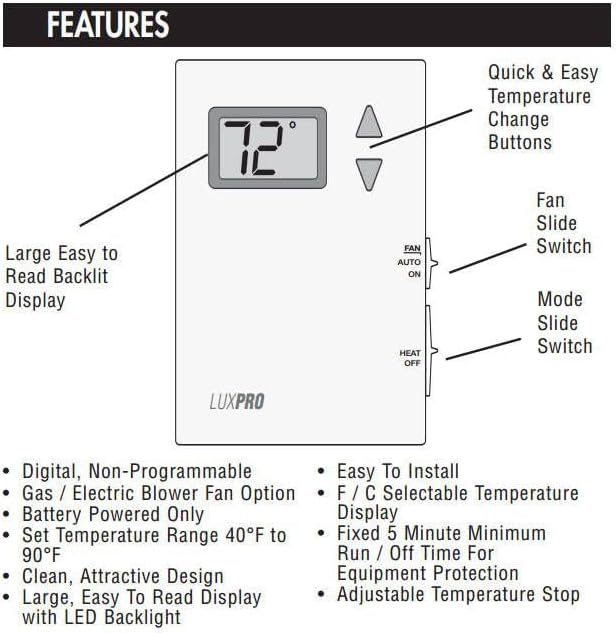
Image 3: Detailed diagram highlighting the key features and controls of the thermostat.
4. Compatibility
The LUX Pro PSD010BF thermostat is compatible with the following systems:
- Most 24-volt, single-stage heating systems, with or without a blower fan.
- Millivolt systems (e.g., gas fireplaces, floor furnaces).
This thermostat cannot be used to control:
- Cooling systems.
- Heat pumps.
- 3-wire zone valves.
- 120/240 volt (line voltage) systems.
For other system types, please consult your dealer for alternative LUXPRO thermostats.

Image 4: Official compatibility guidelines for the thermostat.
5. Installation
5.1 Pre-Installation Checklist
- Ensure the thermostat is compatible with your heating system (refer to Section 4).
- Gather necessary tools: Phillips screwdriver, wire strippers (if needed), drill (if new mounting holes are required).
- Turn off power to the heating system at the circuit breaker.
5.2 Removing Your Old Thermostat
- Turn off power to the heating system.
- Remove the cover of your old thermostat.
- Note the wire connections. It is recommended to take a picture or label each wire with the terminal designation (e.g., R, W, G).
- Disconnect the wires and remove the old thermostat base from the wall.
5.3 Wiring Your New Thermostat
The PSD010BF is designed for simple 2-wire or 4-wire heat-only systems. Refer to the diagram below for typical wiring configurations.

Image 5: Wiring diagram for heating-only systems, including those with a fan. Note the jumper between RC and RH.
- Connect the wires from your heating system to the corresponding terminals on the new thermostat base.
- For heating-only systems, ensure the jumper between RC and RH terminals is installed.
- W1 terminal: Connect to the heating control wire.
- G terminal: Connect to the blower fan control wire (if applicable).
- Ensure all connections are tight and secure.
5.4 Mounting the Thermostat
- Secure the thermostat base to the wall using the provided screws. Avoid overtightening.
- Insert two fresh AA batteries into the battery compartment. Ensure correct polarity.
- Carefully align the thermostat front cover with the base and snap it into place.
6. Operation
6.1 Powering On and Initial Setup
- After installation and battery insertion, restore power to your heating system at the circuit breaker.
- The thermostat display should illuminate, showing the current room temperature.
- Use the F/C selectable temperature display option if you wish to change between Fahrenheit and Celsius (refer to the thermostat's internal settings or specific instructions for this model if available, otherwise assume it's a simple switch).
6.2 Setting the Temperature
- Use the ▲ (Up) and ▼ (Down) buttons on the front of the thermostat to adjust the desired temperature.
- The display will show the set temperature briefly, then revert to the current room temperature.
- The heating system will activate when the room temperature falls below your set temperature.
6.3 Fan Control
The thermostat features a fan slide switch with two positions:
- AUTO: The fan will run only when the heating system is actively heating. This is the recommended setting for normal operation.
- ON: The fan will run continuously, regardless of whether the heating system is active.
6.4 System Mode
The thermostat features a mode slide switch with two positions:
- HEAT: The thermostat will control your heating system to maintain the set temperature.
- OFF: The heating system is turned off. The thermostat will not activate the heater.
7. Maintenance
7.1 Battery Replacement
The thermostat is powered by two AA batteries. Replace them annually or when the low battery indicator appears on the display.
- Gently pull the thermostat cover from the base to access the battery compartment.
- Remove the old batteries and dispose of them responsibly.
- Insert two new AA alkaline batteries, ensuring correct polarity (+/-).
- Snap the thermostat cover back onto the base.
Note: Replacing batteries typically does not affect your temperature settings.
7.2 Cleaning
Clean the thermostat's exterior with a soft, damp cloth. Do not use abrasive cleaners or solvents.
8. Troubleshooting
| Problem | Possible Cause | Solution |
|---|---|---|
| No Display / Blank Screen | Dead or incorrectly installed batteries. | Replace batteries with fresh AA alkaline batteries, ensuring correct polarity. |
| Heating System Not Responding |
|
|
| Inaccurate Temperature Reading | Thermostat located near a heat source, draft, or direct sunlight. | Relocate the thermostat to a more central location away from direct influences. Ensure proper air circulation around the unit. |
| Fan Runs Continuously | Fan switch set to ON. | Set the fan switch to AUTO for automatic operation with heating cycles. |
9. Specifications
- Model: PSD010BF
- Power Source: 2 AA Batteries (included)
- Voltage: 24 Volts (low voltage)
- Control Type: Push Button, Slide Switch
- Display Type: Digital, LED Backlit
- Product Dimensions: 1.25"D x 3.5"W x 5.25"H
- Item Weight: 1.92 ounces
- Material: Plastic
- Color: White
- Mounting Type: Wall Mount
- Specific Uses: Heating only systems
10. Warranty and Support
For warranty information or technical support, please refer to the official LUX website or contact LUX customer service directly. Keep your purchase receipt as proof of purchase.
LUX Customer Support: www.luxproproducts.com/support
Related documentsPSD010BF


Ask a question about this manual
Ask about setup, troubleshooting, compatibility, parts, safety, or missing instructions. Manuals+ will review the question and use this page’s manual context to help answer it.