
1. Introduction
This manual provides detailed instructions for the proper installation, operation, and maintenance of your Pioneer Elite VSX-50 7.1-Channel 3-D Ready A/V Receiver. Please read this manual thoroughly before using the receiver to ensure optimal performance and safety. Keep this manual for future reference.

Figure 1: Front and side view of the Pioneer Elite VSX-50 A/V Receiver. This image shows the main unit with its front panel controls and ventilation grilles.
2. Safety Information
Always observe the following safety precautions to prevent electric shock, fire, or damage to the unit.
- Power Source: Connect the unit only to an AC outlet of the voltage specified on the rear panel.
- Ventilation: Ensure adequate ventilation. Do not block ventilation openings. Allow sufficient space around the unit for heat dissipation.
- Water and Moisture: Do not expose the unit to rain or moisture. Do not place objects filled with liquids, such as vases, on the unit.
- Foreign Objects: Do not insert any foreign objects into the unit's openings.
- Servicing: Do not attempt to service the unit yourself. Refer all servicing to qualified service personnel.
- Cables: Ensure all cables are securely connected and not damaged. Avoid placing heavy objects on power cords.
3. Setup
3.1 Unpacking
Carefully remove the receiver from its packaging. Retain the packaging materials for future transport or storage. Verify that all accessories are present.
3.2 Connecting Speakers
The VSX-50 supports a 7.1 channel surround sound configuration. Connect your speakers to the corresponding terminals on the rear panel. Ensure correct polarity (+ to + and - to -) for all speakers.
- Front Speakers (L/R): Connect to the FRONT L/R terminals.
- Center Speaker: Connect to the CENTER terminal.
- Surround Speakers (L/R): Connect to the SURROUND L/R terminals.
- Surround Back Speakers (L/R): Connect to the SURROUND BACK L/R terminals.
- Subwoofer: Connect to the SUBWOOFER PRE OUT terminal using an RCA cable.
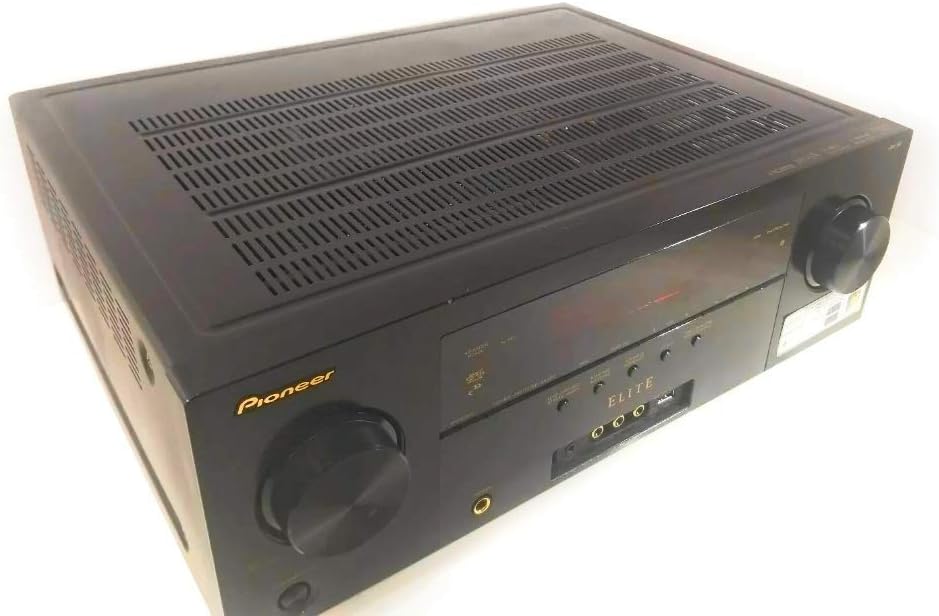
Figure 2: Rear panel of the Pioneer Elite VSX-50 A/V Receiver, showing various input/output ports including speaker terminals, HDMI, and other audio/video connections.
3.3 Connecting Audio/Video Devices
The receiver features 5 HDMI inputs and various other analog and digital audio/video inputs.
- HDMI Devices: Connect your Blu-ray player, game console, or cable box to any of the HDMI IN ports. Connect the HDMI OUT port to your TV or projector.
- Optical/Coaxial Digital Audio: For devices without HDMI, use the OPTICAL or COAXIAL digital audio inputs.
- Analog Audio/Video: Use RCA cables for older devices.
- Network Connection: Connect an Ethernet cable to the LAN port for network features (if applicable).
3.4 Power Connection
After all audio/video and speaker connections are made, plug the power cord into a wall outlet. Do not connect the power cord until all other connections are complete.
3.5 Initial Setup and Calibration
Upon first power-on, follow the on-screen setup guide (if available) to configure basic settings. Utilize the included MCACC (Multi-Channel Acoustic Calibration System) microphone to automatically optimize speaker levels, distances, and equalization for your listening environment. Refer to the on-screen menu for detailed MCACC instructions.
4. Operating Instructions
4.1 Basic Controls
The receiver can be controlled using the front panel buttons and knobs, or the supplied remote control.
- Power: Press the POWER button on the front panel or remote to turn the unit on/off.
- Volume: Use the MASTER VOLUME knob on the front panel or VOLUME +/- buttons on the remote.
- Input Selector: Rotate the INPUT SELECTOR knob or use the INPUT buttons on the remote to switch between connected devices.
4.2 Input Selection
Select the appropriate input source corresponding to the device you wish to use (e.g., "BD/DVD" for a Blu-ray player connected to the BD/DVD HDMI input).
4.3 Sound Modes and Surround Sound
The VSX-50 offers various sound modes to enhance your listening experience. Use the "SURROUND" or "MODE" buttons on the remote to cycle through options like Dolby Digital, DTS, Stereo, and various Pioneer-specific sound fields. Refer to the on-screen display for current mode information.
4.4 Bluetooth Connectivity
The receiver features built-in Bluetooth for wireless audio streaming from compatible devices such as smartphones and tablets.
- Activate Bluetooth on your mobile device.
- Select the Bluetooth input on the receiver.
- Search for "Pioneer VSX-50" (or similar) in your device's Bluetooth settings and pair.
- Once paired, you can stream audio wirelessly to the receiver.
5. Maintenance
5.1 Cleaning
To clean the unit, wipe the exterior surfaces with a soft, dry cloth. Do not use abrasive cleaners, waxes, or solvents. For stubborn stains, lightly dampen the cloth with water and a mild detergent, then wipe dry immediately.
5.2 Storage
If storing the unit for an extended period, disconnect the power cord and store it in a cool, dry place, preferably in its original packaging.
6. Troubleshooting
Before contacting customer support, please refer to the following common issues and solutions.
| Problem | Possible Cause | Solution |
|---|---|---|
| No power | Power cord disconnected; unit in standby mode. | Ensure power cord is securely plugged in. Press the POWER button. |
| No sound | Incorrect input selected; speaker wires loose; volume too low; mute activated. | Select correct input. Check speaker connections. Increase volume. Deactivate mute. |
| No video | Incorrect input selected; HDMI cable loose or faulty; TV input incorrect. | Select correct input. Check HDMI connections. Ensure TV is on correct input. |
| Bluetooth pairing fails | Device too far; Bluetooth not enabled on device/receiver; interference. | Move device closer. Ensure Bluetooth is active on both. Restart devices. |
7. Specifications
| Feature | Detail |
|---|---|
| Brand | PIONEER |
| Model Number | VSX-50 |
| Surround Sound Channel Configuration | 7.1 Channel |
| Output Wattage | 90 Watts per channel |
| Total HDMI Ports | 5 |
| Connectivity Technology | Wireless; Bluetooth |
| Special Feature | Built-In Bluetooth |
| Compatible Devices | Smartphone, Speaker |
| Audio Output Mode | Stereo, Surround |
| Control Method | Remote |
| Color | Black |
| UPC | 884938133210 |
8. Warranty & Support
8.1 Warranty Information
This Pioneer Elite VSX-50 A/V Receiver comes with a 2-year warranty from the date of purchase. This warranty covers manufacturing defects and workmanship under normal use. Please retain your proof of purchase for warranty claims. The warranty does not cover damage caused by misuse, accidents, unauthorized modifications, or acts of nature.
8.2 Customer Support
For technical assistance, service, or further inquiries, please contact Pioneer customer support. Visit the official Pioneer website for the most up-to-date contact information, including phone numbers and online support resources.
Note: Product specifications and appearance are subject to change without notice for improvement.