1. Introduction
Thank you for purchasing the Panasonic ES-LV81-K Arc5 Electric Shaver. This manual provides essential information for the safe and effective use, maintenance, and care of your new electric razor. Please read these instructions thoroughly before use and retain them for future reference.
2. Safety Information
WARNING: To reduce the risk of electric shock, burns, fire, or injury:
- Always unplug the shaver before cleaning or when not in use.
- Do not use the shaver while charging.
- Do not use or store the shaver near water sources such as bathtubs, showers, sinks, or other vessels containing water.
- Exercise caution while shaving to prevent cuts or skin irritation.
- Clean and dry the shaver thoroughly after each use to prevent bacterial growth and maintain hygiene.
- Keep the appliance out of reach of children.
3. Package Contents
Verify that all items are present in the package:
- Panasonic ES-LV81-K Arc5 Electric Shaver
- Premium Automatic Clean & Charge Station
- AC Adaptor/Charger
- Cleaning Cartridge
- Protective Cap
- Travel Pouch
- Instruction Manual (this document)

Image: The complete package contents, including the shaver, cleaning station, power adapter, travel pouch, and cleaning cartridge.
4. Product Features
The Panasonic ES-LV81-K Arc5 Electric Shaver is designed for a close and comfortable shave with advanced technology.
- 5-Blade Shaving System: Features five ultra-sharp, 30-degree angled hypoallergenic blades for exceptional closeness.
- High-Performance Linear Motor: Delivers 14,000 cuts per minute, maintaining peak power throughout the battery charge.
- Multi-Flex Pivoting Head: Glides effortlessly along facial contours for a smooth, even shave.
- Wet/Dry Operation: Allows for convenient shaving in or out of the shower, with or without shaving foam/gel.
- Pop-Up Trimmer: Integrated trimmer for detailing sideburns and mustaches.
- Automatic Clean & Charge Station: Washes, dries, and charges the shaver with the touch of a button.
- 10-Stage LCD Display: Shows battery status, charge indicator, and cleaning/replacement reminders.

Image: The Panasonic ES-LV81-K shaver displaying its LCD screen with battery charge status.

Image: A detailed view of the shaver's cutting head, highlighting the five 30-degree angled blades designed for a close shave.

Image: An internal view diagram of the shaver, emphasizing the high-speed linear motor that delivers powerful performance.

Image: A visual representation of the shaver's Multi-Flex Pivoting Head, showing how it moves to follow the curves of the face for enhanced shaving comfort.

Image: The integrated pop-up trimmer extended from the shaver, ready for precise detailing and trimming.

Image: A composite image demonstrating the shaver's versatility for both wet and dry shaving, showing a face with and without shaving cream.
Video: An official product video demonstrating the key features and benefits of the Panasonic Arc5 Electric Shaver, including its 5-blade system, powerful motor, and flexible head.
5. Setup and Initial Charging
5.1 Initial Shaver Charge
- Ensure the shaver is turned off.
- Connect the AC adaptor to the shaver's charging port.
- Plug the AC adaptor into a wall outlet.
- Charge the shaver for approximately 1 hour for a full charge. The LCD display will indicate charging progress.
5.2 Setting up the Automatic Clean & Charge Station
- Place the Clean & Charge Station on a flat, stable surface away from water.
- Open the station's lid and insert a fresh cleaning cartridge. Ensure it clicks into place.
- Connect the station's power cord to a wall outlet.
- Place the shaver upside down into the station, ensuring the charging contacts align. The shaver will begin charging automatically.

Image: The Panasonic ES-LV81-K electric shaver securely placed in its Automatic Clean & Charge Station.

Image: The Automatic Clean & Charge Station in operation, with a blue light indicating the cleaning process for the shaver head.
6. Operating Instructions
6.1 Shaving
- Dry Shaving: Ensure your face is clean and dry. Turn on the shaver and gently press the head against your skin, moving it in circular or linear motions against the direction of hair growth.
- Wet Shaving: Apply shaving foam or gel to your face. Turn on the shaver and shave as you would with a manual razor, moving it gently over your skin. The shaver is 100% waterproof and can be used in the shower.
- Stretch your skin with your free hand to ensure a smooth surface for the shaver.
- Avoid excessive pressure, as this can cause skin irritation and reduce shaving efficiency.
6.2 Using the Pop-Up Trimmer
- Slide the trimmer switch upwards to extend the pop-up trimmer.
- Use the trimmer to shape sideburns, mustaches, or trim longer hairs before shaving.
- After use, push the trimmer switch downwards to retract it.
7. Cleaning and Maintenance
7.1 Manual Cleaning
- After each use, turn off the shaver and unplug it from any power source.
- Remove the outer foil frame.
- Rinse the shaver head and inner blades thoroughly under running water. You can apply a small amount of liquid hand soap to the foils and turn the shaver on for a few seconds to create lather, then rinse.
- Shake off excess water and allow the shaver to air dry completely before reattaching the foil frame or storing.
7.2 Automatic Cleaning with the Clean & Charge Station
- After shaving, rinse off any large debris from the shaver head under running water.
- Place the shaver into the Clean & Charge Station.
- Press the 'CLEAN' button on the station. The station will automatically clean, dry, and charge the shaver.
- Replace the cleaning cartridge when indicated by the station or approximately once a month with daily use.
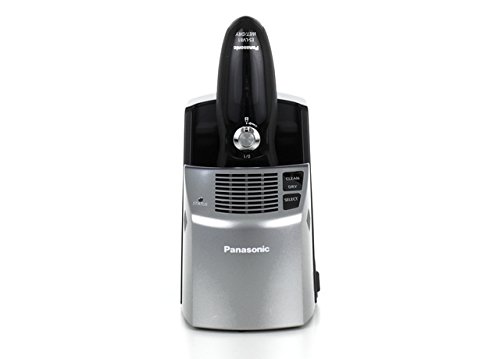
Image: A front view of the Automatic Clean & Charge Station, showing the control buttons for clean, dry, and select functions, with the shaver docked.
7.3 Blade and Foil Replacement
For optimal shaving performance, it is recommended to replace the outer foil and inner blades periodically. Refer to the shaver's LCD display for replacement reminders or consult the Panasonic website for recommended replacement intervals.
8. Troubleshooting
If you encounter issues with your Panasonic ES-LV81-K shaver, please refer to the following common solutions:
- Shaver not turning on: Ensure the shaver is fully charged. Check if the travel lock is engaged (indicated by a lock icon on the LCD). Press and hold the power button for a few seconds to disengage the lock.
- Poor shaving performance: Clean the shaver head thoroughly. The blades and foils may need replacement if they are dull or damaged.
- Cleaning station not operating: Ensure the station is properly plugged in and the cleaning cartridge is correctly inserted. Check if the shaver is correctly seated in the station.
- Skin irritation: Ensure you are not applying excessive pressure. Shave against the grain gently. If using wet shaving, ensure adequate lubrication with foam or gel.
For more detailed troubleshooting, please visit the official Panasonic support website.
9. Specifications
| Feature | Specification |
|---|---|
| Model Number | ES-LV81-K |
| Blade System | 5-Blade Arc5 |
| Motor Speed | 14,000 CPM Linear Motor |
| Shaving Type | Wet/Dry |
| Power Source | AC 100-240V (Automatic International Dual Voltage Conversion) |
| Battery Type | 1 Lithium Ion |
| Special Features | Multi-Flex Pivoting Head, Pop-Up Trimmer, Automatic Clean & Charge Station, 10-Stage LCD |
| Product Dimensions | 2 x 2.8 x 6.3 inches |
| Weight | 6.4 ounces |
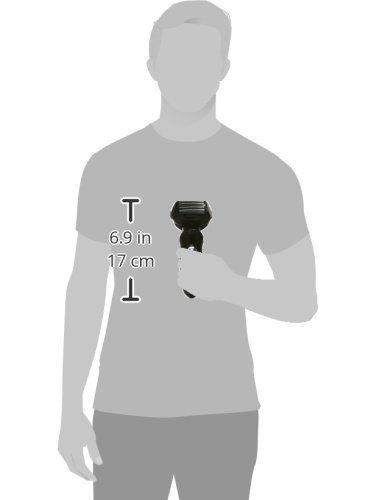
Image: A visual representation of the shaver's dimensions (6.9 inches / 17 cm in height) relative to a person's hand.
10. Warranty and Support
This product is covered by a manufacturer's warranty. For detailed warranty information, product registration, and customer support, please visit the official Panasonic website or contact their customer service department. Keep your proof of purchase for warranty claims.
Panasonic Official Website: www.panasonic.com