Thank you for choosing the Bazooka RXT2 12-inch Triangular Subwoofer. This manual provides essential information for the proper installation, operation, and maintenance of your new subwoofer. Please read this manual thoroughly before use to ensure optimal performance and safety.
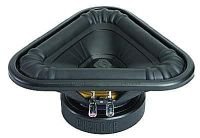
The Bazooka RXT2 is an innovative 12-inch triangular subwoofer designed to deliver powerful bass for car audio systems. It features 450W RMS and 900W MAX power handling, with a 4 Ohm impedance and a frequency response of 20 Hz to 250 Hz. Its robust construction includes a steel basket and polyester membrane, with water cooling for enhanced durability.
Figure 1: Front view of the Bazooka RXT2 12-inch Triangular Subwoofer. This image shows the unique triangular design and the speaker cone.
2. Safety Information
Always disconnect the vehicle's battery before performing any electrical work.
Ensure all wiring connections are secure and properly insulated to prevent short circuits.
Do not expose the subwoofer to excessive moisture or extreme temperatures. While it features water cooling, it is not waterproof.
Mount the subwoofer securely to prevent it from becoming a projectile in the event of a sudden stop or accident.
Consult a professional installer if you are unsure about any installation steps.
Operating the subwoofer at excessively high volumes for extended periods can cause hearing damage.
3. Setup and Installation
The Bazooka RXT2 subwoofer is designed for integration into car audio systems. Proper installation is crucial for optimal performance and safety.
3.1 Unpacking
Carefully remove the subwoofer from its packaging. Inspect for any signs of damage during transit. Retain the packaging for future transport or storage.
3.2 Mounting
The RXT2 is a 12-inch triangular subwoofer. It is recommended for flush mounting in a suitable enclosure or vehicle compartment. Ensure the mounting location is sturdy enough to support the subwoofer's weight and withstand vehicle vibrations.
Choose a secure, flat surface within your vehicle, typically in the trunk or a dedicated subwoofer enclosure.
Mark the mounting points using the subwoofer's frame as a template.
Drill pilot holes if necessary, ensuring not to damage any vehicle components behind the mounting surface.
Secure the subwoofer using appropriate screws or bolts, ensuring a tight fit without over-tightening.
3.3 Wiring Connections
The RXT2 subwoofer requires a wired connection to an appropriate amplifier. It has a 4 Ohm impedance.
Power Connection: Connect the positive (+) terminal of the subwoofer to the positive (+) output of your amplifier. Connect the negative (-) terminal of the subwoofer to the negative (-) output of your amplifier.
Grounding: Ensure your amplifier is properly grounded to the vehicle chassis.
Signal Input: Connect the amplifier's input to your head unit's subwoofer output or full-range output (if using a crossover).
Cable Gauge: Use appropriate gauge wiring for power and speaker connections to handle the subwoofer's power requirements (450W RMS / 900W MAX). Consult your amplifier's manual for recommended wire gauges.
Note: Incorrect wiring can damage the subwoofer, amplifier, or vehicle electrical system. If you are unsure, seek professional assistance.
4. Operation
Once installed and wired correctly, the Bazooka RXT2 subwoofer operates in conjunction with your car audio amplifier and head unit.
4.1 Initial Power-Up
After all connections are made, reconnect the vehicle's battery.
Turn on your car's ignition and then the head unit.
Start with the amplifier's gain control set to its minimum position.
Play a familiar audio track with good bass content.
Slowly increase the amplifier's gain until the desired bass level is achieved without distortion.
4.2 Adjusting Settings
Most adjustments for the subwoofer's performance will be made on your amplifier and head unit.
Gain Control: Adjust the amplifier's gain to match the output voltage of your head unit. Avoid setting the gain too high, as this can lead to distortion and potential damage.
Low-Pass Filter (LPF): Set the LPF on your amplifier or head unit to filter out high frequencies from the subwoofer, typically between 80 Hz and 120 Hz. This ensures the subwoofer only reproduces bass frequencies.
Bass Boost: Use bass boost sparingly, if at all, as it can quickly lead to distortion and overheating.
Phase Control: If your amplifier has a phase switch (0°/180°), experiment with both settings to find the one that provides the most cohesive bass response with your front speakers.
The subwoofer itself does not have external controls; its operation is managed through the connected amplifier and head unit.
5. Maintenance
The Bazooka RXT2 subwoofer is designed for durability and requires minimal maintenance.
Cleaning: Use a soft, dry cloth to wipe down the subwoofer's exterior. Do not use harsh chemicals or abrasive cleaners.
Inspection: Periodically check all wiring connections to ensure they remain secure and free from corrosion.
Environment: Ensure the subwoofer is not exposed to direct sunlight for prolonged periods or extreme temperatures, which can degrade materials over time.
Water Cooling: The water cooling feature is internal and does not require user maintenance. Avoid attempting to open the subwoofer enclosure.
6. Troubleshooting
If you experience issues with your Bazooka RXT2 subwoofer, refer to the following common problems and solutions:
Problem
Possible Cause
Solution
No sound from subwoofer
Amplifier not powered on
Loose or incorrect wiring
Head unit settings incorrect
Blown fuse in amplifier or power line
Check amplifier power and remote turn-on wire.
Verify all speaker and power connections.
Ensure subwoofer output is enabled and volume is up on head unit.
Inspect and replace any blown fuses.
Distorted sound
Amplifier gain set too high
Input signal too high
Incorrect LPF setting
Damaged subwoofer
Reduce amplifier gain.
Lower head unit volume or amplifier input sensitivity.
Adjust LPF to appropriate frequency (e.g., 80-120 Hz).
If distortion persists at low volumes, subwoofer may be damaged; seek professional service.
Weak or muddy bass
Incorrect phase setting
Low amplifier gain
Improper enclosure
Toggle phase switch (0°/180°) on amplifier.
Increase amplifier gain gradually.
Ensure subwoofer is mounted in a suitable, sealed, or ported enclosure as recommended for its design.
If these steps do not resolve the issue, contact Bazooka customer support or a qualified car audio technician.
7. Specifications
Feature
Detail
Model
Bazooka RXT2
Speaker Type
Subwoofer
Subwoofer Diameter
12 inches (30.48 cm)
RMS Power Output
450 Watts
Max Power Output
900 Watts
Impedance
4 Ohms
Frequency Response
20 Hz - 250 Hz
Connectivity Technology
Wired
Audio Output Mode
Mono or Stereo (via amplifier)
Cone Material
Polyester membrane
Basket Material
Steel
Cooling
Water cooling
Recommended Use
Car audio systems
Control Method
Tactile (via amplifier/head unit)
Waterproof
No
8. Warranty and Support
Specific warranty information for the Bazooka RXT2 subwoofer is typically provided with the product at the time of purchase or can be found on the official Bazooka website. Please retain your proof of purchase for warranty claims.
For technical support, service, or warranty inquiries, please contact Bazooka customer service through their official website or the contact information provided with your purchase documentation.
Online Resources: For additional information, FAQs, or to locate authorized service centers, please visit the official Bazooka website.
9. Product Media
No official product videos were provided for this model in the available data. For visual references, please refer to the product listing or the manufacturer's official website.
Ask a question about this manual
Ask about setup, troubleshooting, compatibility, parts, safety, or missing instructions. Manuals+ will review the question and use this page’s manual context to help answer it.