
1. Introduction
The Source Audio SA143 Soundblox Pro Bass Envelope Filter is an advanced effects pedal designed for bassists, offering a wide array of envelope filter effects. This unit expands upon its predecessors with enhanced features and comprehensive control options, allowing for precise sound shaping.
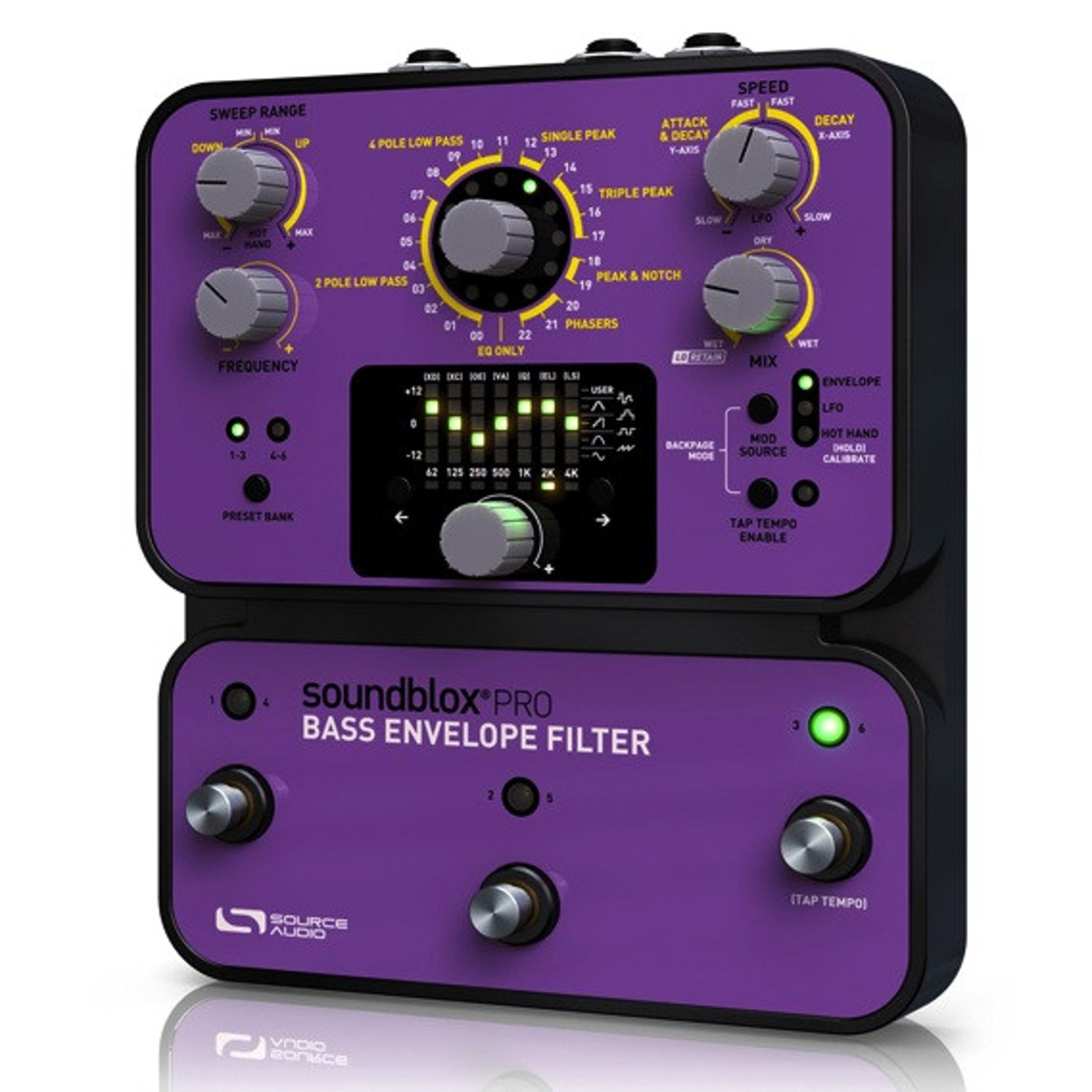
Image: The Source Audio SA143 Soundblox Pro Bass Envelope Filter pedal, showcasing its control surface and footswitches.
Key Features:
- 22 Filter Sounds: Includes 2-Pole and 4-Pole Low Pass, Single Peak, Triple Peak, Peak & Notch, and Phaser settings.
- Wet/Dry Mix with 'Lo-Retain': A dedicated knob featuring a low-end preserving algorithm to maintain bass frequencies.
- Four Modulation Sources: Standard envelope filter sweeps, selectable LFO waveforms, expression pedal input, and Hot Hand motion sensing ring compatibility.
- Six Customizable Presets: Three footswitches provide access to six user-definable sound settings.
- Tap Tempo LFO: One footswitch can be assigned for tap tempo control of LFO effects.
- Expression Pedal Input: Allows control over various parameters such as filter modulation, sweep range, effect selection, and LFO speed.
2. Setup
2.1 Power Connection
Connect a 9V DC power supply (minimum 300mA, center negative) to the power input jack located on the rear of the unit. Ensure the power supply meets these specifications to prevent damage.
2.2 Audio Connections
- Connect your bass guitar or other instrument to the Input jack.
- Connect the Output jack to your amplifier, mixing console, or the next pedal in your signal chain.
2.3 Expression Pedal / Hot Hand Connection
If using an external expression pedal or a Source Audio Hot Hand motion sensing ring, connect it to the dedicated control input jack. Refer to the Hot Hand or expression pedal manual for specific setup instructions.
3. Operating Instructions
3.1 Controls Overview
The Soundblox Pro Bass Envelope Filter features a comprehensive set of knobs and footswitches for precise control over your sound. Familiarize yourself with the functions of each control:
- Drive: Adjusts the input gain and sensitivity of the envelope follower.
- Mix: Controls the blend between the dry (unaffected) and wet (effected) signals.
- Frequency: Sets the center frequency or starting point of the filter sweep.
- Q: Adjusts the resonance or peak of the filter.
- Sweep: Determines the range and direction of the filter sweep.
- Attack: Controls the speed at which the filter opens.
- Decay: Controls the speed at which the filter closes.
- LFO Speed: Adjusts the rate of the Low Frequency Oscillator when LFO modulation is selected.
- Depth: Controls the intensity of the LFO modulation.
3.2 Effect Selection
The pedal offers 22 distinct filter effects. Use the dedicated effect selector knob or buttons (refer to the unit's interface) to cycle through and choose your desired filter type. Each effect type will respond differently to the Drive, Frequency, Q, and Sweep controls.
3.3 Modulation Sources
The Soundblox Pro Bass Envelope Filter supports four primary modulation sources:
- Envelope: The classic envelope follower, where your playing dynamics control the filter sweep.
- LFO: A Low Frequency Oscillator provides rhythmic, cyclical filter modulation.
- Expression Pedal: Allows real-time manual control over filter parameters, similar to a wah pedal.
- Hot Hand: Integrates with the Source Audio Hot Hand motion sensor for unique, gesture-controlled effects.
Select the desired modulation source using the dedicated switch or menu option on the pedal.
3.4 Saving and Recalling Presets
The three footswitches allow you to store and recall up to six customizable presets. To save a preset, adjust the controls to your desired sound, then follow the pedal's specific instructions (typically involving holding down a footswitch) to store it. To recall, simply press the corresponding footswitch.
3.5 Tap Tempo LFO
One of the footswitches can be configured to function as a Tap Tempo control for LFO-based effects. Repeatedly tap the footswitch at your desired tempo, and the LFO speed will synchronize accordingly.
4. Maintenance
4.1 Cleaning
To clean the pedal, use a soft, dry cloth. Avoid using liquid cleaners, solvents, or abrasive materials, as these can damage the finish or internal components.
4.2 Storage
When not in use for extended periods, store the pedal in a cool, dry environment, away from direct sunlight, extreme temperatures, and excessive humidity. Disconnect the power supply when storing.
5. Troubleshooting
5.1 No Sound Output
- Ensure the power supply is correctly connected and functioning.
- Check all audio cables for proper connection and integrity.
- Verify that your instrument's volume and amplifier settings are appropriate.
- Confirm that the pedal is engaged (LED indicator should be on).
5.2 Unexpected Effect Behavior
- Review the current knob settings; even slight adjustments can significantly alter the effect.
- Check which preset is currently active.
- Ensure the correct modulation source (Envelope, LFO, Expression, Hot Hand) is selected for your intended sound.
- If using an expression pedal or Hot Hand, ensure it is properly calibrated and connected.
5.3 Unwanted Noise or Hum
- Check for faulty or unshielded audio cables.
- Ensure the power supply is isolated and not causing ground loops.
- Move the pedal away from other electronic devices that may cause interference.
6. Specifications
| Feature | Detail |
|---|---|
| Brand | Source Audio |
| Model Number | SA143 |
| Style | Compact |
| Item Weight | 1.1 Pounds |
| Voltage | 9 Volts |
| Amperage | 300 Milliamps |
| Controls Type | Knob |
| Power Source | Corded Electric |
| Signal Format | Analog |
| Item Dimensions (L x W x H) | 8.25 x 4.25 x 2.5 inches |
| UPC | 890729001170 |
7. Warranty Information
The Source Audio SA143 Soundblox Pro Bass Envelope Filter comes with a 1-year parts & labor warranty from the date of purchase. Please retain your proof of purchase for warranty claims. This warranty covers manufacturing defects and malfunctions under normal use.
8. Support
For further assistance, technical support, or to access additional resources such as firmware updates and detailed tutorials, please visit the official Source Audio website. You can find contact information and a comprehensive FAQ section there.
