
1. Introduction
Thank you for choosing the Xtreme 18002 Ultra Slim Fixed TV Wall Mount. This manual provides essential information for the safe and correct installation, operation, and maintenance of your new TV wall mount. Please read all instructions carefully before installation to ensure proper setup and to prevent damage or injury. This mount is designed for LCD, LED, or Plasma Flat Panel Displays between 23 and 42 inches, offering a discreet, low-profile installation.
2. Safety Information
WARNING: Failure to read and follow all instructions can result in personal injury, property damage, or voiding of your warranty. The manufacturer is not responsible for damage or injury caused by incorrect assembly or use.
- Ensure the mounting surface can safely support the combined weight of the mount and the television.
- Do not exceed the maximum load capacity of 110 lbs (50 kg).
- Use only the provided mounting hardware. If you are unsure about the type of wall, consult a qualified installer.
- Keep small parts away from children.
- Always have at least two people for installation to prevent injury or damage.
- Check for hidden electrical wires, water pipes, or gas lines in the wall before drilling.
3. Package Contents
Verify that all components are present and undamaged before installation. If any parts are missing or defective, contact Xtreme customer support.
- Wall Plate Assembly
- TV Bracket Rails (2x)
- Mounting Hardware Kit (screws, anchors, washers, spacers)
- Instruction Manual
4. Setup and Installation
Before beginning, ensure you have the necessary tools: pencil, stud finder, drill, level, Phillips head screwdriver, and a socket wrench.
- Pre-Installation Check:
- Confirm your TV's weight and VESA mounting pattern are within the mount's specifications (max 110 lbs, VESA up to 8" x 16").
- Determine the desired height for your TV.
- Locate wall studs if mounting to a wood stud wall. For concrete or brick walls, use appropriate anchors (not always included).
- Mounting the Wall Plate:
- Position the wall plate on the wall at the desired height and use a level to ensure it is straight. Mark the drilling locations.
- Drill pilot holes at the marked locations. For wood studs, drill 3/16" (4.5mm) holes. For concrete/brick, drill 3/8" (10mm) holes and insert concrete anchors.
- Secure the wall plate to the wall using the provided lag bolts and washers. Tighten firmly but do not overtighten.
- Attaching TV Brackets:
- Carefully place your TV face down on a soft, clean surface.
- Attach the two TV bracket rails to the back of your TV using the appropriate screws, washers, and spacers from the hardware kit. Ensure the brackets are centered and securely fastened.
- Mounting the TV to the Wall Plate:
- With assistance, carefully lift the TV and hook the TV bracket rails onto the top edge of the wall plate.
- Gently lower the TV until the brackets engage with the wall plate. The mount allows for lateral shift for precise placement.
- Secure the TV to the wall plate using the safety screws or locking mechanism at the bottom of the TV brackets.
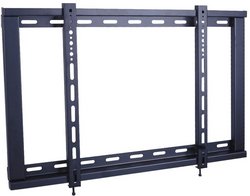
Figure 1: The Xtreme 18002 Ultra Slim TV Wall Mount Bracket. This image shows the compact design of the wall mount, highlighting its low-profile nature suitable for various flat panel displays.
5. Operating Instructions
Once installed, the Xtreme 18002 is a fixed wall mount, meaning it does not offer tilt, swivel, or extension capabilities. Its operation is straightforward:
- Ensure all connections (power, HDMI, etc.) are securely plugged into your TV.
- Verify that the TV is securely locked onto the wall plate using the safety screws.
- The mount provides a fixed, ultra-slim distance of 1 inch from the wall, offering a clean and flush appearance.
6. Maintenance
Regular maintenance helps ensure the longevity and safety of your TV wall mount.
- Periodically check all screws and bolts to ensure they remain tight. Retighten if necessary.
- Dust the mount and TV with a soft, dry cloth. Avoid using harsh chemicals or abrasive cleaners.
- Inspect the mount for any signs of wear, damage, or corrosion. If any issues are found, contact customer support.
7. Troubleshooting
If you encounter issues during or after installation, refer to the following common problems and solutions:
- Problem: TV appears crooked or not level.
Solution: Ensure the wall plate was installed level. If the wall plate is level, the TV brackets may allow for minor adjustments. Re-check the level during the final mounting step. - Problem: TV feels loose on the mount.
Solution: Verify that the safety screws or locking mechanism at the bottom of the TV brackets are fully engaged and tightened. Re-check all mounting screws on both the wall plate and TV brackets. - Problem: Unable to attach TV brackets to the TV.
Solution: Ensure you are using the correct size and length of screws and spacers for your specific TV model. Refer to your TV's manual for VESA mounting hole specifications.
8. Specifications
| Feature | Specification |
|---|---|
| Model Number | 18002 |
| Screen Size Compatibility | 23" – 42" Flat Panel Displays |
| Mounting Type | Fixed Wall Mount |
| Movement Type | Fixed |
| Maximum Load Capacity | 110 lbs (50 kg) |
| VESA Mounting Patterns | Up to 8" x 16" (200mm x 400mm) |
| TV to Wall Distance | 1 inch (25mm) |
| Item Weight | 2.8 lbs (1.27 kg) |
| Material | Steel |
9. Warranty and Support
Xtreme products are designed for durability and reliability. For warranty information, product support, or to purchase replacement parts, please visit the official Xtreme website or contact their customer service department. Keep your purchase receipt as proof of purchase for warranty claims.
Website: www.xtreme.com (Example URL, please refer to actual product documentation for correct URL)
Customer Service: Refer to the Xtreme website for contact details.