1. Introduction
Thank you for choosing the Philips AJB3552/12 DAB+ FM Clock Radio. This manual provides essential information for setting up, operating, and maintaining your device. Please read it carefully to ensure optimal performance and safe use of your clock radio.
Key features of your Philips AJB3552/12 include:
- DAB+ (Digital Audio Broadcasting) for clear, noise-free radio reception.
- FM tuner for traditional radio stations.
- Dynamic Bass Boost for enhanced low-frequency sound.
- Integrated alarm with multiple wake-up options.
- Light sensor for automatic display brightness adjustment.
- Backlit LCD display for easy readability.
2. Safety Information
Please observe the following safety precautions to prevent electric shock, fire, or damage to the device:
- Do not expose the device to rain or moisture.
- Do not place objects filled with liquids, such as vases, on the device.
- Ensure adequate ventilation. Do not block ventilation openings.
- Protect the power cord from being walked on or pinched.
- Only use attachments/accessories specified by the manufacturer.
- Unplug the device during lightning storms or when unused for long periods.
- Refer all servicing to qualified service personnel.
3. Package Contents
Verify that your package contains the following items:
- Philips AJB3552/12 Clock Radio
- User Manual (this document)
- Quick Start Guide
- Power Supply Unit
- Warranty Certificate
4. Product Overview
Familiarize yourself with the components of your Philips AJB3552/12 Clock Radio.
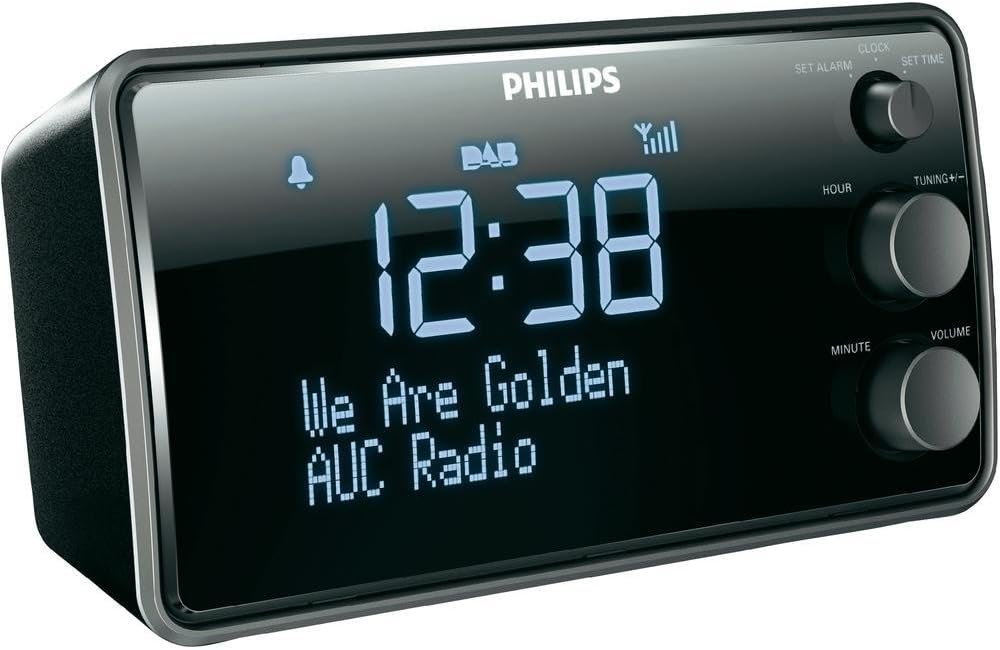
Image 1: Front view of the Philips AJB3552/12 Clock Radio, showing the digital display, Philips logo, and control knobs for setting time, tuning, and volume.
Front Panel
- Display: Shows time, radio station information, and alarm status.
- SET ALARM knob: Used to set the alarm time.
- SET TIME knob: Used to set the current time.
- HOUR button: Adjusts the hour.
- MINUTE button: Adjusts the minute.
- TUNING +/- knob: For tuning radio frequencies or navigating menus.
- VOLUME knob: Adjusts the audio output level.
Rear Panel
- Power Input: Connects to the provided power adapter.
- FM/DAB Antenna: For radio signal reception.
5. Setup
5.1 Connecting Power
- Uncoil the FM/DAB antenna fully for optimal reception.
- Connect the power adapter to the DC IN socket on the rear of the clock radio.
- Plug the power adapter into a wall outlet.
5.2 Initial Power On and Time Synchronization
Upon first connection, the clock radio will automatically attempt to synchronize the time via DAB+ signal. This process may take a few minutes.

Image 2: The Philips AJB3552/12 Clock Radio positioned on a wooden bedside table next to a bed, illustrating a typical usage scenario.
5.3 Manual Time Setting (if automatic synchronization fails)
- Press and hold the SET TIME knob until the hour digits flash.
- Rotate the HOUR button to adjust the hour. Press HOUR to confirm.
- Rotate the MINUTE button to adjust the minute. Press MINUTE to confirm.
- The time is now set.
6. Operating Instructions
6.1 Power On/Off
- To turn on the clock radio, press the POWER button (usually integrated with the VOLUME knob).
- To turn off the clock radio, press the POWER button again. The display will show the current time.
6.2 Radio Operation
6.2.1 DAB+ Radio
- Press the MODE button (if available, or cycle through modes using the power button) to select DAB+ mode.
- The radio will automatically scan for available DAB+ stations. This may take a few moments.
- Once scanning is complete, rotate the TUNING +/- knob to browse through the available stations.
- Press the TUNING +/- knob to select a station.
- To store a preset, press and hold a preset number button (if available) until the display confirms.
6.2.2 FM Radio
- Press the MODE button to select FM mode.
- Rotate the TUNING +/- knob to manually tune to a frequency.
- To auto-scan for the next available station, press and hold the TUNING +/- knob.
- To store a preset, press and hold a preset number button (if available) until the display confirms.
6.2.3 Dynamic Bass Boost
The Dynamic Bass Boost feature enhances low-frequency sounds for a richer audio experience. To activate or deactivate, press the DBB button (if available, or check menu options).
6.3 Alarm Settings
The Philips AJB3552/12 allows you to set an alarm to wake up to your preferred radio station or a buzzer.
- Press and hold the SET ALARM knob until the alarm time digits flash.
- Rotate the HOUR button to set the alarm hour. Press HOUR to confirm.
- Rotate the MINUTE button to set the alarm minute. Press MINUTE to confirm.
- Select the alarm source: Rotate the TUNING +/- knob to choose between Radio or Buzzer. Press the knob to confirm.
- Select the alarm frequency: Rotate the TUNING +/- knob to choose between Daily, Weekdays (Mon-Fri), or Weekends (Sat-Sun). Press the knob to confirm.
- To activate/deactivate the alarm, press the ALARM ON/OFF button (often located on top or integrated with the SET ALARM knob). An alarm icon will appear on the display when active.
6.3.1 Snooze Function
When the alarm sounds, press the SNOOZE button (usually a large button on top) to temporarily silence the alarm. The alarm will sound again after a few minutes (default snooze time is typically 9 minutes).
6.3.2 Sleep Timer
The sleep timer allows you to fall asleep to the radio, which will automatically turn off after a set period. Press the SLEEP button repeatedly to cycle through available sleep times (e.g., 120, 90, 60, 30, 15 minutes, or OFF).
6.4 Display Settings
The clock radio features a light sensor that automatically adjusts the display brightness based on ambient light conditions. If manual adjustment is desired, consult the full user manual for specific steps, as this may vary.
7. Maintenance
7.1 Cleaning
To clean the unit, use a soft, dry cloth. Do not use abrasive cleaners, alcohol, or benzene, as these can damage the surface. Ensure the device is unplugged before cleaning.
7.2 Battery Information
The device requires 1 Lithium-ion battery for backup purposes (e.g., to retain time settings during a power outage). This battery is typically pre-installed and not user-replaceable. If the time is consistently lost after power interruptions, professional servicing may be required.
8. Troubleshooting
If you encounter issues with your clock radio, refer to the following common problems and solutions:
| Problem | Possible Cause | Solution |
|---|---|---|
| No power | Power cord not properly connected. | Ensure the power cord is securely plugged into the unit and the wall outlet. |
| Poor radio reception (DAB+/FM) | Antenna not fully extended or positioned incorrectly. Interference from other electronic devices. | Fully extend and adjust the antenna. Move the unit away from other electronic devices. Try repositioning the unit. |
| Alarm does not sound | Alarm not activated. Alarm volume too low. | Ensure the alarm is set and activated (alarm icon visible). Increase the alarm volume. |
| Display too bright/dim | Automatic light sensor adjustment. | The light sensor adjusts brightness automatically. If manual override is desired, refer to the full user manual. |
9. Specifications
Detailed technical specifications for the Philips AJB3552/12 Clock Radio:

Image 3: Top-down view of the Philips AJB3552/12 Clock Radio, indicating its dimensions: 9.2 cm depth and 6.3 cm height.
| Feature | Specification |
|---|---|
| Brand | Philips |
| Model Number | AJB3552/12 |
| Manufacturer | TP Vision |
| Product Dimensions | 17.2 x 6.3 x 9.2 cm (W x H x D) |
| Weight | 658 g |
| Color | Black |
| Display Type | Digital |
| Special Features | Integrated clock, Built-in speakers, Volume control, DAB+, Dynamic Bass Boost, Light sensor |
| Power Source | Battery (backup) / AC Power |
| Room Type | Bedroom |
| Form Factor | Rectangular prism |
| Usage Environment | Indoor |
| Batteries Required | 1 Lithium ion battery (for backup) |
10. Warranty and Support
For warranty information and customer support, please refer to the warranty certificate included in your package or visit the official Philips support website. Keep your proof of purchase for warranty claims.


