1. Introduction
This manual provides essential information for the safe and efficient operation of your Astron RS-12A Linear Power Supply. The RS-12A is designed to deliver a stable 13.8 VDC output, with a continuous current rating of 9 Amps and a peak intermittent current of 12 Amps. Please read this manual thoroughly before installation and use.
2. Safety Instructions
- Always connect the power supply to a properly grounded electrical outlet.
- Do not expose the unit to moisture, rain, or extreme temperatures.
- Ensure adequate ventilation around the power supply to prevent overheating. Do not block ventilation openings.
- Do not open the power supply casing. There are no user-serviceable parts inside. Refer all servicing to qualified personnel.
- Disconnect power before making any connections or disconnections to the output terminals.
- Do not exceed the specified current ratings (9 Amps continuous, 12 Amps peak).
3. Product Overview
The Astron RS-12A features a robust design for reliable DC power delivery. Key components include the power switch, output terminals, and cooling fins.

Figure 1: Front view of the Astron RS-12A Linear Power Supply. Shows the main power switch on the left side of the front panel.
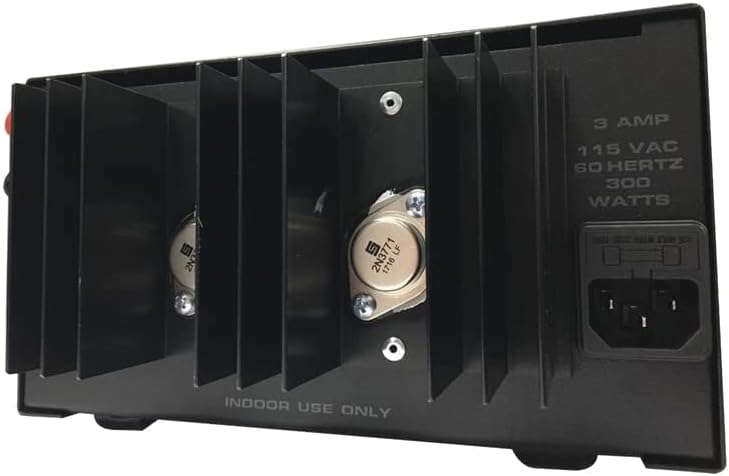
Figure 2: Rear view of the Astron RS-12A Linear Power Supply. Displays large heat sinks, output screw terminals, and the AC power input socket.
4. Setup and Connection
- Placement: Position the power supply on a stable, level surface, ensuring adequate air circulation around the unit, especially near the heat sinks.
- AC Power Connection: Ensure the power switch on the front panel is in the OFF (down) position. Connect the provided AC power cord to the AC input socket on the rear of the power supply (refer to Figure 2). Plug the other end of the AC power cord into a standard 115 VAC, 60 Hz grounded wall outlet.
- DC Output Connection: Identify the positive (+) and negative (-) screw terminals on the rear of the power supply (refer to Figure 2). Connect your compatible DC device's positive lead to the (+) terminal and its negative lead to the (-) terminal. Ensure connections are secure and polarity is correct to prevent damage to your device or the power supply.
- Initial Check: Double-check all connections before proceeding to operation.
5. Operating Instructions
- After completing the setup, turn the power switch on the front panel to the ON (up) position.
- The power supply will now provide a stable 13.8 VDC output to your connected device.
- Monitor the current draw of your connected equipment. The RS-12A is rated for 9 Amps continuous and 12 Amps intermittent peak current. Exceeding these limits can trigger the overcurrent protection or damage the unit.
- When finished, turn the power switch to the OFF position. For extended periods of non-use, it is recommended to unplug the AC power cord from the wall outlet.
6. Maintenance
- Cleaning: Keep the exterior of the power supply clean using a soft, dry cloth. Do not use liquid cleaners or solvents.
- Ventilation: Periodically check that the ventilation openings and heat sinks are free from dust and obstructions. Use compressed air to gently clear any accumulated dust.
- Inspection: Regularly inspect the power cord and output cables for any signs of damage. Replace damaged cables immediately.
7. Troubleshooting
| Problem | Possible Cause | Solution |
|---|---|---|
| No power output. | Power cord not connected, wall outlet faulty, power switch off, internal fuse blown. | Check AC power cord connection. Test wall outlet with another device. Ensure power switch is ON. If fuse is suspected, contact qualified service personnel. |
| Output voltage is unstable or low. | Overload condition, faulty connection, internal component issue. | Reduce the load on the power supply to ensure it is within specifications. Check all DC output connections for looseness or corrosion. If problem persists, contact support. |
| Unit becomes excessively hot. | Poor ventilation, sustained overload. | Ensure adequate space around the unit for airflow. Clear any obstructions from ventilation openings. Reduce the load if operating near maximum capacity for extended periods. |
8. Specifications
| Model: | RS-12A |
| Input Voltage: | 115 VAC, 60 Hz |
| Output Voltage: | 13.8 VDC (Fixed) |
| Continuous Current: | 9 Amps |
| Intermittent Peak Current (ICS): | 12 Amps |
| Wattage: | 100 watts |
| Product Dimensions (L x W x H): | 8 x 9 x 4.5 inches |
| Item Weight: | 13 pounds |
| Cooling Method: | Air |
9. Warranty and Support
For detailed warranty information, please refer to the official Astron Corporation website or contact your authorized dealer. Keep your purchase receipt as proof of purchase for warranty claims.
For technical support or service inquiries, please contact Astron customer service. Contact details can typically be found on the manufacturer's official website.


