1. Introduction
This manual provides comprehensive instructions for the proper setup, operation, and maintenance of your Peavey Impulse 200/1012 Monitor Stand. Designed specifically for the Peavey Impulse 200 series monitors, this accessory ensures stable and adjustable positioning for optimal sound projection.
Key features include:
- Sturdy and Reliable construction
- Easy to transport
- Stand mount allows the unit to be tilted from 15 degrees minimum to 90 degrees maximum
- Easy to use
- Professional accessory
- Legendary Peavey reliability
2. Setup
Follow these steps to correctly assemble and set up your monitor stand.
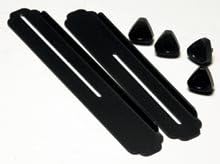
Image: Components of the Peavey Impulse 200/1012 Monitor Stand, showing two black slotted rails and four black triangular feet.
This image displays the individual components of the Peavey Impulse 200/1012 Monitor Stand. It includes two elongated black rails with central slots, designed to support the monitor, and four smaller, black, triangular-shaped feet that attach to the rails for stability.
- Unpack Components: Carefully remove all parts from the packaging. Verify that you have two (2) slotted rails and four (4) triangular feet.
- Attach Feet: Insert the narrow end of each triangular foot into the designated slots at the ends of the rails. Ensure they are securely seated and provide a stable base.
- Position Stand: Place the assembled stand on a flat, stable surface where the monitor will be used.
- Place Monitor: Carefully place your Peavey Impulse 200 monitor onto the stand, ensuring it rests securely within the rails.
3. Operating
The Peavey Impulse 200/1012 Monitor Stand is designed for simple and effective use.
- Monitor Placement: Always ensure the monitor is centered and stable on the stand to prevent tipping.
- Tilt Adjustment: The stand allows for tilting the monitor from a minimum of 15 degrees to a maximum of 90 degrees. Adjust the angle by carefully lifting and repositioning the monitor within the stand's rails until the desired tilt is achieved. Ensure the monitor is stable at the chosen angle before use.
- Portability: For transport, carefully remove the monitor from the stand. The stand's lightweight and compact design makes it easy to carry.
4. Maintenance
Proper maintenance will extend the life of your monitor stand.
- Cleaning: Wipe the stand with a soft, dry cloth to remove dust and debris. For stubborn marks, a slightly damp cloth can be used, followed by immediate drying. Avoid abrasive cleaners or solvents.
- Inspection: Periodically inspect all components for any signs of wear, damage, or loose connections. Ensure the feet are securely attached to the rails.
- Storage: Store the monitor stand in a cool, dry place away from direct sunlight and extreme temperatures when not in use.
5. Troubleshooting
If you encounter issues with your monitor stand, consider the following common solutions:
- Instability: If the stand feels wobbly, ensure it is placed on a flat, level surface. Verify that all four triangular feet are fully inserted and securely seated in the rail slots.
- Monitor Slipping: Ensure the monitor is correctly positioned within the rails and that its base is fully supported. The stand is designed for the Peavey Impulse 200 series; using incompatible monitors may result in instability.
- Difficulty Adjusting Tilt: Ensure no obstructions are preventing the monitor from sliding smoothly within the rails. The tilt adjustment relies on the monitor's base resting securely in the grooves.
If problems persist, please refer to the Customer Support section.
6. Specifications
| Attribute | Value |
|---|---|
| Item Weight | 2.5 pounds |
| Product Dimensions | 16.5 x 4.75 x 5.5 inches |
| Item Model Number | 00370480 |
| Compatible Devices | Monitor |
7. Warranty Information
Peavey products are manufactured to the highest quality standards. This product is covered by Peavey's standard manufacturer's warranty. Please refer to the warranty card included with your original purchase or visit the official Peavey website for detailed warranty terms and conditions.
8. Customer Support
For technical assistance, replacement parts, or any other inquiries regarding your Peavey Impulse 200/1012 Monitor Stand, please contact Peavey customer support.
You can find more information and contact details by visiting the official Peavey store on Amazon: Peavey Store