
1. Introduction
This manual provides comprehensive instructions for the installation, operation, and maintenance of your Cres Cor 0848-008-ACK Solid State Thermostat. Please read this manual thoroughly before installation and use to ensure proper function and safety.
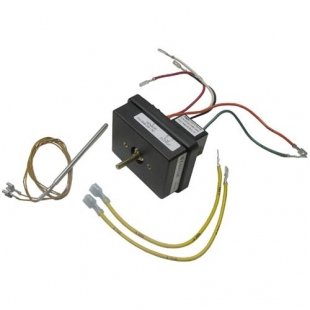
Figure 1: Front view of the Cres Cor 0848-008-ACK Solid State Thermostat. This image shows the compact, rectangular black unit with an LCD display and control buttons.
2. Safety Information
Always observe the following safety precautions to reduce the risk of electric shock, fire, or injury:
- Ensure power is disconnected before installation or maintenance.
- Installation should be performed by a qualified technician in accordance with local electrical codes.
- Do not expose the thermostat to water or excessive moisture.
- Do not attempt to repair or modify the unit yourself. Contact qualified service personnel.
- Use only the specified voltage (24 Volts AC/DC) for operation.
3. Setup and Installation
The Cres Cor 0848-008-ACK thermostat is designed for wall mounting and wired connectivity. Follow these general steps for installation:
- Power Disconnection: Before beginning, ensure that power to the HVAC system is completely turned off at the circuit breaker.
- Mounting Location: Select an appropriate wall-mount location, typically on an interior wall, away from direct sunlight, drafts, and heat sources.
- Wiring: Connect the thermostat to your HVAC system using appropriate wiring. This unit uses wired connectivity and operates on 24 Volts AC/DC. Refer to your HVAC system's manual for specific wiring diagrams. The connectivity protocol is BACnet MS/TP.
- Mounting: Secure the thermostat base to the wall using the provided hardware.
- Attach Thermostat: Carefully attach the thermostat body to its base.
- Power Restoration: Once installation is complete and all connections are secure, restore power to the HVAC system.
Note: Professional installation is recommended to ensure correct wiring and optimal performance.
4. Operating Instructions
The 0848-008-ACK thermostat features a programmable temperature control type with a push-button and touch control method, displayed on an LCD screen.
4.1. Basic Operation
- Power On/Off: Use the designated button (if available) or follow system-specific procedures to power the unit.
- Temperature Adjustment: Use the touch or push-button controls to increase or decrease the desired temperature setting. The current temperature and setpoint will be visible on the LCD display.
- Mode Selection: Select operating modes such as Heat, Cool, Auto, or Off using the control buttons.
4.2. Programming Settings
This is a programmable thermostat, allowing you to set schedules for temperature changes throughout the day or week. Consult the on-screen menu or specific programming instructions for detailed steps on setting schedules, fan operation, and other advanced features.
- Access the programming menu via the control interface.
- Set desired temperatures for different time periods (e.g., morning, day, evening, night).
- Save your programming settings to ensure they are applied.
5. Maintenance
The Cres Cor 0848-008-ACK Solid State Thermostat requires minimal maintenance to ensure optimal performance.
- Cleaning: Gently wipe the exterior of the thermostat with a soft, dry cloth. Do not use abrasive cleaners, solvents, or spray directly onto the unit.
- Inspection: Periodically check for any loose connections or visible damage. If any issues are found, contact a qualified technician.
- Battery Replacement: This unit is primarily AC/DC powered and does not typically require user-replaceable batteries for primary operation. If a backup battery is present for settings retention, consult a technician for replacement.
6. Troubleshooting
If you encounter issues with your thermostat, refer to the following common troubleshooting steps:
| Problem | Possible Cause | Solution |
|---|---|---|
| Thermostat display is blank. | No power to the unit. | Check the circuit breaker for your HVAC system. Ensure all wiring connections are secure. |
| System not responding to thermostat settings. | Incorrect wiring; system mode incorrect; thermostat malfunction. | Verify wiring connections. Ensure the thermostat is set to the correct mode (Heat/Cool). If issues persist, contact support. |
| Temperature readings seem inaccurate. | Thermostat location affected by drafts or heat sources. | Ensure the thermostat is not exposed to direct sunlight, drafts from windows/doors, or heat from appliances. |
If these steps do not resolve the issue, contact customer support for further assistance.
7. Specifications
| Feature | Detail |
|---|---|
| Brand | Cres Cor |
| Model Number | 0848-008-ACK |
| Controller Type | Push Button |
| Color | Black |
| Temperature Control Type | Programmable |
| Connectivity Technology | Wired |
| Power Source | AC/DC |
| Voltage | 24 Volts |
| Display Type | LCD |
| Control Type | Button Control |
| Control Method | Touch |
| Connectivity Protocol | BACnet MS/TP |
| Mounting Type | Wall Mount |
| Backlight | No |
| Shape | Rectangular |
8. Warranty and Support
Cres Cor products are manufactured to high-quality standards. For specific warranty information, please refer to the warranty card included with your product or visit the official Cres Cor website. For technical support, service, or parts, please contact Cres Cor customer service.
Contact Information:
- Refer to your product packaging or the official Cres Cor website for the most current contact details.