
1. Introduction
This manual provides essential information for the safe and efficient operation of your Onkyo TX-NA809 7.1-channel AV receiver. Please read this manual thoroughly before using the unit and retain it for future reference. The TX-NA809 is designed to deliver high-quality audio and video performance for your home theater system, supporting advanced audio formats and multiple connectivity options.
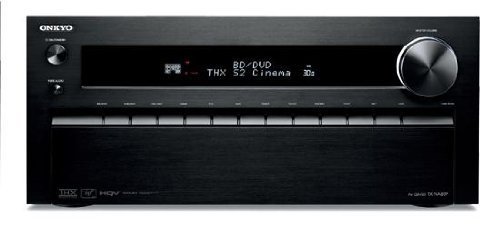
Figure 1: Front view of the Onkyo TX-NA809 7.1ch AV Receiver. This image displays the main unit, showcasing its black finish and front panel controls.
2. Safety Information
To ensure safe operation and prevent damage, observe the following precautions:
- Power Source: Connect the unit only to an AC outlet of the voltage specified on the rear panel.
- Ventilation: Ensure adequate ventilation. Do not block ventilation openings. Maintain a minimum clearance of 20 cm (8 inches) above the unit and 10 cm (4 inches) on the sides.
- Water and Moisture: Do not expose the unit to rain or moisture. Do not place objects filled with liquids, such as vases, on the unit.
- Foreign Objects: Do not insert any foreign objects into the unit's openings.
- Servicing: Do not attempt to service the unit yourself. Refer all servicing to qualified service personnel.
- Speaker Impedance: Ensure that the connected speakers have an impedance rating compatible with the receiver.
3. Package Contents
Verify that your package contains the following items:
- Onkyo TX-NA809 AV Receiver
- Remote Control
- Power Cord
- FM Indoor Antenna
- AM Loop Antenna
- Speaker Setup Microphone
- Instruction Manual (this document)
- Quick Start Guide
4. Setup
4.1 Physical Connections
Before making any connections, ensure the receiver and all connected devices are powered off and unplugged from the wall outlet.
- Speaker Connections: Connect your 7.1 channel speakers to the corresponding speaker terminals on the rear panel. Ensure correct polarity (+ to + and - to -) for each speaker. The receiver supports a 7.1 channel speaker configuration.
- HDMI Connections:
- Connect your video sources (e.g., Blu-ray player, game console, cable box) to the HDMI IN ports (8 available).
- Connect your TV or projector to one of the HDMI OUT ports (2 available).
- Digital Audio Connections: For devices without HDMI, use optical or coaxial digital audio cables. The receiver has 3 optical and 3 coaxial digital audio inputs.
- USB Connection: Connect USB devices to the USB port for media playback.
- Network Connection: Connect an Ethernet cable to the LAN port for network features and firmware updates.
- Power Connection: After all other connections are made, plug the power cord into the receiver and then into a wall outlet.
Figure 2: Illustrative rear panel connections of the Onkyo TX-NA809. This image represents the various input and output ports for audio, video, and network connections.
4.2 Initial Configuration
After connecting all components, power on your TV and the TX-NA809 receiver. Follow the on-screen setup wizard to configure basic settings such as speaker calibration, network settings, and input assignments. Use the included speaker setup microphone for automatic speaker calibration (Audyssey MultEQ XT32).
5. Operating Instructions
5.1 Basic Operation
- Power On/Off: Press the POWER button on the front panel or remote control.
- Input Selection: Use the INPUT SELECTOR buttons on the front panel or remote to choose your desired audio/video source (e.g., BD/DVD, GAME, TV/CD).
- Volume Control: Adjust the volume using the MASTER VOLUME knob on the front panel or the VOLUME +/- buttons on the remote.
- Mute: Press the MUTE button on the remote to temporarily silence the audio.
5.2 Advanced Features
- App Control: The TX-NA809 supports control via a dedicated app for Android and iOS devices. Download the Onkyo Remote App from your device's app store. Ensure your receiver is connected to the same network as your smartphone.
- Sound Modes: The receiver supports various surround sound formats including Dolby TrueHD, DTS-HD Master Audio, and THX Select2 Plus. Use the LISTENING MODE buttons on the remote to cycle through available sound modes.
- HDMI Link: Utilize the HDMI Link feature for synchronized power on/off and input switching with compatible HDMI-CEC devices. Refer to your TV and source device manuals for HDMI-CEC setup.
- USB Playback: Connect a USB storage device to the front USB port to play audio files. Navigate through files using the remote control and on-screen display.
6. Maintenance
Proper maintenance ensures the longevity and performance of your receiver.
- Cleaning: Wipe the unit with a soft, dry cloth. Do not use abrasive cloths, waxes, or solvents.
- Ventilation: Regularly check that the ventilation openings are not obstructed by dust or other materials.
- Power Cord: Periodically inspect the power cord for any damage. If damaged, contact qualified service personnel for replacement.
7. Troubleshooting
If you encounter issues, refer to the following common solutions before contacting support.
| Problem | Possible Cause / Solution |
|---|---|
| No power | Ensure the power cord is securely plugged into the wall outlet and the receiver. Check the power outlet with another device. |
| No sound |
|
| No video |
|
| Remote control not working | Replace batteries. Ensure there are no obstructions between the remote and the receiver's IR sensor. |
8. Specifications
Key technical specifications for the Onkyo TX-NA809 AV Receiver:
- Model: TX-NA809
- Brand: Onkyo
- Channels: 7.1ch
- Maximum Output Power: 230W x 7 channels
- Rated Output Power: 145W x 7 channels
- Supported Surround Sound: Dolby TrueHD, DTS-HD Master Audio, THX Select2 Plus
- Digital Audio Inputs: Optical x 3, Coaxial x 3
- HDMI Inputs: 8
- HDMI Outputs: 2
- Connectivity: HDMI, USB, Network (Ethernet)
- Control Methods: Remote Control, Smartphone App (Android/iOS)
- Compatible Devices: Smartphones
- Color: Black
- Item Weight: 18.3 kg
- AAC Support: Yes
9. Warranty and Support
For warranty information, please refer to the separate warranty card included with your product or visit the official Onkyo website. For technical support, troubleshooting assistance beyond this manual, or service inquiries, please contact Onkyo customer support through their official channels.
Onkyo Official Website: www.onkyo.com


