
1. Introduction
This manual provides detailed instructions for the safe and effective operation of the UNI-T UT360 Series Anemometers, including models UT361 and UT362. These devices are designed for precise measurement of wind speed, wind count (CMM/CFM), and temperature. Please read this manual thoroughly before using the instrument and keep it for future reference.

Image 1.1: The UNI-T UT361 Anemometer being used in an industrial environment to measure airflow.
2. Safety Information
To ensure safe operation, observe the following precautions:
- Do not operate the device in explosive atmospheres or near flammable gases.
- Avoid exposing the device to extreme temperatures, humidity, or direct sunlight.
- Keep the device dry. Do not immerse it in water or other liquids.
- Use only the specified battery type (9V battery).
- Do not attempt to repair or modify the device. Refer all servicing to qualified personnel.
- Remove the battery if the device will not be used for an extended period to prevent leakage.
3. Package Contents
Upon unpacking, verify that all items listed below are present and undamaged:
- UNI-T UT360 Series Anemometer (Main Unit)
- Wind Speed Sensor (Vane Probe)
- USB Interface Cable
- PC Software CD (for UT362 model)
- Carrying Bag
- 9V Battery (GF22)
- English User Manual (this document)
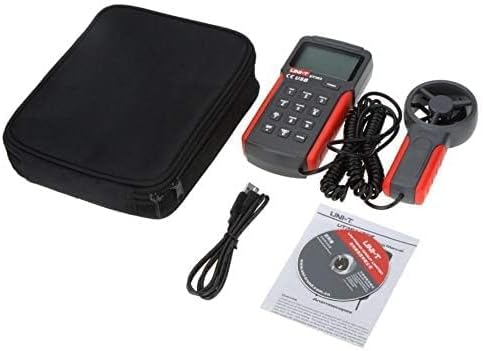
Image 3.1: Contents of the UNI-T UT360 Series Anemometer package, including the main unit, vane probe, USB cable, software CD, carrying bag, and user manual.
4. Product Overview
The UNI-T UT360 Series Anemometers feature a clear LCD display and a user-friendly keypad for various measurement functions. The device includes a separate vane probe for accurate wind speed and temperature readings.
4.1 Front Panel and Display
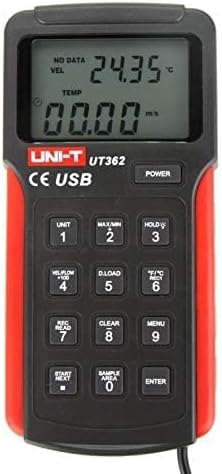
Image 4.1: Front view of the UT362 Anemometer, highlighting the LCD display and control buttons.
The LCD displays measurement values for wind velocity (VEL), temperature (TEMP), and wind count (FLOW). Indicators for data storage, MAX/MIN mode, and low battery are also present. The keypad includes buttons for power, unit selection, data hold, data loading, recording, clearing, menu access, and navigation.
4.2 Rear Panel and Stand

Image 4.2: Rear view of the anemometer, showing the integrated kickstand for desktop use.
The rear of the device features a battery compartment and an integrated kickstand for convenient hands-free operation on a flat surface.
5. Setup
5.1 Battery Installation
- Locate the battery compartment cover on the rear of the device.
- Slide the cover open or remove it as indicated.
- Insert a new 9V battery (GF22) into the compartment, observing the correct polarity (+/-).
- Replace the battery compartment cover securely.
5.2 Connecting the Vane Probe
Connect the cable from the wind speed sensor (vane probe) to the designated port on the main unit. Ensure the connection is firm to prevent intermittent readings.
6. Operating Instructions
6.1 Power On/Off
Press the POWER button to turn the device on. Press and hold the POWER button again to turn it off. The device features an auto power-off function after approximately 10 minutes of inactivity to conserve battery life.
6.2 Measurement Modes and Units
- Wind Speed Units: Press the UNIT button to cycle through available wind speed units (e.g., m/s, ft/min, knots, km/h, mph).
- Temperature Units: Press the °F/°C button to switch between Celsius and Fahrenheit temperature displays.
- Wind Count (CMM/CFM): Press the VEL/FLOW x 100 button to switch between wind velocity and wind count measurements.
6.3 Data Hold, MAX/MIN Measurement
- Data Hold: Press the HOLD button to freeze the current reading on the display. Press again to release.
- MAX/MIN: Press the MAX/MIN button to display the maximum or minimum recorded values during a measurement session. Cycle through MAX, MIN, and current readings by pressing the button repeatedly.
6.4 Data Storage and Recall (UT362 Model)
The UT362 model supports data storage of up to 2044 sets. Refer to the specific instructions below for data logging and recall:
- Setting Sample Area: Use the SAMPLE AREA button to define the area for wind count calculations.
- Recording Data: Press REC/READ to enter recording mode. Use START/NEXT and ENTER to manage data recording.
- Recalling Data: Press REC/READ to enter recall mode. Use START/NEXT to browse stored data.
- Clearing Data: Press the CLEAR button to delete stored data.
- Downloading Data: Connect the device to a PC using the USB cable and the provided software (for UT362) to download stored data. Press D.LOAD to initiate data transfer.

Image 6.1: The UNI-T UT361 Anemometer displayed on a laboratory bench, demonstrating its professional application.
7. Maintenance
7.1 Cleaning
Wipe the device casing with a soft, damp cloth. Do not use abrasive cleaners or solvents. Ensure the vane probe is free from dust and debris for accurate readings.
7.2 Battery Replacement
When the low battery indicator appears on the display, replace the 9V battery as described in Section 5.1. Dispose of used batteries responsibly.
7.3 Storage
If the device is not used for an extended period, remove the battery and store the anemometer in its carrying bag in a cool, dry place, away from direct sunlight and extreme temperatures.
8. Troubleshooting
| Problem | Possible Cause | Solution |
|---|---|---|
| Device does not power on. | Dead or incorrectly installed battery. | Replace the 9V battery, ensuring correct polarity. |
| Inaccurate wind speed readings. | Vane probe obstructed or damaged; incorrect unit selected. | Check the vane for obstructions. Ensure the correct unit is selected using the UNIT button. |
| Display shows "Lo Batt". | Low battery voltage. | Replace the 9V battery immediately. |
| Data download fails (UT362). | USB connection issue; software not installed or running. | Ensure USB cable is securely connected. Verify PC software installation and operation. |
9. Specifications
The UNI-T UT360 Series Anemometers offer robust performance for various environmental measurements. Key specifications are detailed below:
9.1 General Specifications
- Brand: UNI-T
- Material: Plastic
- Power: 9V battery (as indicated by "Voltage: 9 Volts" in specifications)
- Product Net Weight: 375 Grams
- Item Dimensions (L x W x H): 3.07 x 1.18 x 6.38 inches
- Included Components: English user manual, USB cable, carrying bag, software CD (for UT362)
9.2 Measurement Capabilities
- Measurement Functions: Wind Speed (Velocity), Wind Count (CMM/CFM), Temperature
- Wind Count Measurement Range: 0.001 ~ 9999 x 100
- Data Features: MAX/MIN/Real-time measurement, Data Hold
- Data Storage: 2044 sets (UT362 model)
- Connectivity: USB interface (UT362 model)
- Display: LCD with backlight, showing VEL, TEMP, FLOW indicators
- Auto Power Off: Yes
- Low Battery Indication: Yes
Note: Specific measurement ranges and accuracies may vary between models (UT361 and UT362). Refer to the product packaging or official UNI-T documentation for precise model-specific details.
10. Warranty and Support
UNI-T products are manufactured to high quality standards. For warranty information, technical support, or service, please refer to the warranty card included with your product or visit the official UNI-T website. Do not attempt to open or repair the device yourself, as this may void the warranty.
For further assistance, please contact UNI-T customer service through their official channels.