
TOMY MP-10
Instruction Manual
TOMY MasterPieces Transformers MP-10 Convoy (Optimus Prime)
Introduction
This manual provides detailed instructions for the assembly, operation, and maintenance of your MasterPieces Transformers MP-10 Convoy (Optimus Prime) figure. Designed with intricate detail and transformable features, this collectible figure offers a comprehensive play and display experience. Please read through this manual carefully to ensure proper handling and to maximize your enjoyment of this product.
Product Overview and Components
The MP-10 Convoy (Optimus Prime) figure is a highly detailed representation of the iconic Autobot leader. It is fully transformable between robot and truck modes and comes with several accessories to enhance play and display.
- MP-10 Convoy (Optimus Prime) Figure
- Transformable Trailer
- Beam Rifle (transformable)
- Energy Axe
- Matrix of Leadership (removable from chest)
- Tiny Vehicle (Roller)
- Tiny Human Figure (Spike)


Setup
Upon unboxing, carefully remove all components from their packaging. The figure may be secured with twist ties or plastic inserts; gently detach them to avoid damage. It is recommended to familiarize yourself with the figure's joints and articulation points before attempting transformation.
Initial Inspection:
- Inspect all parts for any visible damage or manufacturing defects.
- Ensure all listed components are present.
- Gently move joints to understand their range of motion. Some joints may be stiff initially; apply gentle, consistent pressure.
Operating Instructions
The MP-10 Convoy figure is designed for complex transformation. Follow these steps carefully to convert between robot and vehicle modes, and to utilize its various features.
Transformation from Robot to Truck Mode:
- Prepare the Robot Mode: Ensure the figure is standing upright with arms and legs straightened. Remove any accessories like the rifle or axe.
- Fold Arms: Carefully fold the robot's arms inward and upward, tucking them into the chest cavity. Ensure the hands are properly retracted or folded.
- Rotate Torso: Rotate the upper torso section to align with the waist.
- Form Cab: Manipulate the chest panels and windshield sections to form the front cab of the truck. The chest windows will become the truck's windshield.
- Transform Legs: Extend and collapse the leg sections to form the rear chassis and wheels of the truck. The feet will typically fold up to become part of the underside or rear.
- Secure Panels: Ensure all panels and tabs are securely locked into place to form a solid truck mode.

Transformation from Truck to Robot Mode:
- Unlock Panels: Carefully unlatch and unfold the truck's panels, starting with the cab section.
- Extend Legs: Separate and extend the rear chassis sections to form the robot's legs. Rotate and position the feet.
- Unfold Torso: Unfold the cab section to reveal the robot's torso. Extend the arms from their folded positions.
- Position Head: Extend the robot's head from its hidden compartment.
- Final Adjustments: Adjust all joints and panels to achieve a stable and accurate robot mode.
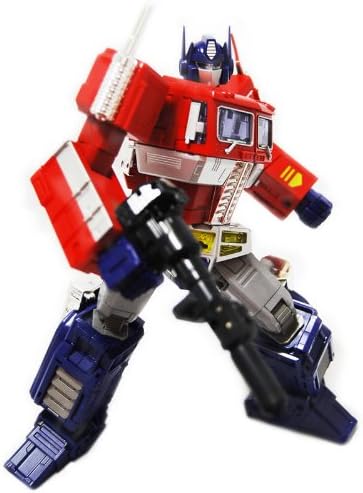
Accessing the Matrix of Leadership:
The Matrix of Leadership is stored within Convoy's chest. To access it:
- Gently open the two chest panels on the robot mode.
- The Matrix of Leadership will be visible inside. It can be carefully removed for display.
- Close the chest panels securely after use.

Using Accessories:
- Beam Rifle: The rifle can be held in Convoy's hand in robot mode. It also transforms and can be stored in Convoy's backpack in robot mode or within the trailer.
- Energy Axe: The Energy Axe can be attached to Convoy's arm in robot mode.
- Trailer: The trailer attaches to the truck mode. It can also transform into a battle station/repair bay. The tiny vehicle (Roller) and tiny human figure (Spike) can be placed inside the transformed trailer.


Maintenance
Proper maintenance will ensure the longevity and appearance of your MP-10 Convoy figure.
- Cleaning: Use a soft, dry cloth to gently wipe away dust. For stubborn dirt, a slightly damp cloth can be used, but avoid excessive moisture, especially near joints or painted areas. Do not use harsh chemicals or abrasive cleaners.
- Storage: Store the figure away from direct sunlight, extreme temperatures, and high humidity to prevent discoloration or material degradation. Keep it in a stable environment where it won't be easily knocked over.
- Handling: Always handle the figure by its main body parts. Avoid applying excessive force to small or delicate components during transformation or posing.
Troubleshooting
If you encounter any issues with your MP-10 Convoy figure, refer to the common problems and solutions below:
- Stiff Joints: If a joint is too stiff, gently work it back and forth a few times. Avoid forcing it. Applying a very small amount of silicone-based lubricant (specifically designed for plastics) can help, but test on an inconspicuous area first.
- Loose Panels/Parts: During transformation, ensure all tabs are fully inserted into their corresponding slots and all panels are pressed firmly into place. If a part consistently comes loose, check for any obstructions or misalignments.
- Difficulty Transforming: Refer to the transformation steps outlined in this manual. If a step is difficult, re-examine the previous steps to ensure correct alignment. Do not force parts; gentle manipulation is key.
- Finger Detachment: Some users have reported fingers detaching easily. These can typically be re-attached by gently pushing them back into place. Handle the hands with care.
Specifications
| Feature | Detail |
|---|---|
| Product Dimensions | 14 x 6.5 x 13.75 inches |
| Item Weight | 3.57 pounds |
| Model Number | MP-10 |
| Manufacturer Recommended Age | 6 years and up |
| Manufacturer | Takara |
Warranty and Support
For information regarding warranty coverage or to seek technical support for your MasterPieces Transformers MP-10 Convoy figure, please contact the manufacturer, TOMY, directly through their official customer service channels. Retain your proof of purchase for any warranty claims.
For general inquiries or to explore other products, you may visit the TOMY Store on Amazon.
Related documentsMP-10

Ask a question about this manual
Ask about setup, troubleshooting, compatibility, parts, safety, or missing instructions. Manuals+ will review the question and use this page’s manual context to help answer it.