
Introduction
The DEWALT 20V MAX* LED Work Light/Flashlight (DCL040) is a versatile and durable lighting solution designed for various work environments. It features bright LED output, an integral hook for hands-free use, and a 120-degree rotating head for optimal light positioning. Its efficient LED bulb ensures extended run-time and low heat output.
Safety Information
Always read and understand all instructions before using this product. Failure to follow all instructions listed below may result in electric shock, fire, and/or serious personal injury.
- Do not operate the light in explosive atmospheres, such as in the presence of flammable liquids, gases, or dust.
- Do not expose the light to rain or wet conditions. Water entering the light will increase the risk of electric shock.
- Use only with specified DEWALT 20V MAX* battery packs.
- Do not look directly into the light source when it is on. This may cause temporary or permanent vision impairment.
- Keep the light out of reach of children.
Components
The DEWALT DCL040 package includes:
- (1) DCL040 Flashlight
Note: Battery and Charger are NOT included and must be purchased separately.
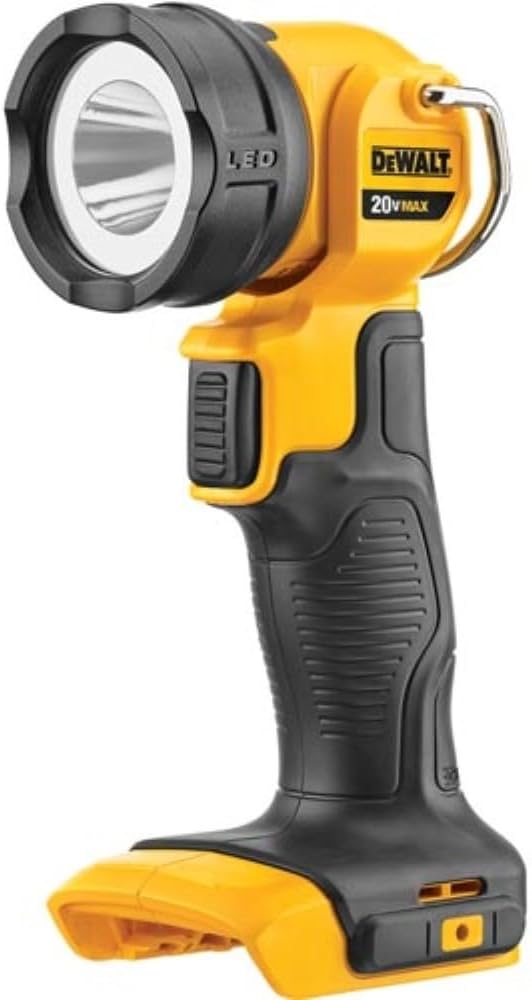
Figure 1: The DEWALT 20V MAX* LED Work Light/Flashlight (DCL040) without battery attached.
Setup
- Battery Installation: Ensure the light is turned off. Align the battery pack (sold separately) with the battery port on the base of the flashlight. Slide the battery pack firmly into place until it clicks securely.
- Battery Removal: To remove the battery, press the battery release button(s) on the battery pack and slide the pack out of the tool.

Figure 2: The DEWALT DCL040 with a battery attached, ready for use.
Operating Instructions
The DCL040 is designed for ease of use and versatility in various lighting situations.
- Power On/Off: Press the trigger switch located on the handle to turn the light on. Press it again to turn the light off.
- Head Rotation: The light head can rotate 120 degrees. Adjust the head to direct the light beam precisely where needed.
- Hands-Free Use: Utilize the integral hook located at the top of the light for hands-free operation. The hook allows the light to be hung from various objects, providing illumination without needing to hold it.

Figure 3: The DEWALT DCL040 illuminating a dark workspace, demonstrating its practical application.
Maintenance
Proper maintenance ensures the longevity and optimal performance of your DEWALT DCL040 Work Light.
- Cleaning: Use only mild soap and a damp cloth to clean the light. Do not immerse the light in any liquid.
- Storage: Store the light in a cool, dry place, out of reach of children. Remove the battery pack when storing for extended periods.
- Battery Care: Follow the instructions provided with your DEWALT 20V MAX* battery and charger for proper charging and storage.
Troubleshooting
| Problem | Possible Cause | Solution |
|---|---|---|
| Light does not turn on. | Battery not installed correctly or battery is depleted. | Ensure battery is fully seated. Charge or replace battery. |
| Light flickers or is dim. | Low battery charge. | Charge the battery pack. |
| Light head is stiff to rotate. | Accumulation of dirt or debris. | Clean the joint area with a damp cloth. Do not force rotation. |
Specifications
| Feature | Detail |
|---|---|
| Model Number | DCL040 |
| Power Source | Battery Powered (20V MAX* Lithium Ion) |
| Light Source Type | LED |
| Brightness | 110 Lumens (White Brightness) / 160 Lumens (Overall Brightness) |
| Head Rotation | 120 degrees |
| Run-time | 11 - 25 hours (depending on battery amp hour) |
| Material | Plastic |
| Color | Black & Yellow |
| Item Weight | 10.1 ounces |
| Product Dimensions | 6"D x 3.1"W x 12"H |
| Water Resistance Level | Not Water Resistant |
| UPC | 885911242028, 013588055904, 715658269227 |

Figure 4: Dimensions of the DEWALT DCL040 Work Light.
Warranty and Support
This DEWALT product is covered by a Manufacturer's Warranty. For specific warranty details, registration, or technical support, please refer to the official DEWALT website or contact their customer service directly.
Additional user guide information may be available in PDF format: User Guide (PDF)