
1. Introduction
This manual provides detailed instructions for the installation, operation, and maintenance of your DIG RBC 8000 Battery Powered Irrigation Automatic Controller with a 3/4" Anti-Siphon Valve. Please read this manual thoroughly before use to ensure proper function and longevity of your irrigation system.

Image: The DIG RBC 8000 controller attached to its 3/4 inch anti-siphon valve, ready for installation.
2. Product Overview and Components
The DIG RBC 8000 is a battery-powered irrigation controller designed for automatic watering of sprinklers or drip irrigation systems. It features a user-friendly interface with an LCD display and a 7-button keypad for easy programming.

Image: Detailed diagram illustrating the various components of the RBC 8000 controller and anti-siphon valve.
Component List:
- Timer cover
- Quick reference label
- LCD display with icon-based programs
- 7-button programming keypad (used for programming, system on/off, manual run, and reviewing programs)
- Battery compartment cap for two AA alkaline batteries (not included)
- Rain sensor yellow-wire connection
- Collapsible 36 inch solenoid wire
- DC solenoid
- Anti-siphon air vent
- 3/4 inch pipe-thread outlet (FNPT)
- Manual flow control
- External bleed screw
- 3/4 inch pipe-thread inlet (FNPT)
- Anti-siphon valve

Image: The RBC 8000 irrigation timer shown separately from its anti-siphon valve.
3. Setup and Installation
3.1. Installing the Batteries
The controller is powered by two AA alkaline batteries. It provides a 60-second safe period to replace batteries without losing your programmed settings.

Image: Visual guide for opening the battery cap, inserting AA batteries, and closing the cap.
- Open Cap: Turn the battery compartment cap counterclockwise to remove it.
- Insert Batteries: Insert two fresh AA alkaline batteries (not included). Ensure the positive (+) and negative (-) symbols match the markings inside the compartment.
- Close Cap: Turn the cap clockwise and hand-tighten to secure it.
3.2. Anti-Siphon Valve Installation
Proper installation of the anti-siphon valve is crucial for system performance and to prevent backflow.
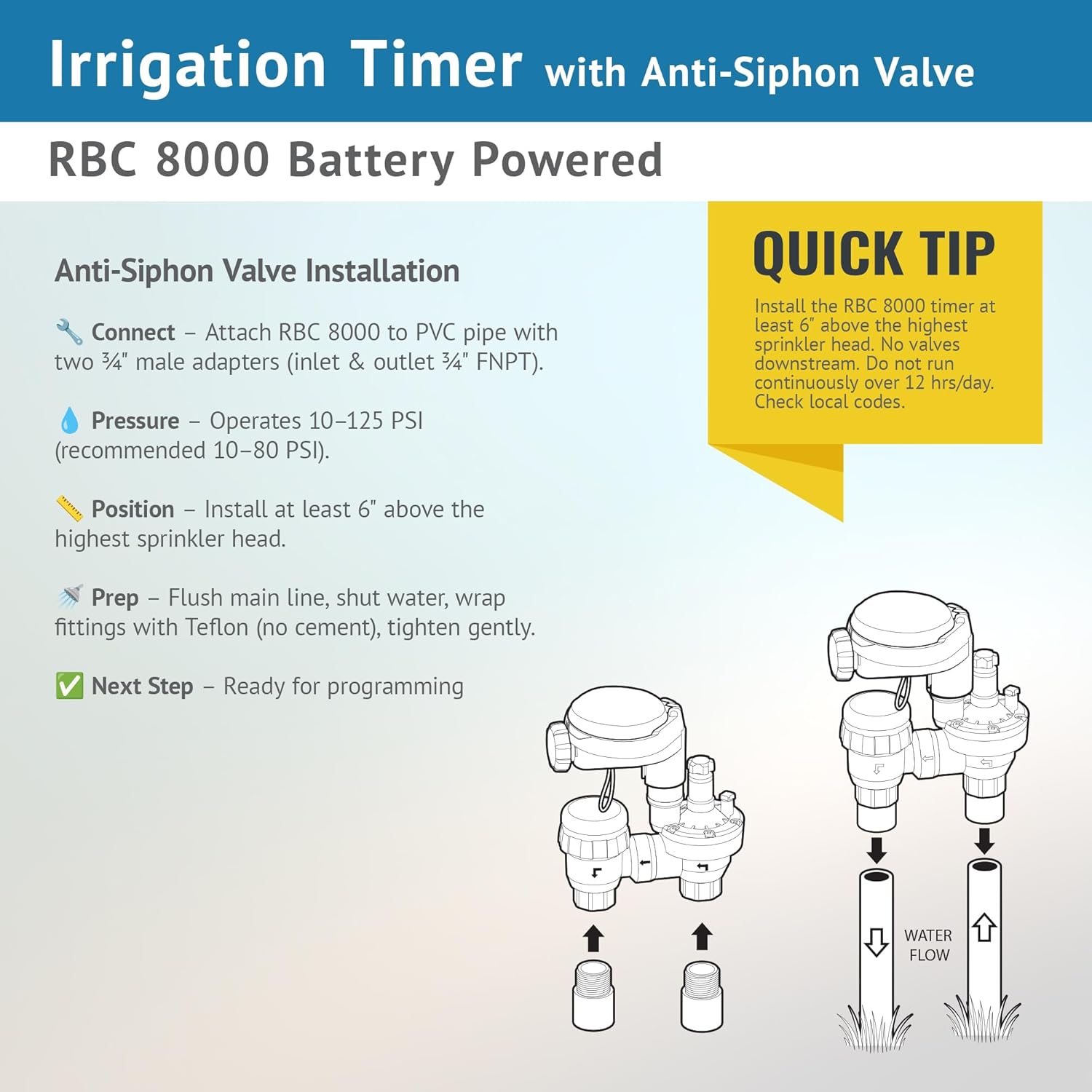
Image: Illustration detailing how to connect the RBC 8000 to PVC pipe and important installation considerations.
- Connect: Attach the RBC 8000 to PVC pipe using two 3/4" male adapters (for both inlet and outlet FNPT).
- Pressure: The system operates optimally with water pressure between 10-125 PSI. A recommended operating range is 10-80 PSI.
- Position: Install the RBC 8000 at least 6 inches above the highest sprinkler head in your system. Ensure no valves are downstream from the anti-siphon valve.
- Preparation: Before connecting, flush the main line to clear debris. Shut off the water supply. Wrap fittings with Teflon tape (do not use cement) and tighten gently.
3.3. Installing a Drip Zone Head Assembly
For drip irrigation systems, follow these steps to install a drip zone head assembly with the anti-siphon valve.

Image: Exploded view diagram showing the components and assembly order for a drip zone head connected to the anti-siphon valve.
- Connect an MPT screen filter to the outlet of the anti-siphon valve.
- Attach a 25 PSI preset pressure regulator to the screen filter.
- Connect an FNPT swivel adapter to the pressure regulator.
- Finally, connect 1/2" Poly tubing to the FNPT swivel adapter.
- Apply 3-5 wraps of Teflon tape to all threaded connections and tighten with a wrench if needed, ensuring a watertight seal.
4. Operating and Programming
The RBC 8000 controller offers flexible programming options for various watering needs. Use the 7-button keypad and the easy-to-read LCD display with icon-based programming for navigation.

Image: Visual representation of the key programming features available on the RBC 8000 controller.
Programming Features:
- Specific Days of the Week: Program watering for chosen days.
- Odd or Even Days: Set schedules based on odd or even calendar days.
- Cycles: Watering cycles from 1 hour to 12 hours.
- Start Times: Up to four start times per day.
- Durations: Watering durations from 1 minute to 59 minutes.
- Manual Irrigation: Option for immediate, non-scheduled watering.
Refer to the quick reference label under the timer cover for detailed step-by-step programming instructions.
5. Maintenance
Regular maintenance ensures the optimal performance and longevity of your DIG RBC 8000 controller.
- Battery Replacement: Replace the two AA alkaline batteries annually, or when the low battery indicator appears on the LCD. The controller allows a 60-second window to replace batteries without losing programmed settings.
- Filter Cleaning: If using a drip zone head assembly, periodically check and clean the MPT screen filter to prevent clogging and maintain proper water flow.
- Winterization: In freezing climates, disconnect the controller and valve assembly from the irrigation system and store indoors to prevent freeze damage.
6. Troubleshooting
If you encounter issues with your RBC 8000 controller, refer to the following troubleshooting guide:
| Problem | Possible Cause | Solution |
|---|---|---|
| Controller display is blank or dim. | Dead or low batteries. | Replace both AA alkaline batteries with fresh ones. |
| Watering schedule not running. | Incorrect programming; Low battery; Water supply off; Valve malfunction. | Verify program settings (start times, durations, days). Check battery level. Ensure main water supply is on. Inspect valve for debris or damage. |
| Water leaks from valve or connections. | Loose connections; Damaged O-rings/seals; Cracked housing; Improper Teflon tape application. | Tighten all connections. Reapply Teflon tape if necessary. Inspect O-rings and seals for damage and replace if needed. If housing is cracked, the unit may need replacement. |
| Date and time are incorrect. | Low battery; Internal electronic confusion. | Replace batteries. Reprogram the date and time. If the issue persists after battery replacement, the internal electronics may be faulty. |
| Watering continuously or not shutting off. | Solenoid malfunction; Debris in valve; Controller fault. | Check if the solenoid wire is properly connected. Disassemble and clean the valve to remove any debris. If the problem continues, the solenoid or controller may need replacement. |
7. Specifications
- Model Number: RBC8000
- Product Dimensions: 6 x 4 x 5 inches
- Item Weight: 1.79 pounds
- Manufacturer: DIG
- Power Source: 2 x AA Alkaline Batteries (not included)
- Valve Size: 3/4 inch Anti-Siphon Valve
- Operating Pressure: 10-125 PSI (recommended 10-80 PSI)
- Watering Frequencies: Specific days of the week, Odd/Even days, Cycles (1-12 hours)
- Start Times: Up to 4 per day
- Watering Duration: 1 to 59 minutes
8. Support
For further assistance, technical support, or inquiries regarding your DIG RBC 8000 controller, please contact DIG customer service. Visit the official DIG website for contact information and additional resources.
Website: www.digcorp.com


