
Konus 2172
Konus Konusarmy 10X50 Binoculars User Manual
Model: 2172
Introduction
Thank you for choosing the Konus Konusarmy 10X50 Binoculars. This manual provides essential information for the proper setup, operation, and maintenance of your binoculars, ensuring optimal performance and longevity. Please read these instructions carefully before using your device.

Image: Front view of the Konus Konusarmy 10X50 Binoculars, showcasing the robust rubber armor and objective lenses.
Product Features
- BAK-4 Prisms: For bright, clear, and sharp images.
- Central Focusing: Allows for quick and easy focus adjustment.
- Extra Large Eyepiece: Provides a comfortable viewing experience.
- Wide Angle (10x50): Offers a broad field of view, ideal for observing moving subjects or expansive landscapes.
- Multicoated Optics: Enhances light transmission for brighter images and improved contrast.
- Rubber Covered: Provides a secure grip and protection against impacts.
- Fast Roll-Down Eyecups: Convenient for users wearing eyeglasses.
- Tripod Adaptable: Allows for stable, extended viewing sessions when mounted on a tripod.
- Waterproof: Designed to withstand various weather conditions.
Setup
1. Unpacking
Carefully remove the binoculars and all accessories from the packaging. Retain the packaging for future storage or transport.
2. Adjusting Interpupillary Distance (IPD)
Hold the binoculars with both hands and look through them. Bend the hinge to adjust the distance between the two barrels until you see a single, clear circular field of view. This ensures proper alignment with your eyes.
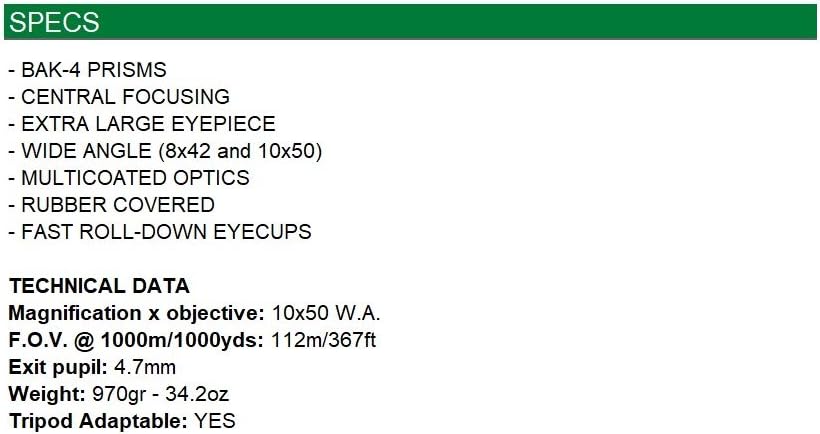
Image: Side view of the Konus Konusarmy 10X50 Binoculars, showing the central focus wheel and eyecups.
3. Focusing
- Close your right eye and look through the left objective lens. Rotate the central focus wheel until the image is sharp and clear.
- Close your left eye and look through the right objective lens. Rotate the diopter adjustment ring (usually on the right eyepiece) until the image is sharp and clear.
- Now, with both eyes open, the binoculars are adjusted for your vision. For subsequent use, you will only need to adjust the central focus wheel for different distances.
4. Eyecup Adjustment
The binoculars feature roll-down eyecups. If you wear eyeglasses, roll down the eyecups to bring your eyes closer to the lenses, providing a full field of view. If you do not wear eyeglasses, keep the eyecups in the up position for comfortable viewing.
5. Tripod Mounting (Optional)
For extended viewing or increased stability, your binoculars can be mounted on a tripod. Locate the tripod adapter thread (usually under a cap on the front hinge). Remove the cap and screw in a compatible tripod adapter (sold separately), then attach it to your tripod.
Operating Instructions
1. Holding the Binoculars
Hold the binoculars firmly with both hands. For maximum stability, brace your elbows against your body or use a tripod.
2. Viewing Technique
Once focused, scan the area of interest. Use the wide-angle view to locate your subject, then fine-tune the focus with the central wheel. Avoid direct sunlight exposure through the binoculars, as this can cause severe eye damage.
Maintenance
1. Cleaning Lenses
- Gently brush away any dust or debris from the lenses using a soft lens brush or compressed air.
- Apply a few drops of lens cleaning fluid to a clean microfiber cloth.
- Wipe the lenses in a circular motion, starting from the center and moving outwards. Avoid excessive pressure.
- Do not use abrasive cloths, paper towels, or household cleaners, as these can scratch or damage the lens coatings.
2. General Care and Storage
- Store your binoculars in a cool, dry place, preferably in their protective case, when not in use.
- Avoid exposing the binoculars to extreme temperatures or high humidity for prolonged periods.
- The rubber armor provides protection, but avoid dropping or subjecting the binoculars to severe impacts.
- Keep lens caps on when not in use to protect the lenses from dust and scratches.
Troubleshooting
| Problem | Possible Cause | Solution |
|---|---|---|
| Image is blurry or out of focus. | Improper focus adjustment. | Re-adjust the central focus wheel and diopter ring as described in the "Focusing" section. |
| Seeing two overlapping images. | Interpupillary distance is incorrect. | Adjust the hinge to match your eye distance until a single circular field of view is achieved. |
| Dark or dim image. | Lens caps are on, or lenses are dirty. | Ensure lens caps are removed. Clean lenses as per "Cleaning Lenses" section. |
Specifications
| Feature | Detail |
|---|---|
| Model Number | 2172 |
| Magnification x Objective | 10x50 W.A. (Wide Angle) |
| Field of View (FOV) @ 1000m/1000yds | 112m / 367ft |
| Exit Pupil | 4.7mm |
| Weight | 970g / 34.2oz |
| Prism Type | BAK-4 |
| Optics Coating | Multicoated |
| Eyecups | Fast Roll-Down |
| Body Material | Rubber Covered |
| Tripod Adaptable | Yes |
| Waterproof | Yes |
Warranty and Support
Konus products are manufactured to high-quality standards. For specific warranty information, please refer to the warranty card included with your purchase or visit the official Konus website. For technical support, service, or inquiries, please contact Konus customer service through their official channels.
Official Website: www.konus.com
Ask a question about this manual
Ask about setup, troubleshooting, compatibility, parts, safety, or missing instructions. Manuals+ will review the question and use this page’s manual context to help answer it.