
1. Introduction
This manual provides detailed instructions for the operation and maintenance of your Sylvania SDVD7024 7-Inch Portable DVD Player. Please read this manual thoroughly before using the device to ensure proper functionality and to maximize your viewing experience.
The Sylvania SDVD7024 is designed for portable entertainment, featuring a 7-inch widescreen display that swivels 360 degrees, compatibility with various disc formats, and multiple power options for use at home or on the go.
2. Package Contents
Verify that all items are present in your package:
- Sylvania SDVD7024 Portable DVD Player
- AC Power Adapter
- Vehicle Power Adapter (DC Car Adapter)
- A/V Cable
- Carrying Bag
- Remote Control
- Stereo Earphones
- User Manual (this document)
3. Product Overview
Familiarize yourself with the components of your portable DVD player.
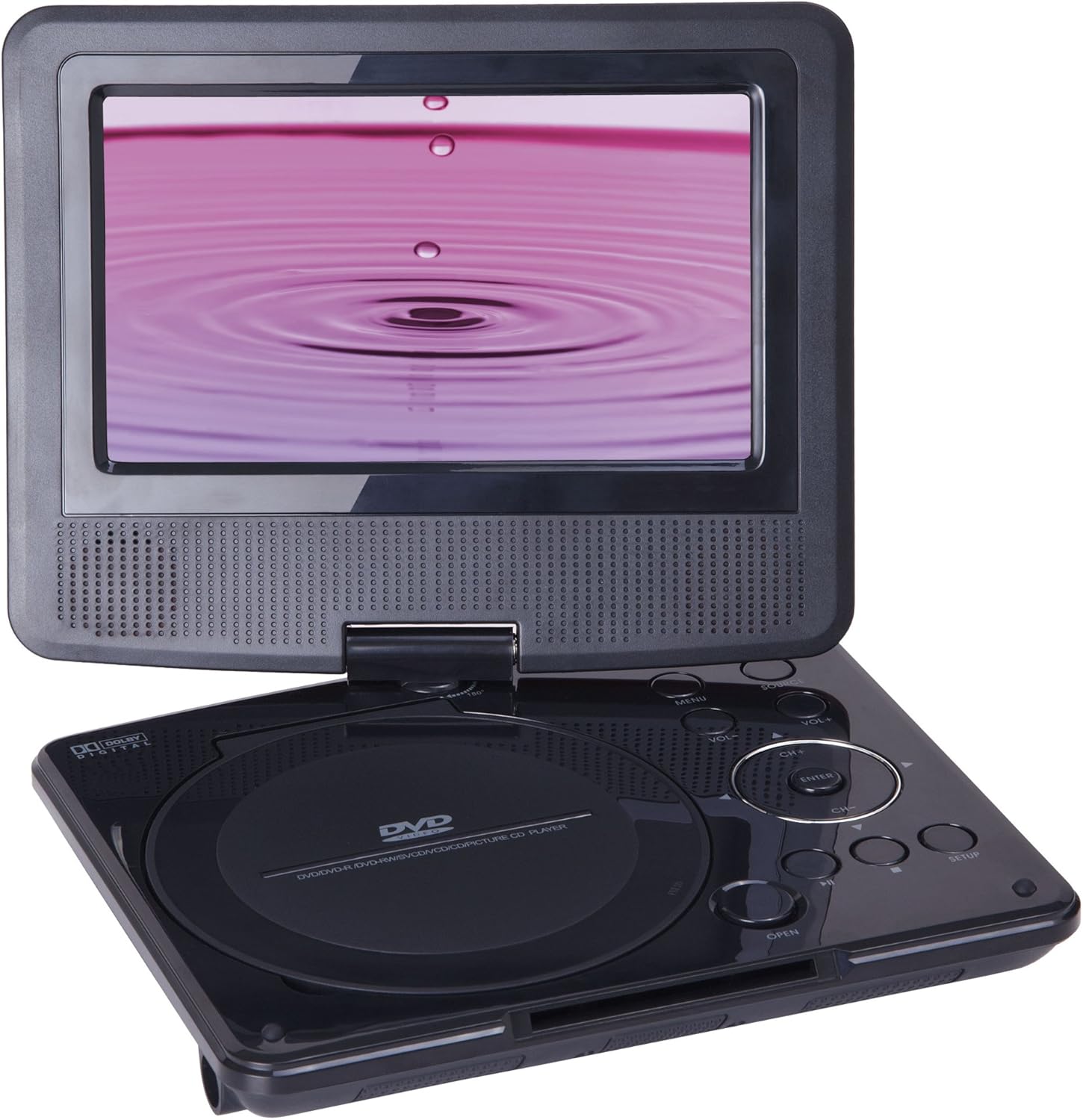
Figure 1: Sylvania SDVD7024 Portable DVD Player with the 7-inch screen swiveled open, revealing the disc compartment and control buttons. The screen displays a purple image with ripples, and the disc tray is labeled "DVD/DVD-R/DVD-RW/SVCD/VCD/CD/PICTURE CD PLAYER".
Key Components:
- 7-Inch Widescreen TFT Display: The main viewing screen, capable of 360-degree swivel.
- Disc Compartment: Located on the base unit, for inserting DVDs and CDs.
- Control Buttons: Including MENU, SOURCE, VOL+, VOL-, CH+, CH-, ENTER, OPEN, PLAY/PAUSE, STOP, REWIND, FAST FORWARD, and SETUP.
- Built-in Stereo Speakers: Integrated into the player for audio output.
- Headphone Jack: For private listening with the included earphones or other standard 3.5mm headphones.
- AV Out Port: For connecting the player to an external display.
- Power Input: For connecting the AC or DC power adapters.
4. Setup and Powering the Device
4.1 Charging the Battery
- Connect the AC power adapter to the DC IN port on the DVD player.
- Plug the AC power adapter into a standard wall outlet.
- Allow the unit to charge fully before first use. The charging indicator light will typically change color or turn off when charging is complete.
The player is equipped with a built-in rechargeable lithium polymer battery for portable use.
4.2 Powering On/Off
- To power on, press the POWER button.
- To power off, press and hold the POWER button until the unit shuts down.
4.3 Connecting to a Vehicle Power Source
- Connect the vehicle power adapter to the DC IN port on the DVD player.
- Insert the other end of the vehicle power adapter into your car's 12V accessory socket (cigarette lighter).
4.4 Connecting to an External Display (AV Out)
- Connect one end of the supplied A/V cable to the AV OUT port on the DVD player.
- Connect the other end of the A/V cable to the corresponding Audio/Video input ports on your external display (e.g., TV).
- Select the correct input source on your external display.
5. Operating Instructions
5.1 Inserting and Removing Discs
- Gently press the OPEN button to open the disc compartment lid.
- Place a disc (DVD or CD) onto the spindle with the label side facing up. Ensure the disc is seated correctly.
- Close the disc compartment lid firmly until it clicks.
- To remove a disc, press the OPEN button, lift the disc carefully from the spindle, and then close the lid.
Supported Disc Formats: DVD, DVD+/-RW, CD, CD-R/RW, MP3 music burned onto CD-R/RW, JPEG photos burned onto CD-R/RW.
5.2 Basic Playback Controls
- PLAY/PAUSE: Press to start playback or pause a playing disc. Press again to resume.
- STOP: Press to stop disc playback.
- REWIND (Previous): Press to go to the previous chapter/track or to rewind during playback.
- FAST FORWARD (Next): Press to go to the next chapter/track or to fast forward during playback.
- VOL+/VOL-: Adjust the volume level.
- CH+/CH-: Used for menu navigation or channel selection in certain modes.
- ENTER: Confirms selections in menus.
- MENU: Accesses the disc menu during DVD playback.
- SETUP: Accesses the system setup menu.
5.3 Swivel Screen Operation
The 7-inch LCD screen can swivel 360 degrees. Gently rotate the screen to your desired viewing angle. Avoid excessive force when adjusting the screen.
5.4 Using the Remote Control
The included remote control provides full functionality for operating the DVD player from a distance. Ensure the remote control has working batteries and is pointed towards the infrared sensor on the player.
- All functions available on the player's control panel are also accessible via the remote.
- Refer to the remote control diagram (if available in a separate leaflet) for specific button layouts.
6. Maintenance
6.1 Cleaning the Player
- Use a soft, dry cloth to clean the exterior of the player.
- For the screen, use a soft, lint-free cloth specifically designed for electronics screens. Do not use abrasive cleaners or solvents.
- Keep the disc compartment free of dust and debris.
6.2 Battery Care
- To prolong battery life, fully charge the player before extended storage.
- Avoid exposing the player to extreme temperatures.
- If the player will not be used for a long period, it is recommended to charge it periodically (e.g., every 3 months) to maintain battery health.
7. Troubleshooting
If you encounter issues with your Sylvania SDVD7024, refer to the following common problems and solutions:
| Problem | Possible Cause | Solution |
|---|---|---|
| Player does not power on. | Battery is depleted; Power adapter not connected or faulty. | Connect the AC adapter and charge the battery. Ensure power connections are secure. |
| No disc playback. | Disc inserted incorrectly; Disc is dirty or scratched; Unsupported disc format. | Ensure disc is inserted label-side up. Clean the disc with a soft cloth. Verify disc format compatibility. |
| No sound. | Volume is too low or muted; Headphones not fully inserted; External speakers not connected properly. | Increase volume. Check headphone connection. If using AV Out, ensure external speakers are connected and powered. |
| Remote control not working. | Batteries are depleted or inserted incorrectly; Obstruction between remote and player. | Replace remote batteries. Ensure clear line of sight to the player's IR sensor. |
| Screen is blank or distorted. | Player is in AV Out mode; Screen settings incorrect. | Check if AV Out cable is connected. Access setup menu to adjust display settings. |
8. Specifications
- Brand: SYLVANIA
- Model: SDVD7024
- Screen Size: 7 Inches
- Display Type: LCD, Widescreen TFT with 360-degree swivel
- Supported Media Types: DVD, DVD+/-RW, CD, CD-R/RW, MP3, JPEG
- Battery: Built-in rechargeable Lithium Polymer
- Power Input: AC Adapter, DC Car Adapter
- Audio Output: Built-in stereo speakers, 3.5mm headphone jack
- Video Output: AV Out (Composite)
- Product Dimensions: 9.8 x 4 x 7.75 inches
- Item Weight: 2.4 pounds
9. Warranty and Support
For warranty information and customer support, please refer to the documentation included with your purchase or visit the official SYLVANIA website. Keep your proof of purchase for warranty claims.
If you require technical assistance or have questions not covered in this manual, please contact SYLVANIA customer service.