
Tomato B004WSJAW0
Mosi Oa Tunya (Victoria Falls) Audio CD User Guide
By Van Kampen
1. Product Overview
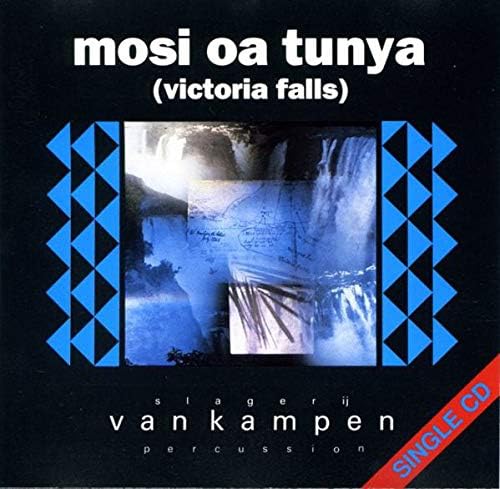
The Mosi Oa Tunya (Victoria Falls) audio CD is a musical release by artist Van Kampen, produced by Tomato. This single CD features a collection of tracks, including different versions of the title track and an additional piece. It is designed for playback on standard audio CD players.


2. Setup
Setting up the Mosi Oa Tunya (Victoria Falls) audio CD for playback is straightforward.
- Unpack the CD: Carefully remove the CD from its jewel case. Hold the CD by its edges to avoid touching the playing surface.
- Prepare your CD Player: Ensure your audio CD player is powered on and ready to accept a disc. Open the disc tray or lid.
- Insert the CD: Place the CD into the disc tray with the label side facing up. Ensure it is seated correctly in the center spindle.
- Close the Tray/Lid: Gently close the disc tray or lid of your CD player.
3. Operating Instructions
Once the CD is inserted, you can begin playback.
- Start Playback: Press the "Play" button on your CD player or remote control. The CD player should automatically begin playing the first track.
- Navigate Tracks: Use the "Next Track" or "Previous Track" buttons to skip between songs.
- Pause/Stop: Use the "Pause" button to temporarily stop playback and "Stop" to end playback.
- Adjust Volume: Control the playback volume using your amplifier, receiver, or the volume controls on your CD player if available.
4. Track List
The Mosi Oa Tunya (Victoria Falls) audio CD features the following tracks:
| Track No. | Title | Duration |
|---|---|---|
| 1 | Mosi Oa Tunya (Radio Version) | 3:30 |
| 2 | Mosi Oa Tunya (Long Version) | 5:02 |
| 3 | Wakarimasen | 8:16 |
Note: Tracks 1 and 2 are also featured on the album "A Long Walk On A Short Pier".
5. Maintenance and Care
Proper care will extend the life and maintain the sound quality of your audio CD.
- Handling: Always hold the CD by its outer edge or the center hole. Avoid touching the shiny playing surface.
- Cleaning: If the CD becomes dirty or smudged, gently wipe it with a soft, lint-free cloth (e.g., a microfiber cloth) from the center outwards in a straight line. Do not wipe in circular motions. Use a specialized CD cleaning solution if necessary, but avoid abrasive cleaners or solvents.
- Storage: Store the CD in its original jewel case when not in use. Keep it away from direct sunlight, extreme temperatures, and high humidity.
- Avoid Scratches: Do not place the CD on rough surfaces or allow it to come into contact with sharp objects.
6. Troubleshooting
If you encounter issues during playback, consider the following common solutions:
- Skipping or Stuttering:
- Check the CD for visible smudges or fingerprints. Clean the disc as described in the Maintenance section.
- Inspect the CD for deep scratches or cracks. Severely damaged discs may not play correctly.
- Ensure the CD player is on a stable, level surface to prevent vibrations.
- Try playing another CD to determine if the issue is with the player or the disc.
- No Sound:
- Verify that your audio system (amplifier, speakers) is powered on and connected correctly.
- Check the volume levels on your CD player and amplifier.
- Ensure the correct input source is selected on your amplifier/receiver.
- Disc Not Recognized:
- Ensure the CD is inserted correctly, label side up.
- Clean the disc.
- Some older CD players may have difficulty reading certain types of discs (e.g., CD-R/RWs, though this is a standard audio CD).
7. Specifications
| Attribute | Detail |
|---|---|
| Product Title | Mosi Oa Tunya (Victoria Falls) |
| Artist | Van Kampen |
| Format | Audio CD |
| Label / Manufacturer | Tomato |
| ASIN | B004WSJAW0 |
| Manufacturer Reference | 2696713 |
| Number of Discs | 1 |
| Discontinued by Manufacturer | Yes |
| Release Year | 1989 (based on copyright info on disc image) |
8. Support
For further assistance or inquiries regarding the Mosi Oa Tunya (Victoria Falls) audio CD, please refer to the contact information provided by the original retailer or the record label, Tomato.
Given the product's nature as an audio CD and its "discontinued by manufacturer" status, direct product support from the manufacturer may be limited.
Related Documents - B004WSJAW0
 |
Postharvest Calcium Chloride Treatment for Chilling Injury Reduction in Tomato Fruit Research on the impact of calcium chloride (CaCl2) treatments on reducing postharvest chilling injury and improving the quality of tomato fruit (Solanum lycopersicum). The study evaluates various CaCl2 concentrations and their effects on chilling injury symptoms, surface pitting, weight loss, pH, total soluble sugar, and vitamin C content during storage. |
 |
MXQ PRO Android TV Box: Especificações e Recursos Detalhados Explore o MXQ PRO, uma Smart TV Box com Android 5.1.1, processador Amlogic S905 Quad-Core, suporte 4K Ultra HD, H.265 HEVC e HDMI 2.0. Ideal para streaming e entretenimento em casa. |
 |
MXQ Pro Android TV Box: Amlogic S905 Quad Core Full HD Media Player Discover the MXQ Pro, an Android 5.1 TV box featuring the Amlogic S905 Quad Core processor for Full HD 1080p and 4K media. Explore its hardware, software, and connectivity features for an enhanced home entertainment experience. |
 |
Tomato TM8S Smart Android TV Box - Amlogic S812 Quad Core 4K UHD Explore the Tomato TM8S, a powerful Smart Android TV Box featuring an Amlogic S812 Quad Core processor, 4K Ultra HD support, Android 4.4 KitKat, dual-band Wi-Fi, and extensive media playback capabilities. Detailed specifications and features. |
 |
MXQ Pro 4K Android TV Box - Amlogic S905 Smart Media Player Explore the MXQ Pro, a powerful Android 5.1.1 TV box featuring an Amlogic S905 Quad-Core CPU, 4K resolution, H.265 HEVC, and HDMI 2.0 for an immersive entertainment experience. This smart media player offers seamless streaming and app access. |
 |
Tomato X6 Android TV Box - Reproductor Multimedia con Soporte Kodi Descubra el Tomato X6, un versátil Android TV Box de China. Este reproductor multimedia permite instalar aplicaciones populares como Kodi y ofrece acceso a servicios de streaming como Netflix, Hulu, YouTube y Spotify. Incluye micrófono y cámara web integrados, audio Hi-Fi con soporte Dolby/AC3/DTS, procesador Quad Core, 1GB de RAM, 8GB de Flash y amplias opciones de conectividad vía HDMI, USB, Ethernet y Wi-Fi. |