
Onkyo C-7030
Onkyo C-7030 Home Audio CD Player
User Manual
Introduction
This manual provides detailed instructions for the setup, operation, maintenance, and troubleshooting of your Onkyo C-7030 Home Audio CD Player. Designed for music enthusiasts, the C-7030 delivers a high-fidelity audio experience from your CD collection. It incorporates advanced technologies like VLSC for noise reduction and a custom-built transformer for stable power supply, all within a robust and elegant chassis.
Key features include: Plays MP3 CDs, CD-R/CD-RWs. High Quality 192 kHz/24-Bit DAC. Headphone jack with volume control. Solid aluminum front panel. Custom-built transformer for stable power supply. Onkyo Vector Linear Shaping Circuitry (VLSC) technology for noise reduction.

Figure 1: Front view of the Onkyo C-7030 CD Player, showcasing its sleek black design and front panel controls.
Setup
Follow these steps to properly set up your CD player:
- Unpacking: Carefully remove the CD player and all accessories from the packaging. Retain the packaging for future transport or storage.
- Placement: Place the CD player on a stable, level surface, away from direct sunlight, heat sources, and excessive dust or moisture. Ensure adequate ventilation around the unit.
- Connections:
- Audio Output: Connect the RCA audio cables from the ANALOG AUDIO OUTPUT (L/R) jacks on the rear of the CD player to the corresponding audio input jacks on your amplifier or receiver.
- Digital Audio Output (Optional): For digital audio connections, use either an optical cable from the OPTICAL DIGITAL AUDIO OUT or a coaxial cable from the COAXIAL DIGITAL AUDIO OUT to your amplifier's digital input.
- RI (Remote Interactive) Cable: If your Onkyo amplifier or receiver supports RI, connect the RI cable to enable integrated control functions.
- Power Connection: Plug the power cord into a suitable AC outlet.
- Remote Control Batteries: Insert the two AAA batteries (included) into the remote control, ensuring correct polarity.

Figure 2: Rear panel connections of the Onkyo C-7030, illustrating analog and digital audio outputs, and the RI control port.
Operating Instructions
This section details the basic operation of your Onkyo C-7030 CD Player.
- Power On/Off: Press the ON/STANDBY button on the front panel or the POWER button on the remote control to turn the unit on or off.
- Loading a Disc: Press the OPEN/CLOSE button (triangle with line) on the front panel or remote to open the disc tray. Place a CD with the label side up into the tray and press the OPEN/CLOSE button again to close the tray.
- Playback:
- Press the PLAY/PAUSE button (triangle/two vertical bars) to start playback.
- Press PLAY/PAUSE again to pause playback. Press again to resume.
- To stop playback, press the STOP button (square).
- Skipping Tracks: Use the SKIP buttons (double arrows) to move to the next or previous track.
- Fast Forward/Rewind: Press and hold the SEARCH buttons (single arrows) to fast forward or rewind within a track.
- Headphone Output: Connect headphones to the PHONES jack on the front panel. Adjust the headphone volume using the PHONES LEVEL knob.
- Display: Use the DISPLAY button on the remote to cycle through different display modes (e.g., track time, total time).
- Repeat Playback: Press the REPEAT button on the remote to repeat the current track or the entire disc.
- Random Playback: Press the RANDOM button on the remote to play tracks in a random order.
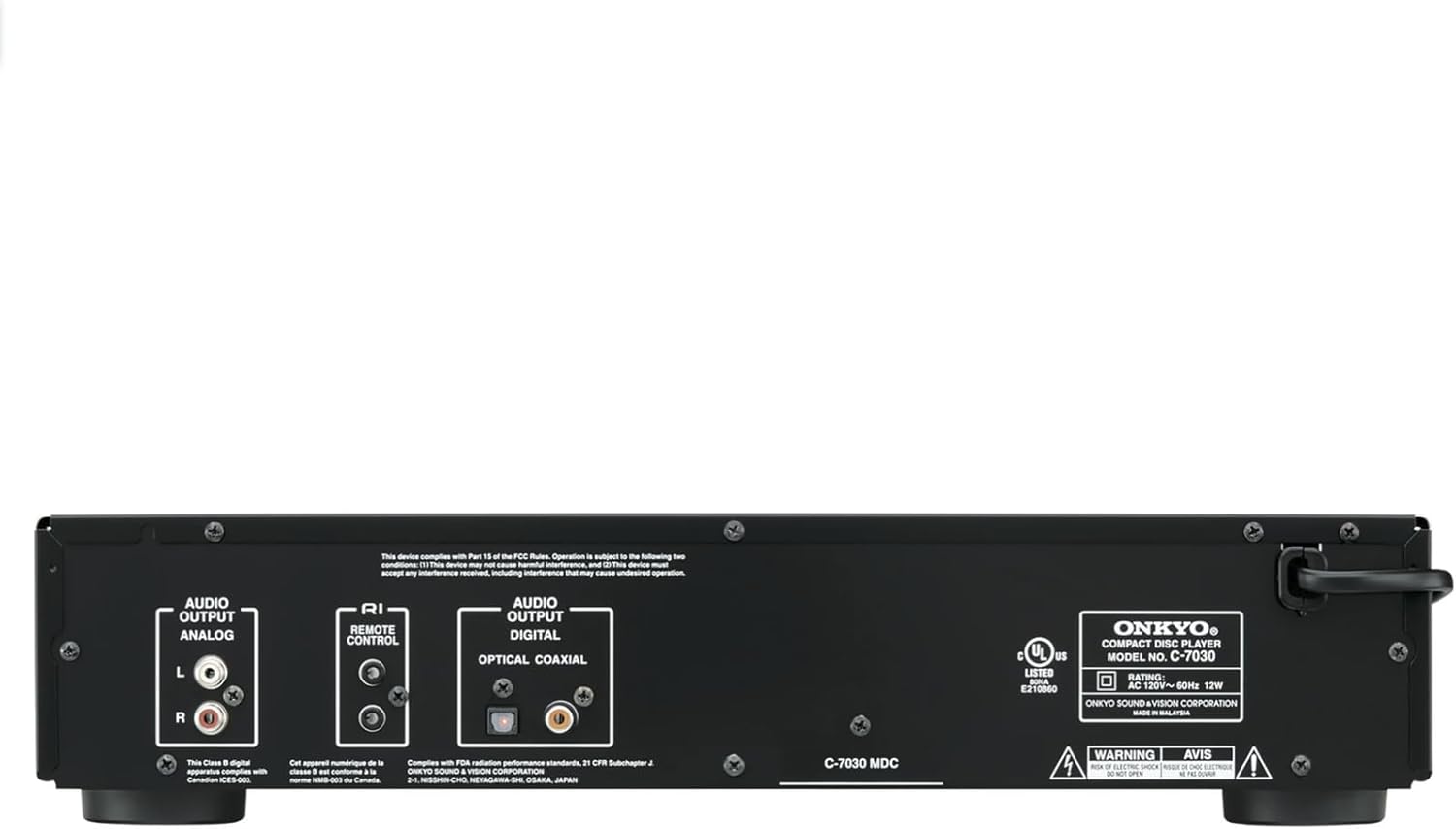
Figure 3: The RC-822C remote control for the Onkyo C-7030, showing buttons for power, playback, track navigation, and display functions.
Maintenance
Proper care ensures the longevity and optimal performance of your CD player.
- Cleaning the Unit: Wipe the exterior of the unit with a soft, dry cloth. For stubborn stains, dampen the cloth with a mild, non-abrasive cleaner and wipe gently. Avoid using harsh chemicals or abrasive materials.
- Cleaning Discs: Handle CDs by their edges. If a disc is dirty, wipe it gently from the center outwards with a soft, lint-free cloth. Do not use solvents or abrasive cleaners.
- Ventilation: Ensure that the ventilation openings on the unit are not blocked. Proper airflow prevents overheating.
- Storage: When not in use for extended periods, disconnect the power cord and store the unit in a cool, dry place.
Troubleshooting
If you experience issues with your Onkyo C-7030, refer to the following common problems and solutions:
| Problem | Possible Cause | Solution |
|---|---|---|
| No power | Power cord not connected securely. | Check power cord connection to the unit and the wall outlet. |
| No sound | Incorrect audio cable connection; amplifier/receiver input not selected; volume too low. | Ensure audio cables are correctly connected. Select the correct input on your amplifier/receiver. Increase volume on both CD player (if applicable, e.g., headphones) and amplifier. |
| Disc does not play or skips | Disc is dirty, scratched, or inserted incorrectly; disc format not supported. | Clean the disc. Try another disc. Ensure the disc is inserted label-side up. Verify the disc is a standard audio CD or supported MP3 CD. |
| Remote control not working | Batteries are dead or inserted incorrectly; obstruction between remote and unit; remote sensor blocked. | Replace batteries. Ensure line of sight to the unit's remote sensor. Remove any obstructions. |
Specifications
Below are the technical specifications for the Onkyo C-7030 Home Audio CD Player:
- Product Dimensions: 12.06 x 17.13 x 4 inches
- Item Weight: 11.7 pounds
- Manufacturer: Onkyo
- Model Name: C-7030
- Color: Black
- Connectivity Technology: Auxiliary, Infrared
- Included Components: Onkyo C-7030 CD Player, Remote Control, RCA Audio Cable, RI Cable, 2 AAA Batteries, User Guide, 1-Year Warranty
- Batteries: 2 AAA batteries required (included)
- Date First Available: March 28, 2011
Warranty and Support
Your Onkyo C-7030 CD Player comes with a 1-Year Warranty from the date of purchase, covering manufacturing defects. For warranty claims or technical support, please contact Onkyo customer service.
An official User Manual (PDF) is also available for download: Onkyo C-7030 User Manual PDF.