
1. Introduction
This manual provides essential information for the safe and effective use of your HQRP AC Adapter/Power Supply. This product is designed as a replacement power source for various Casio keyboards, including models CTK-611 and CTK-620L. Please read these instructions carefully before use.
2. Safety Information
Your HQRP AC Adapter is UL Listed, ensuring it meets recognized safety standards. It incorporates several safety features to protect your device and ensure reliable operation.
- Automatic Overload Cut-off: Prevents damage from excessive current draw.
- Automatic Thermal Cut-off: Protects against overheating.
- Short Circuit Protection: Safeguards against electrical shorts.
- Over Voltage Protection: Shields devices from voltage spikes.
- Low Interference & Noise: Ensures stable power delivery without disrupting other electronics.

Image of the HQRP AC Adapter/Power Supply, highlighting the UL Listed certification mark on the adapter body.

Close-up image of the UL Listed certification mark on the HQRP AC Adapter/Power Supply, indicating safety compliance.
3. Package Contents
Verify that all items are present in your package:
- 1 x HQRP AC Adapter/Power Supply
- 1 x HQRP Euro Plug Adapter (for international use)

Image of the HQRP AC Adapter/Power Supply packaging, showing the adapter and the 'UL Listed' certification mark.

Image of the included HQRP Euro Plug Adapter, designed for use in European outlets.
4. Setup
Follow these steps to connect your HQRP AC Adapter to your compatible Casio keyboard:
- Ensure your Casio keyboard is powered off.
- Locate the DC input jack on your Casio keyboard. This is typically labeled 'DC IN' or 'POWER'.
- Insert the barrel connector of the HQRP AC Adapter into the DC input jack of your keyboard. Ensure it is fully seated.
- Plug the AC adapter into a standard wall outlet (100V-240V AC). If using in Europe, attach the HQRP Euro Plug Adapter first.
- You can now power on your Casio keyboard.
Compatible Casio Keyboard Models:
- CTK-611, CTK611, CTK-620L, CTK620L
- AD-5, AD5, AD-5MU, AD5MU
- World Tour WTAD5, WTAD-5
- AT-1, AT1, CA-100, CA-110, CA100, CA110
- CT-360, CT-400, CT-625, CT-638, CT-648, CT-655, CT-670, CT-680, CT-700, CT-770
- CTK-100, CTK-120, CTK-150, CTK-2000, CTK-2100, CTK-230, CTK-245, CTK-3000, CTK-330, CTK-401, CTK-411, CTK-431, CTK-451, CTK-471, CTK-481, CTK-483, CTK-491, CTK-496, CTK-510, CTK-511, CTK-519, CTK-520L, CTK-530

Image demonstrating the HQRP AC Adapter connected to a Casio keyboard, showing the proper insertion into the DC input jack.
5. Operating Instructions
Once the adapter is correctly connected to your keyboard and a power outlet, simply turn on your Casio keyboard using its power switch. The adapter will provide continuous power for operation.
6. Maintenance
To ensure the longevity and proper functioning of your HQRP AC Adapter, observe the following maintenance guidelines:
- Keep the adapter and its cables dry. Avoid exposure to liquids or high humidity.
- Do not expose the adapter to extreme temperatures. Store and operate it in a moderate environment.
- Avoid bending or crimping the power cord excessively, as this can damage internal wires.
- Unplug the adapter from the wall outlet when not in use for extended periods.
- Clean the adapter with a soft, dry cloth. Do not use harsh chemicals or abrasive cleaners.
7. Troubleshooting
If you encounter issues with your HQRP AC Adapter, consider the following:
- No Power to Keyboard:
- Ensure the adapter is securely plugged into both the keyboard and the wall outlet.
- Verify that the wall outlet is functional by testing it with another device.
- Confirm that your keyboard model is listed as compatible with this adapter (refer to Section 4).
- Adapter Does Not Fit:
- Double-check your keyboard's model number against the compatibility list in Section 4. Some Casio models may have similar numbers but require different adapters.
- Ensure you are inserting the correct end of the adapter into the keyboard's DC input jack.
- Unusual Noise or Smell:
- Immediately unplug the adapter from both the wall and the keyboard.
- Do not attempt to use the adapter again. Contact customer support.
8. Specifications
| Input Voltage | AC 100V - 240V |
| Output Voltage | 9V |
| Output Current | 800mA |
| DC Cord Length | 6 feet (approx. 1.8 meters) |
| Connector Type | Barrel Connector |
| Safety Certifications | UL Listed, FC |
| Item Weight | 4.2 ounces (approx. 119 grams) |
| Adapter Dimensions (approx.) | 3.25" L x 1.75" W x 1.25" H (excluding prongs) |

Image illustrating the 6-foot DC cord length of the HQRP AC Adapter, with a close-up of the high-quality, double-insulated wiring.
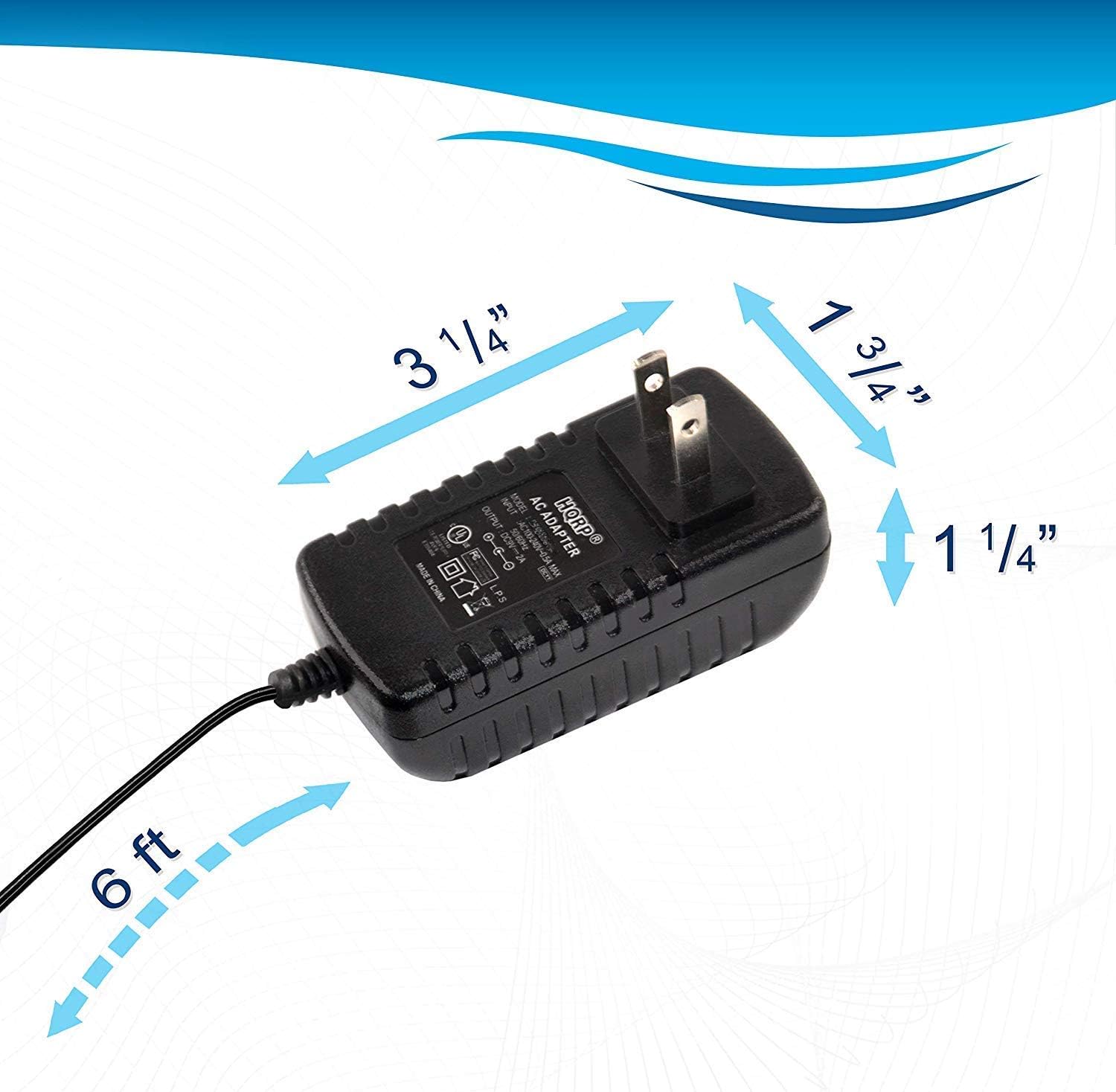
Image displaying the physical dimensions of the HQRP AC Adapter, including its length, width, and height.
9. Warranty and Support
Your HQRP AC Adapter/Power Supply comes with a 1-Year Warranty from the date of purchase. This warranty covers manufacturing defects under normal use.
Please note that this is a replacement product and not an Original Equipment Manufacturer (OEM) product. All brand names and logos mentioned are registered trademarks of their respective owners and are used solely for demonstrating compatibility.
For warranty claims or technical support, please refer to the contact information provided with your purchase or visit the official HQRP website.