
1. Product Overview
The RealFyre Peterson Gas Logs Deluxe On/Off Remote Receiver/Transmitter Set (Model RR-2A) provides convenient remote control for your gas fireplace or log set. This system includes a thermostatic on/off transmitter and a receiver, designed for use with any millivolt valve system. Its straightforward design and high-quality construction ensure reliable operation for controlling your gas fire feature and room temperature.
Key Features
- Gas fireplace remote control for easy operation.
- Premium construction for long-lasting durability.
- Millivolt wiring for compatibility with standard millivolt valve appliances.
- On/off and timer control for convenient operation.
- Thermostatic control to maintain desired room temperature.
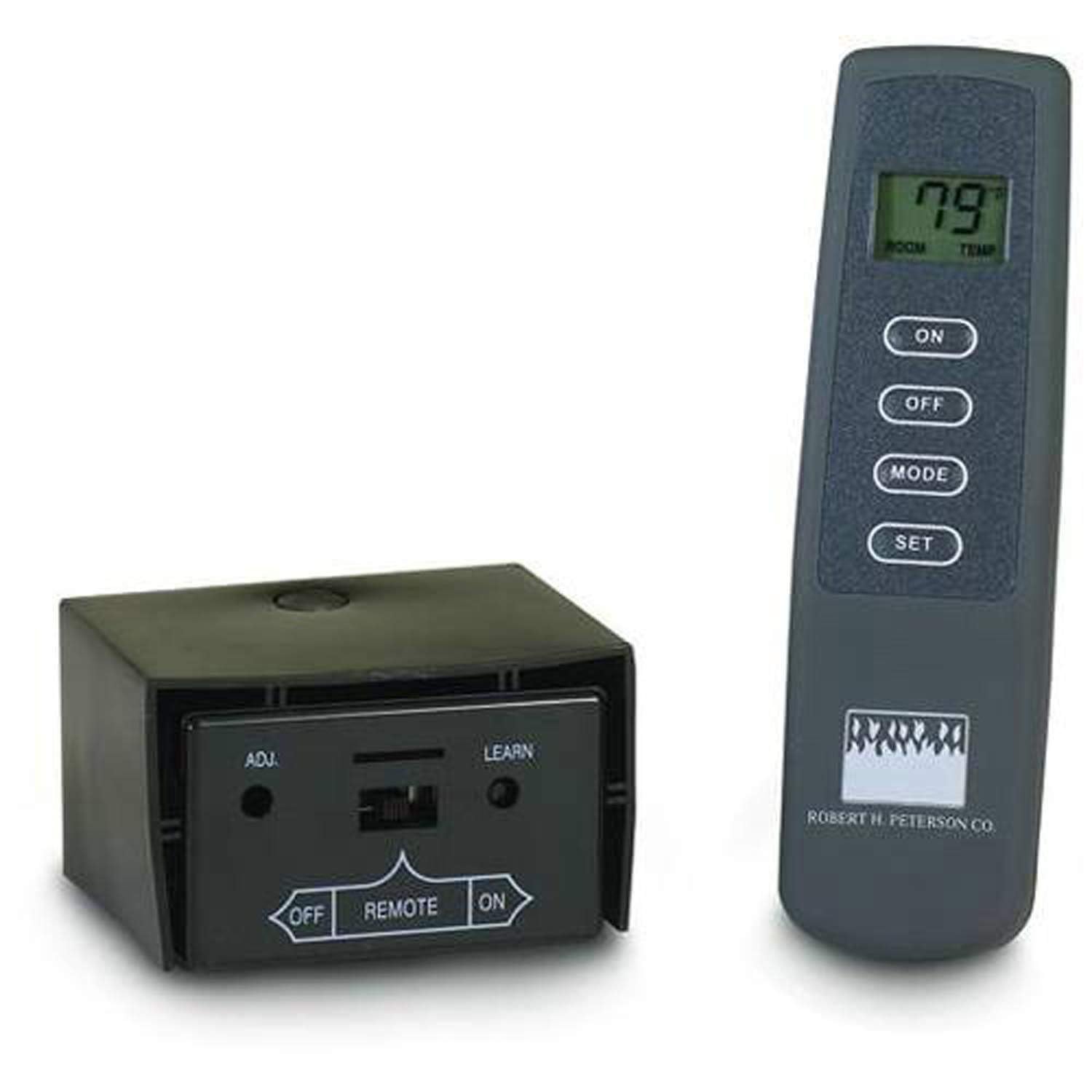
Image of the RealFyre Peterson Gas Logs Deluxe On/Off Remote Receiver/Transmitter Set, showing both the remote control and the receiver unit.
2. Setup & Installation
Before beginning installation, ensure your gas fireplace or log set is compatible with a millivolt valve system. Look for terminals labeled 'TH', 'TP', and 'TH/TP' on your fireplace's control valve. It is recommended to replace both the remote control and the signal receiver simultaneously for optimal performance, as different brands may use different communication protocols.
2.1. Battery Installation
The receiver unit requires four (4) AA batteries, and the remote control requires two (2) AAA batteries. Ensure batteries are inserted with correct polarity.
Video demonstrating the battery installation for the remote control and receiver, along with other operational features.
2.2. Wiring to Fireplace
Connect the two terminals of the receiver to the 'TH' and 'TH/TP' terminals of your fireplace's millivolt valve. Ensure all connections are secure and follow your fireplace manufacturer's guidelines for safe wiring.
Video illustrating the installation steps for connecting the receiver to a millivolt valve system in a fireplace.
2.3. Learning the Remote to the Receiver
- Set the dip switches on the remote control to your desired configuration.
- On the receiver, locate the 'LEARN' button. Using a small pointed object (like a paper clip), press and hold the 'LEARN' button until you hear three long beeps.
- Within 10 seconds of hearing the beeps, press either the 'ON' or 'OFF' button on the remote control. You will hear several beeps from the receiver, indicating successful connection.
3. Operating Instructions
3.1. Basic On/Off Operation
- To turn the fireplace ON, press the 'ON' button on the remote control. The receiver will beep, and the fireplace will ignite.
- To turn the fireplace OFF, press the 'OFF' button on the remote control. The receiver will beep, and the fireplace will shut off.
3.2. Thermostatic Mode Function
To activate thermostatic mode:
- Press the 'MODE' button on the remote control.
- Then, press the 'SET' button to adjust the desired temperature.
- The room temperature icon will appear on the LCD screen, indicating thermostatic mode is active.
To exit thermostatic mode, press the 'MODE' button again, or press the 'ON' or 'OFF' button for manual control.
3.3. Changing Temperature Display (Celsius/Fahrenheit)
To switch between Celsius and Fahrenheit display, press the 'ON' and 'OFF' buttons simultaneously for 1 second.
3.4. Child Proof Protection
To activate child proof protection:
- Press and hold the 'ON' button and the 'MODE' button at the same time for 5 seconds.
- The display will show 'CP' (Child Proof).
To deactivate, repeat the same process.
4. Troubleshooting
- No Response from Fireplace: Check if the receiver has fresh batteries and is correctly wired to the millivolt valve. Ensure the remote control also has fresh batteries. Try re-pairing the remote and receiver (refer to Section 2.3).
- Intermittent Operation: Replace batteries in both the remote and receiver. Ensure the receiver is not obstructed and is within the maximum range of 20 feet from the remote. Check for any loose wiring connections.
- Temperature Inaccuracy: If using thermostatic mode, ensure the remote is placed in an area that accurately reflects the room temperature and is not near heat sources or drafts.
5. Maintenance
- Battery Replacement: Replace batteries in both the remote and receiver annually, or when the display becomes dim or operation becomes unreliable.
- Cleaning: Wipe the remote and receiver with a soft, dry cloth. Do not use abrasive cleaners or immerse in water.
- Storage: If storing the unit for an extended period, remove all batteries to prevent leakage.
6. Specifications
| Feature | Detail |
|---|---|
| Brand | RealFyre |
| Model Name | RR-2A |
| Model Number | RR-2A |
| Special Feature | Timer, Thermostat |
| Color | Black |
| Max Number of Supported Devices | 1 |
| Compatible Devices | Fire Pit, Fireplace |
| Connectivity Technology | Radio Frequency |
| Button Quantity | 2 (On/Off) + Mode/Set |
| Controller Type | Thermostat, Timer |
| Maximum Range | 20 Feet |
| Remote Battery Type | 2x AAA Alkaline (as per video) |
| Receiver Battery Type | 4x AA Alkaline (as per video) |
| Item Weight | 16 ounces |
| UPC | 619655146331 |
| ASIN | B004THN42G |
7. Warranty Information
This product is covered by the manufacturer's standard warranty. Please refer to the warranty card included with your purchase or visit the RealFyre website for detailed warranty terms and conditions. Keep your proof of purchase for any warranty claims.
8. Support
For technical assistance, troubleshooting, or replacement parts, please contact RealFyre customer support. Contact information can typically be found on the product packaging or the official RealFyre website. When contacting support, please have your product model number (RR-2A) and purchase details ready.


