
Introduction
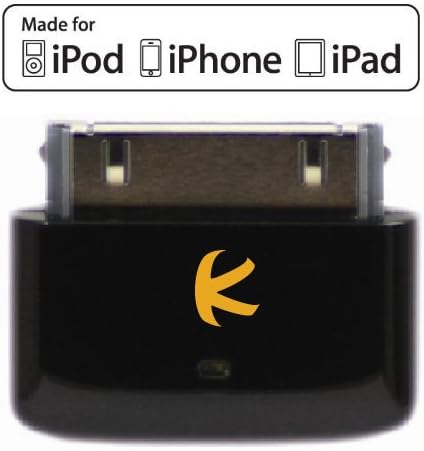
The KOKKIA i10s is a compact Bluetooth transmitter designed to wirelessly stream stereo audio from your iPod, iPhone, or iPad to compatible Bluetooth receivers. Unlike many other transmitters, the i10s is 'Made-for-iPod, iPhone, iPad' and includes an Apple Authentication IC chip. This chip enables local volume adjustment directly from your Apple device, a feature not available with non-authenticated transmitters. Its plug-and-play design ensures ease of use, automatically pairing and reconnecting to previously paired devices.
Setup
- Connect the i10s: Plug the KOKKIA i10s directly into the 30-pin connector port of your compatible iPod, iPhone, or iPad. The device draws power directly from your Apple device, requiring no internal batteries or external power source.
- Automatic Pairing: The i10s is designed for simple operation without physical buttons for pairing. Once connected, it will automatically enter pairing mode.
- Pair with Receiver: Place your Bluetooth receiver (e.g., headphones, speakers) into its pairing mode. The i10s will automatically detect and connect to the receiver. The i10s supports pairing with stereo receivers using common PIN codes such as '0000', '1111', '1234', or '8888'.
- Reconnect: The i10s remembers previously paired devices and will automatically reconnect when both the transmitter and receiver are powered on and within range.
Operating Instructions
- Audio Streaming: Once successfully paired, audio from your iPod, iPhone, or iPad will be wirelessly transmitted to your Bluetooth receiver.
- Remote Control: The i10s responds to Audio/Video Remote Control Profile (AVRCP) commands from your Bluetooth receiver, allowing you to control functions such as Play, Pause, Next Track, and Previous Track.
- Local Volume Control: Thanks to its Apple Authentication IC chip, you can adjust the volume directly on your connected iPod, iPhone, or iPad. This adjustment will control the volume level at the remote Bluetooth receiver.
- No Buttons: The i10s features a minimalist, button-free design for ease of use and to prevent dirt accumulation. All controls are managed either through your Apple device or the connected Bluetooth receiver.
Features
- Made-for-iPod, iPhone, iPad: Ensures full compatibility and functionality with Apple devices.
- Apple Authentication IC Chip: Enables local volume adjustment from your Apple device.
- Ultra-Compact Design: Smallest size among similar Bluetooth transmitters, ensuring a sleek fit.
- Low Power Consumption: Designed for many hours of wireless audio enjoyment without significantly draining your Apple device's battery.
- Device Powered: No separate batteries or charging required for the i10s; it is powered directly by the connected Apple device.
- Direct Connection: Attaches directly via the 30-pin connector, eliminating the need for additional cables.
- Bluetooth + EDR, Class 2: Provides reliable wireless audio transmission.
- Wide Compatibility: Works with iPad, iPhone 4, iPhone 3GS, iPhone 3G, iPhone (1st gen), iPod touch (1st-4th gen), iPod nano (1st-6th gen), and iPod classic (80, 120, 160GB).
Product Overview


Maintenance
- Cleaning: Use a soft, dry cloth to clean the device. Avoid liquid cleaners or solvents.
- Storage: Store the i10s in a cool, dry place when not in use.
- Handling: Handle the device with care. Avoid dropping it or exposing it to excessive force, as this may damage the 30-pin connector or internal components.
- Environmental Conditions: Do not expose the device to extreme temperatures, humidity, or direct sunlight.
Troubleshooting
- Device not pairing:
- Ensure your Bluetooth receiver is in pairing mode and discoverable. If prompted, enter one of the standard PIN codes: '0000', '1111', '1234', or '8888'. Make sure no other Bluetooth devices are actively connected to either the i10s or your receiver.
- No audio or intermittent audio:
- Check that the i10s is securely connected to your Apple device. Ensure your Bluetooth receiver is within effective range (typically up to 10 meters) and free from obstructions or strong interference sources. Verify that the volume on both your Apple device and Bluetooth receiver is turned up.
- Volume control not working from Apple device:
- The i10s features an Apple Authentication IC chip that enables local volume control. If this is not working, ensure your Apple device is fully compatible and that the i10s is properly connected. Some older or non-standard Bluetooth receivers may not fully support AVRCP commands for volume control.
- Excessive battery drain on Apple device:
- While the i10s is designed for low power consumption, any active accessory will draw some power. Ensure your Apple device's battery is in good condition. If you experience significant drain, consider disconnecting the i10s when not actively streaming audio.
Specifications
| Product Dimensions | 0.94 x 0.55 x 0.24 inches |
| Item Weight | 0.704 ounces |
| Item Model Number | I10S_BLACK |
| Connectivity Technology | Bluetooth |
| Special Features | Bluetooth Transmitter |
| Human Interface Input | Buttons (Note: Product description states 'no button design', this might refer to internal components or a generic spec. For user interaction, it's button-free.) |
| Color | Black (Note: Product title mentions 'Black', but specifications list 'White'. This manual focuses on the Black version as per title.) |
| Manufacturer | KOKKIA |
| Date First Available | March 11, 2010 |
| Power Source | Integrated battery (Note: Product description states 'No batteries needed, powered by iPod/iPhone/iPad'. This might refer to the Apple Authentication IC chip having a small internal battery or a generic spec. For practical use, it's powered by the host device.) |
| Material | Plastic |
Safety Information
- May interfere with other wireless devices.
- Do not dispose of batteries in fire.
- Follow local regulations for battery disposal.

Warranty and Support
For warranty information and customer support, please refer to the documentation included with your product or visit the official KOKKIA website. Keep your purchase receipt for warranty claims.