
Dayco 93874
Dayco 93874 Timing Belt Diagnostic Kit User Manual
Model: 93874
Introduction
The Dayco 93874 Timing Belt Diagnostic Kit is a comprehensive set of tools designed to assist automotive technicians and enthusiasts in accurately diagnosing and maintaining timing belt systems. This kit includes specialized instruments for checking belt wear, tension, and pulley alignment, ensuring optimal performance and longevity of your vehicle's belt-driven components.
Kit Components
The Dayco 93874 kit typically includes the following components:
- Belt Wear Gauges: Multiple blue plastic gauges designed to measure the wear of various belt types.
- Belt Tensioner Gauge (Krikit): A mechanical gauge used to accurately measure belt tension.
- Belt Alignment Tool (Laser): A laser-based tool for precise alignment of pulleys.
- Laser Target: A magnetic target used in conjunction with the laser alignment tool.
- Storage Case: A durable case for organizing and protecting the tools.
- Extra Battery: For the laser alignment tool.

Image: All components of the Dayco 93874 Timing Belt Diagnostic Kit, including belt wear gauges, belt tensioner gauge, laser alignment tool, and laser target.
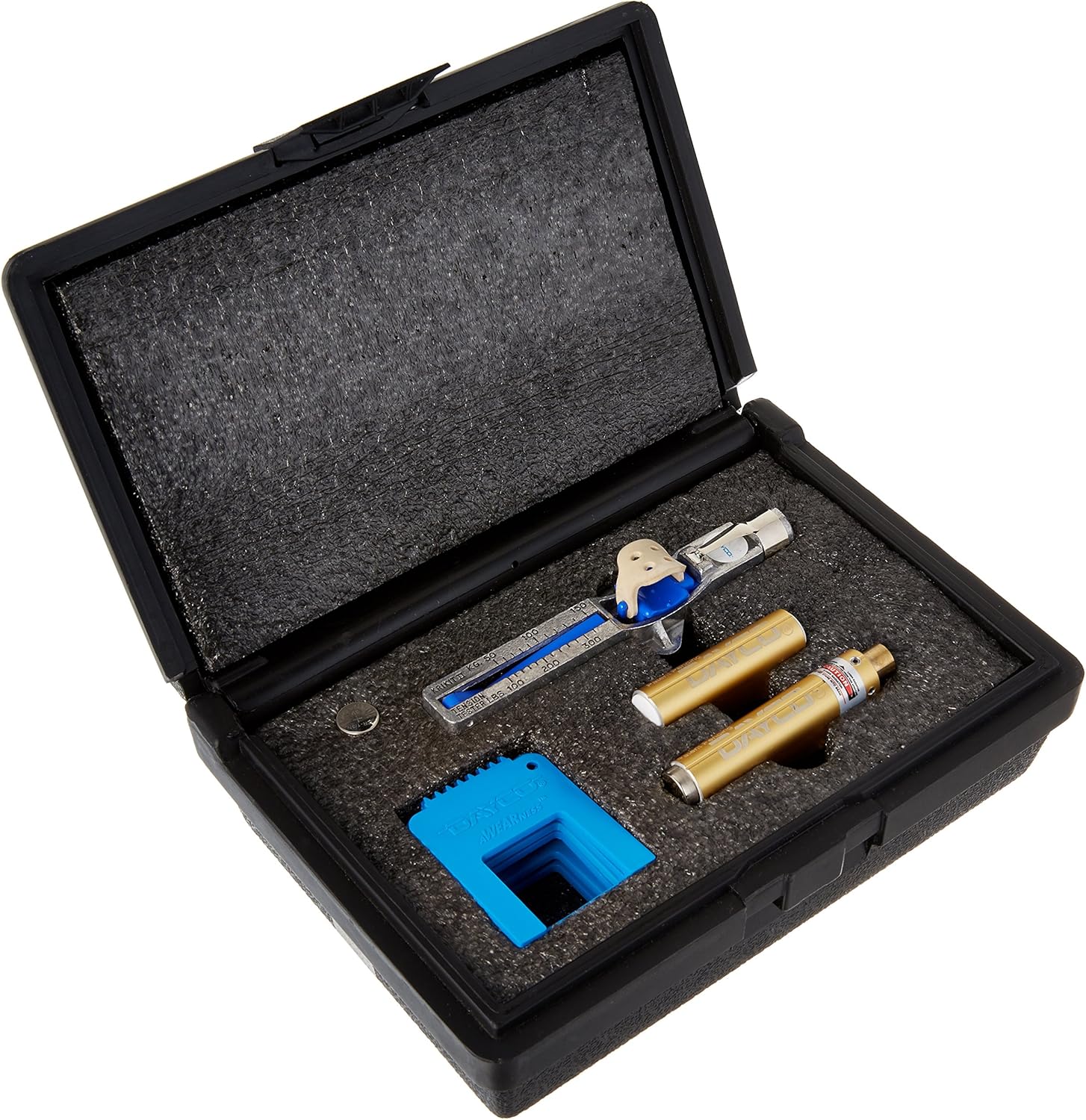
Image: The Dayco 93874 Timing Belt Diagnostic Kit neatly stored within its protective plastic case, showing the custom foam inserts.
Setup
- Unpacking: Carefully remove all components from the storage case.
- Battery Installation (Laser Alignment Tool): If not already installed, insert the provided battery into the laser alignment tool. Ensure correct polarity.
- Familiarization: Identify each tool and understand its basic function before proceeding with any diagnostic work.
Operating Instructions
Using the Belt Wear Gauges
These gauges are designed to quickly assess the wear level of serpentine belts. Each gauge corresponds to a specific belt rib count or profile.
- Select the appropriate belt wear gauge that matches the number of ribs on the belt being inspected.
- Place the gauge onto the belt, ensuring it sits flush against the ribs.
- Observe if the belt material protrudes beyond the gauge's specified wear limit. If it does, the belt is worn and requires replacement.
Using the Belt Tensioner Gauge (Krikit)
The Krikit gauge provides a quantitative measurement of belt tension, crucial for preventing slippage or excessive strain on components.
- Consult the vehicle's service manual for the manufacturer's recommended belt tension specifications.
- Position the Krikit gauge on the belt, typically on the longest unsupported span between two pulleys.
- Apply pressure to the gauge according to its instructions until it clicks or indicates a reading.
- Compare the reading with the manufacturer's specifications. Adjust belt tension as necessary.
Using the Belt Alignment Tool (Laser)
This tool uses a laser to accurately determine if pulleys are misaligned, which can cause premature belt wear and noise.
- Ensure the laser alignment tool has a working battery.
- Attach the laser alignment tool to one of the pulleys in the belt system. The tool typically has magnets or clamps to secure it.
- Place the magnetic laser target onto an adjacent pulley.
- Activate the laser on the alignment tool. The laser beam will project onto the target.
- Observe the laser line on the target. If the pulleys are perfectly aligned, the laser line will be centered and parallel to the pulley's face. Any deviation indicates misalignment.
- Adjust the misaligned pulley until the laser line on the target indicates proper alignment.
Maintenance
- Cleaning: After each use, wipe down all tools with a clean, dry cloth to remove any grease, dirt, or debris.
- Storage: Always store the kit components in their designated slots within the provided storage case to prevent damage and loss.
- Battery Replacement: Replace the laser alignment tool's battery when the laser beam appears dim or fails to activate. Use the extra battery provided or a suitable replacement.
- Inspection: Periodically inspect the tools for any signs of damage, wear, or malfunction. Do not use damaged tools.
Troubleshooting
| Problem | Possible Cause | Solution |
|---|---|---|
| Laser alignment tool does not turn on. | Dead battery; micro switch not depressed on smaller pulleys. | Replace battery. For smaller pulleys, use tape to depress the micro switch to activate the laser. |
| Laser target does not sit level on small pulleys. | Magnets interfere with small diameter pulleys (less than 2.5 inches). | Adjust the target's position or use an alternative method to hold it steady if possible, or note the slight tilt. |
| Laser beam is blocked by adjacent pulleys. | Multiple pulleys are too close together, obstructing the laser path. | This tool may not be suitable for all engine configurations. You may need to check pulleys in pairs or disassemble components to gain clear line of sight. |
| Belt wear gauges do not fit certain belts. | Belt profile or rib count is not compatible with the included gauges. | Ensure you are using the correct gauge for the belt type. If no gauge fits, visual inspection or other methods may be required. |
Specifications
- Brand: Dayco
- Model Number: 93874
- Product Type: Auto Accessory / Timing Belt Diagnostic Kit
- Material: Plastic (for some components), Metal (for others)
- Item Weight: Approximately 6.4 ounces (0.18 kg)
- Product Dimensions (Kit): Approximately 8"D x 5.6"W x 8"H (20.32 cm D x 14.22 cm W x 20.32 cm H)
- UPC: 036687686664
Support
For further assistance, technical questions, or inquiries regarding the Dayco 93874 Timing Belt Diagnostic Kit, please refer to the official Dayco website or contact their customer support channels. Always consult your vehicle's specific service manual for detailed procedures and specifications related to timing belt maintenance.
Warranty Information
This product is covered by Dayco's standard manufacturer's warranty. Please retain your proof of purchase for warranty claims. For detailed terms and conditions of the warranty, refer to the documentation included with your purchase or visit the official Dayco website.
Ask a question about this manual
Ask about setup, troubleshooting, compatibility, parts, safety, or missing instructions. Manuals+ will review the question and use this page’s manual context to help answer it.