
1. Introduction
This manual provides essential information for the proper installation, maintenance, and understanding of carbon brushes compatible with Bosch POF 40, POF 400, and POF 400 A routers. Carbon brushes are critical components in electric motors, facilitating the transfer of electrical current to the motor's rotating armature. Regular inspection and timely replacement ensure optimal tool performance and longevity.
2. Safety Information
- Disconnect Power: Always ensure the power tool is unplugged from the electrical outlet before attempting any inspection, maintenance, or replacement of parts.
- Wear Protective Gear: Use appropriate personal protective equipment, such as safety glasses, to prevent injury.
- Handle with Care: Carbon brushes are fragile. Avoid dropping or subjecting them to impact.
- Use Correct Parts: Only use carbon brushes specifically designed for your tool model to ensure compatibility and safe operation.
- Electrical Safety: If you are unsure about any electrical procedures, consult a qualified technician.
3. Product Overview
This product consists of a set of replacement carbon brushes for Bosch POF 40, POF 400, and POF 400 A routers. Each brush is composed of a carbon block, a coiled spring, and a metal cap, designed to maintain electrical contact with the motor's commutator.
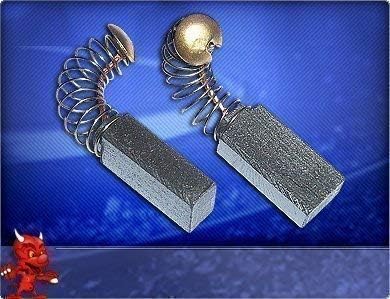
This image displays a pair of carbon brushes, each featuring a rectangular carbon block connected to a coiled spring and a metal cap. These brushes are designed for use with Bosch POF 40, POF 400, and POF 400 A routers.
4. Installation / Replacement
Replacing carbon brushes is a common maintenance task for power tools. Follow these steps carefully:
- Disconnect Power: Unplug the Bosch router from the power source.
- Locate Brush Caps: Identify the brush caps on the motor housing. These are typically plastic or metal caps that can be unscrewed. Refer to your specific Bosch router's user manual for exact locations.
- Remove Old Brushes: Use a screwdriver to carefully unscrew the brush caps. Once the cap is removed, gently pull out the old carbon brush and spring assembly. Note the orientation of the brush for correct installation of the new one.
- Inspect Commutator: While the brushes are out, inspect the commutator (the copper segments on the motor's armature). It should be clean and smooth. If it's excessively grooved or dirty, professional servicing may be required.
- Insert New Brushes: Carefully insert the new carbon brushes into their holders, ensuring they slide in smoothly and are oriented correctly. The carbon block should make full contact with the commutator.
- Replace Brush Caps: Screw the brush caps back into place securely, but do not overtighten.
- Test Tool: Plug the router back into the power source and perform a brief test run. Initial sparking is normal as the new brushes seat themselves. If excessive sparking or unusual noise persists, discontinue use and re-check installation or consult a professional.
5. Operating Considerations
After installing new carbon brushes, allow the tool to run at a low load for a few minutes. This 'seating' period helps the brushes conform to the shape of the commutator, optimizing contact and reducing initial sparking. During normal operation, minor sparking at the brushes is typical, but excessive sparking, burning smell, or significant power loss indicates a problem that requires attention.
6. Maintenance
Carbon brushes are wear items and require periodic inspection and replacement. The lifespan of brushes varies depending on tool usage and load. It is recommended to:
- Inspect Regularly: Check the brushes every 50-100 hours of operation, or if you notice a decrease in tool performance.
- Signs of Wear: Replace brushes when they are worn down to approximately one-quarter of their original length, or if they appear chipped, cracked, or unevenly worn.
- Cleanliness: Keep the motor's ventilation openings clear of dust and debris to ensure proper cooling and prevent premature brush wear.
7. Troubleshooting
| Symptom | Possible Cause | Solution |
|---|---|---|
| Excessive sparking at motor | Worn or improperly seated carbon brushes; dirty commutator. | Inspect and replace carbon brushes; clean commutator. |
| Reduced motor power or intermittent operation | Worn carbon brushes; poor electrical contact. | Replace carbon brushes. |
| Motor fails to start | Completely worn carbon brushes; power supply issue. | Check power supply; replace carbon brushes. |
| Burning smell from motor | Overloaded motor; severely worn brushes; internal motor damage. | Reduce load; replace brushes; seek professional repair if smell persists. |
8. Specifications
- Product Type: Carbon Brushes
- Compatibility: Bosch POF 40, POF 400, POF 400 A Routers
- Manufacturer Reference: BM-09-020-10-06
- Brand (for compatible tools): Bosch
- Contents: 1 set of carbon brushes
9. Warranty and Support
Specific warranty information for this replacement part may vary. Please refer to the seller's or manufacturer's terms of sale for details. For technical support or further assistance with installation or troubleshooting, contact the retailer or the manufacturer of the carbon brushes. Always ensure you have your product model number (BM-09-020-10-06) and the compatible Bosch tool model (POF 40, POF 400, or POF 400 A) available when seeking support.