
Introduction
The Amped Wireless High Power Wireless-N Smart Repeater (SR300) is designed to expand the range of your existing 802.11b/g/n wireless network. It repeats the signal from your home or office wireless router, redistributing it to eliminate wireless dead zones and extend network coverage. This device also provides wired connectivity for various network devices.
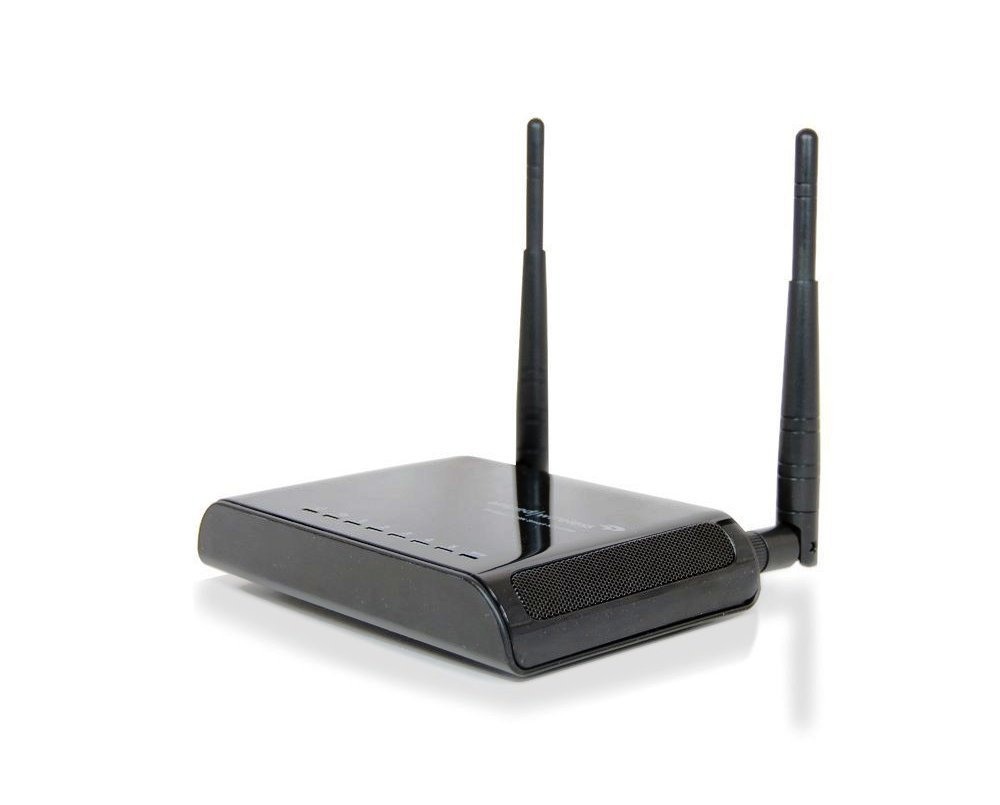
Image: Amped Wireless SR300 High Power Wireless-N Smart Repeater, shown with two external antennas and a sleek black design.
Package Contents
Verify that all items are present in the package:
- High Power Wireless-300N Smart Repeater (SR300)
- 2 Detachable High Gain 3dBi Antennas
- Product Stand
- Ethernet Cable
- Quick Installation Guide
- CD with Manual and Instructional Videos
Key Features
- High Speed Wireless-300N: Supports speeds ideal for video streaming and high-traffic networks.
- Universal Compatibility: Works with most Wi-Fi routers (2.4GHz 802.11b/g/n).
- Wired Connectivity: Includes 5 Ethernet ports for connecting A/V devices and PCs without Wi-Fi capability.
- Easy Installation: Features a Smart Setup Wizard for quick configuration.
- High Power Amplifier & Antennas: Equipped with a 100mW amplifier and two 3dBi high-gain antennas for extended range.
- Smart Security Features: Allows access restrictions, daily time scheduling, and adjustable wireless output power.
Setup Guide
Follow these steps to set up your Amped Wireless SR300 Smart Repeater:
- Placement: Place the Smart Repeater approximately halfway between your existing wireless router and the area where you need extended Wi-Fi coverage. Ensure it receives a strong signal from your main router.
- Power On: Connect the power adapter to the Smart Repeater and plug it into an electrical outlet.
- Connect to Computer: Use the provided Ethernet cable to connect your computer directly to one of the LAN ports on the Smart Repeater.
- Access Setup Wizard: Open a web browser on your connected computer and navigate to setup.ampedwireless.com.
- Scan for Networks: Follow the on-screen instructions in the Smart Setup Wizard. It will scan for available wireless networks. Select your home Wi-Fi network from the list. It is recommended to connect to a network with greater than 70% signal strength for stability.
- Configure Security & Repeater Settings: Enter your existing Wi-Fi network's security password. You will then be prompted to configure the settings for your new extended network, including its name (SSID) and password.
- Review & Apply: Review the setup summary and apply the settings. The repeater will reboot, and your extended network will become active.
Instructional Video: Amped Wireless Smart Repeaters
Video: An overview of Amped Wireless Smart Repeaters, demonstrating how they extend Wi-Fi range and provide wired connections. This video covers the benefits and basic setup process.
Operating Instructions
Extending Wireless Range
Once configured, the SR300 will automatically repeat your existing Wi-Fi signal, creating an extended network. Devices can connect to this extended network to access the internet and local network resources. The high-power amplifier and antennas ensure a strong, stable signal across a wider area, up to 5,000 square feet.
Adding Wired Connections
The SR300 features five RJ-45 10/100 LAN ports. These ports allow you to connect devices that require a wired connection or do not have Wi-Fi capabilities. Examples include desktop computers, gaming consoles (Xbox, Wii, PS3), Blu-ray players, smart TVs, and network printers. Simply connect an Ethernet cable from your device to one of the available LAN ports on the repeater.
Smart Security Features
The Smart Repeater includes various security options accessible through its web interface:
- Access Restrictions: Control which users or devices can connect to your extended network.
- Wireless Access Scheduling: Set specific days and times when the network is available.
- Wireless Coverage Control: Adjust the output power (15% - 100%) to manage the reach of your extended wireless network.
- WPS Setup: Supports secure push-button setup for WPS-enabled devices.
- Encryption: Supports WEP, WPA, WPA2, and WPA Mixed security protocols.
Specifications
| Feature | Detail |
|---|---|
| Brand | Amped Wireless |
| Model | SR300 |
| Wireless Standard | 802.11n, 802.11b/g |
| Frequency Band | 2.4 GHz (Single-Band) |
| Wireless Speed | 300Mbps (Rx), 300Mbps (Tx) |
| Amplifier | Low Noise Amplifier, 100mW Output Power |
| Antennas | 2 x Detachable High Gain 3dBi Antennas, 2 x Reverse SMA Connectors |
| Ports | 5 x RJ-45 10/100 LAN ports |
| Wireless Security | WEP, WPA, WPA2, WPA Mixed, WPS |
| Wireless Access Scheduling | Specific day and time |
| Wireless Coverage Control | 15% - 100% Output Power |
| Range | Up to 5,000 square feet |
| Item Weight | 1 Pound |
| Color | Black |
| Compatible Devices | Wi-Fi enabled devices such as routers, smartphones, tablets, laptops, computers, smart TVs, gaming consoles, printers, and security cameras |
Troubleshooting
- Poor Wi-Fi Signal or Dead Zones: Ensure the repeater is placed optimally, roughly halfway between your main router and the weak signal area. Walls and other obstructions can degrade signals. Adjusting the repeater's position slightly can improve performance.
- Buffering or Lagging Internet: If you experience buffering during streaming or online gaming, check the signal strength between your repeater and the main router. A weak connection to the main router will result in a weak extended signal. Consider repositioning the repeater closer to the main router or adjusting its antennas.
- Cannot Access Setup Page: If you cannot access setup.ampedwireless.com, ensure your computer is directly connected to the repeater via Ethernet and that the repeater is powered on. Try restarting both your computer and the repeater.
- Firmware Updates: Periodically check the Amped Wireless website for firmware updates. Firmware updates can improve performance, add features, and resolve known issues. Follow the instructions provided by Amped Wireless carefully when performing updates.
- No Internet Access on Extended Network: Verify that your main router has an active internet connection. Ensure the repeater is successfully connected to your main Wi-Fi network with the correct password.
Maintenance
To ensure optimal performance and longevity of your Amped Wireless SR300, consider the following:
- Keep Ventilated: Ensure the device is placed in a well-ventilated area to prevent overheating.
- Clean Gently: Use a soft, dry cloth to clean the exterior of the device. Avoid liquid cleaners.
- Regular Reboots: Occasionally restarting the repeater (power cycling) can help resolve minor connectivity issues and improve performance.
Warranty Information
The Amped Wireless SR300 High Power Wireless-N Smart Repeater comes with a 1-year manufacturer's warranty. Please retain your proof of purchase for warranty claims. For detailed warranty terms and conditions, refer to the documentation included with your product or visit the official Amped Wireless website.
Technical Support
Amped Wireless provides free U.S. Based Technical Support for all its products. If you encounter any issues or have questions regarding the setup, operation, or troubleshooting of your SR300 Smart Repeater, please contact their support team. Contact information can be found in your Quick Installation Guide or on the official Amped Wireless website.


