
AV-JEFE CM520
AV-JEFE CM520 Professional Lavalier Microphone User Manual
Model: CM520
1. Introduction
The AV-JEFE CM520 is a compact, miniature, broadcast-quality condenser lavalier microphone designed for professional audio applications. It offers a flat, smooth frequency response and wide dynamic range, making it ideal for interviews, broadcasting, conferences, speeches, and lectures.
This microphone features a detachable tie-clip for easy mounting, providing flexibility and comfort to the user. It is specifically designed for use with Audio-Technica wireless body pack transmitters that utilize a Hirose mini locking 4-pin connector.
2. Package Contents
- CM520 Lavalier Microphone
- Detachable Tie-Clip
3. Setup and Connection
The CM520 microphone is equipped with a Hirose mini locking 4-pin connector, specifically designed for compatibility with various Audio-Technica wireless body pack transmitters. Ensure your transmitter has the correct input for this connector type.
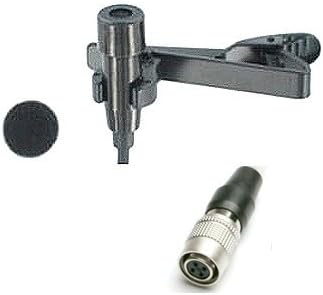
Figure 1: The AV-JEFE CM520 lavalier microphone, showing the microphone capsule, detachable tie-clip, and the Hirose mini locking 4-pin connector.
3.1 Compatibility
The CM520 is compatible with the following Audio-Technica transmitters:
- T27, T31, T51
- T200, T210, T300, T310
- 1100 Series, 1400 Series, 2000 Series, 3000 Series
Important: The CM520 is NOT compatible with the following Audio-Technica transmitters:
- T35, T75, T211, T601
- 1000 Series, 1200 Series, 4000 Series, 5000 Series, 7000 Series
For wireless receivers and transmitters of other brands, please verify compatibility with the manufacturer before attempting to connect, even if the connectors appear identical.
3.2 Connecting the Microphone
- Locate the Hirose mini locking 4-pin input on your compatible Audio-Technica wireless body pack transmitter.
- Align the connector of the CM520 microphone with the input port on the transmitter.
- Gently push the connector into the port until it clicks into place, ensuring a secure connection. The locking mechanism will prevent accidental disconnection.
- To disconnect, gently pull back on the locking collar of the connector and then pull the connector straight out.
4. Operating Instructions
4.1 Microphone Placement
Proper placement of the lavalier microphone is crucial for optimal sound quality. The CM520 is an omnidirectional microphone, meaning it picks up sound equally from all directions. This makes it forgiving in terms of exact placement, but general guidelines still apply:
- Clothing Attachment: Use the provided tie-clip to attach the microphone to clothing, typically on a lapel, tie, or shirt collar.
- Distance: Position the microphone approximately 6-8 inches (15-20 cm) below the speaker's chin, centered on the chest. This distance helps capture a natural voice while minimizing breath sounds.
- Minimize Rubbing: Ensure the microphone cable and capsule do not rub against clothing, jewelry, or other objects, as this can create unwanted noise.
- Wind Noise: For outdoor use or in windy conditions, consider using a foam windscreen (not included) to reduce wind noise.
4.2 Powering the Microphone
The CM520 is a condenser microphone and requires phantom power, which is supplied directly from the connected Audio-Technica wireless body pack transmitter. Ensure your transmitter is powered on and functioning correctly to provide the necessary operating voltage (1.0V-10V D.C).
4.3 Audio Monitoring
Always monitor the audio output from your wireless receiver using headphones to ensure proper signal levels and sound quality. Adjust the gain settings on your transmitter and receiver as needed to prevent clipping (distortion) and to achieve a clear, strong signal.
5. Maintenance and Care
To ensure the longevity and optimal performance of your AV-JEFE CM520 microphone, follow these maintenance guidelines:
- Cleaning: Use a soft, dry cloth to wipe down the microphone capsule and cable. Avoid using liquid cleaners, solvents, or abrasive materials, as these can damage the microphone.
- Storage: When not in use, store the microphone in a clean, dry place, away from extreme temperatures, humidity, and direct sunlight. Protect the cable from sharp bends or kinks.
- Handling: Handle the microphone with care. Avoid dropping it or subjecting it to strong impacts, which can damage internal components.
- Cable Management: Do not pull on the cable to disconnect the microphone. Always grasp the connector itself.
6. Troubleshooting
If you encounter issues with your CM520 microphone, refer to the following common troubleshooting steps:
- No Sound:
- Ensure the microphone is securely connected to the transmitter.
- Verify that the transmitter is powered on and has sufficient battery life.
- Check the compatibility list in Section 3.1 to confirm your Audio-Technica transmitter is supported.
- Ensure the wireless receiver is powered on and properly connected to your audio system.
- Check the gain settings on both the transmitter and receiver.
- Poor Sound Quality (Distortion, Low Volume, Noise):
- Adjust microphone placement (refer to Section 4.1) to minimize clothing rub or excessive distance.
- Check gain levels on the transmitter and receiver. Too high a gain can cause distortion; too low can result in a weak signal and increased noise.
- Inspect the microphone cable and connector for any visible damage.
- Ensure there are no strong electromagnetic interference sources nearby.
- If using outdoors, consider a windscreen to reduce wind noise.
- Intermittent Sound:
- Check for loose connections at both the microphone and transmitter ends.
- Ensure the transmitter's battery is not low.
- Verify that the wireless signal between the transmitter and receiver is strong and unobstructed.
If the issue persists after following these steps, please contact AV-JEFE customer support for further assistance.
7. Specifications
| Specification | Detail |
|---|---|
| Element | Back Electret Condenser |
| Polar Pattern | Omnidirectional |
| Frequency Response | 50 Hz - 18,000 Hz |
| Sensitivity | -65dB +/- 3dB |
| Impedance | 1000 ohm +/- 30% |
| Operating Voltage | 1.0V - 10V D.C (from body pack transmitter) |
| Microphone Dimension | 8 x 16mm |
| Material (Mic and Clip) | Metal |
| Weight (Mic and Clip) | 0.8 oz (approx. 22.7 g) |
| Cable Length | 180 cm (approx. 5.9 ft) |
| Connector | Hirose mini locking 4-pin (for Audio-Technica wireless systems) |
| Signal-to-Noise Ratio | 58 dB |
Note: Specifications are subject to change without notice.
8. Warranty and Support
Information regarding specific warranty terms for the AV-JEFE CM520 Professional Lavalier Microphone is not provided in this manual. For warranty details, please refer to the product packaging, purchase documentation, or contact AV-JEFE directly.
For technical support, troubleshooting assistance beyond what is covered in this manual, or inquiries about product compatibility, please contact AV-JEFE customer service through their official website or the retailer from whom the product was purchased.
Please have your product model number (CM520) and purchase information ready when contacting support.
Ask a question about this manual
Ask about setup, troubleshooting, compatibility, parts, safety, or missing instructions. Manuals+ will review the question and use this page’s manual context to help answer it.