
Introduction
This instruction manual provides important information regarding the Trion G-206-6 Humidifier Filter. It covers product overview, installation, maintenance, and specifications to ensure optimal performance and longevity of your Trion G-200 series whole house humidifier. Please read this manual thoroughly before installing or replacing the filter.
Product Overview
The Trion G-206-6 is a replacement humidifier filter designed specifically for use with the Trion G-200 series whole house humidifiers. This package includes six filters, ensuring you have replacements readily available. Each filter measures approximately 11 inches by 8 7/8 inches by 2 inches. Regular replacement of this filter is crucial for maintaining the efficiency and performance of your humidifier system.
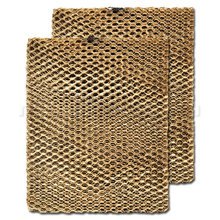
This image displays two Trion G-206-6 humidifier filters, which feature a distinctive honeycomb-like design. These filters are crucial for maintaining the efficiency of your Trion G-200 series humidifier.
Installation
- Power Off: Before beginning any installation or replacement, ensure your Trion G-200 series humidifier and the associated HVAC system are powered off at the main breaker to prevent electrical hazards.
- Access Panel: Locate and open the access panel on your Trion G-200 series humidifier. Refer to your humidifier's specific manual for exact panel location and opening instructions.
- Remove Old Filter: Carefully slide out the old humidifier filter. Note its orientation to ensure the new filter is installed correctly. Dispose of the old filter responsibly.
- Insert New Filter: Unpack a new Trion G-206-6 filter. Slide the new filter into the humidifier, ensuring it is seated properly and in the correct orientation.
- Close Panel: Securely close the access panel of the humidifier.
- Restore Power: Restore power to your humidifier and HVAC system.
Maintenance
For optimal performance and to maintain healthy indoor air quality, the Trion G-206-6 humidifier filter should be replaced at least once per year. Depending on water quality and humidifier usage, more frequent replacement may be necessary. A dirty or clogged filter can reduce humidifier efficiency and potentially lead to mineral buildup.
Troubleshooting
- Reduced Humidifier Output: If your humidifier is producing less humidity than usual, the filter may be clogged. Replace the filter as per the maintenance schedule.
- Unusual Odors: Stagnant water or a heavily soiled filter can cause odors. Ensure the filter is replaced regularly and the humidifier is cleaned according to its own manual.
- Water Leaks: While not directly caused by the filter, improper installation of the filter or access panel can sometimes lead to leaks. Recheck installation steps.
Specifications
| Attribute | Detail |
|---|---|
| Model Number | G-206-6 |
| Compatible Humidifier Series | Trion G-200 Series |
| Approximate Dimensions (each) | 11" x 8 7/8" x 2" |
| Replacement Frequency | At least once per year |
| Item Weight | 1 pound (for the pack) |
| Manufacturer | Trion |
Warranty Information
Specific warranty details for the Trion G-206-6 Humidifier Filter are not provided within this product information. For warranty inquiries, please refer to the original purchase documentation or contact Trion customer support directly.
Customer Support
For further assistance, technical support, or to inquire about other Trion products, please visit the official Trion website or contact their customer service department. Contact information can typically be found on the manufacturer's website or on the packaging of your Trion G-200 series humidifier.