
Introduction
This manual provides essential instructions for the safe installation, operation, and maintenance of the Century B2983 1.5 Horsepower 2-Speed 56Y Frame 230 Volts Square Flange Pool Motor. Please read all instructions carefully before installation and use to ensure proper function and safety.

Image: The Century B2983 1.5 Horsepower 2-Speed Pool Motor, showing its black casing and square flange.
Safety Information
WARNING: Risk of Electric Shock or Electrocution.
- Always disconnect power at the circuit breaker before attempting any installation, service, or maintenance. Failure to do so can result in serious injury or death.
- Installation and servicing must be performed by a qualified electrician or certified pool technician in accordance with all local and national electrical codes.
- Ensure the motor is properly grounded to prevent electrical shock.
- Do not operate the motor if it is damaged or if any electrical components are exposed to water.
- This motor is designed for pool and spa duty. Use only for its intended purpose.
- Use copper conductors only for wiring connections.
Setup and Installation
Proper installation is crucial for the motor's performance and longevity. Follow these steps carefully.
1. Mounting the Motor
The B2983 motor features a square flange design for direct attachment to compatible pool pump wet ends. Ensure the mounting surface is clean and secure.

Image: Underside view of the motor, showing the square flange and mounting holes for attachment to a pump.
- Align the motor's square flange with the pump's mounting plate.
- Secure the motor to the pump using appropriate bolts and gaskets (not included with motor).
- Ensure a tight seal to prevent water leaks into the motor.
2. Electrical Connections
This motor operates on 230 Volts. Refer to the motor's wiring diagram for correct connections. Use only copper conductors.
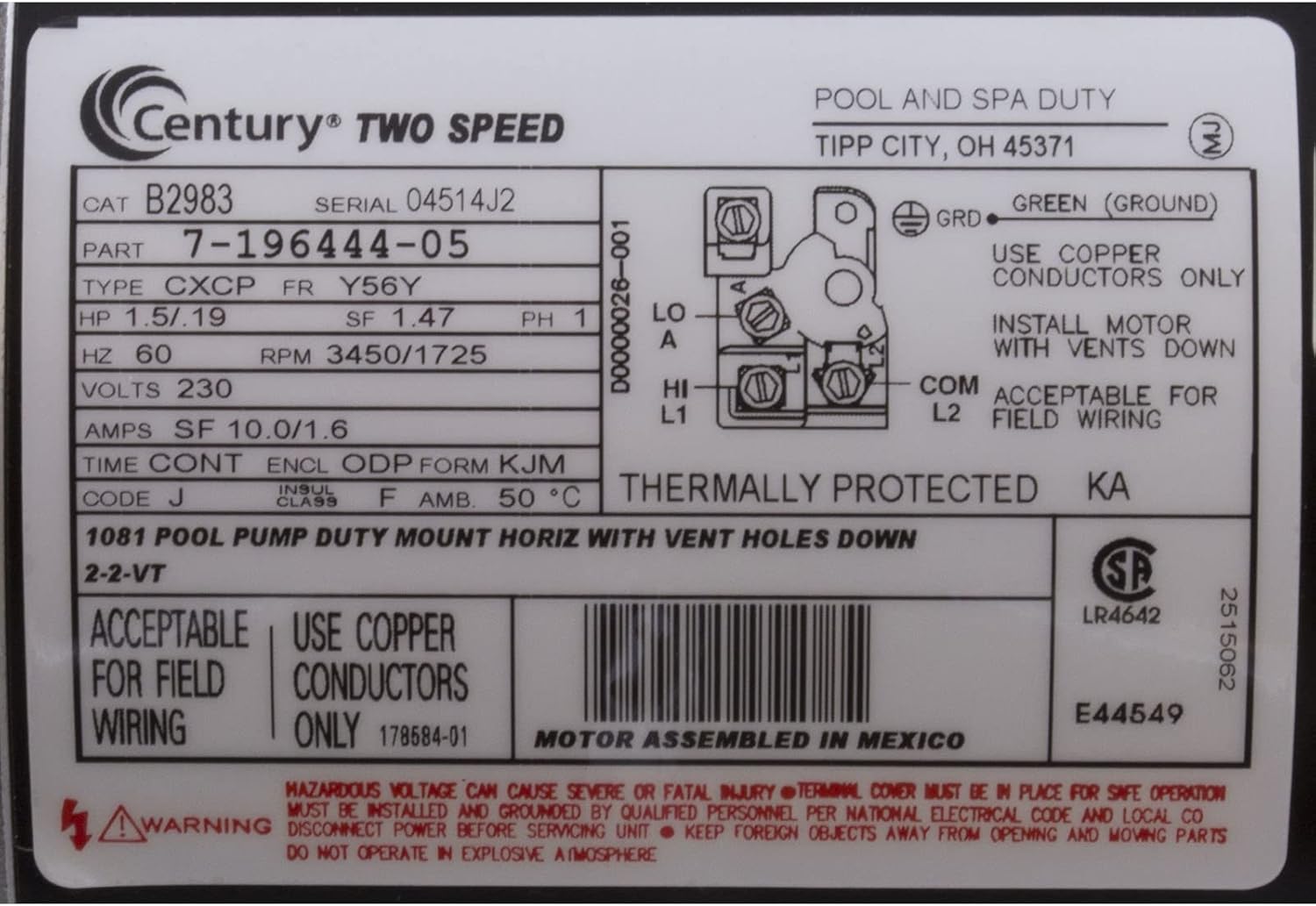
Image: Product label for the Century B2983 motor, displaying electrical specifications, a wiring diagram for high and low speed connections, and safety warnings.
- Power Disconnection: Ensure power is OFF at the main breaker.
- Wiring Access: Remove the terminal cover on the motor to access the wiring compartment.
- Grounding: Connect the green (ground) wire to the designated ground terminal.
- Line Connections: Connect the 230V power lines (L1, L2) to the appropriate terminals as indicated on the motor's wiring diagram for either high or low speed operation. This is a 2-speed motor, so ensure connections match desired speed.
- Secure Connections: Ensure all connections are tight and insulated.
- Replace Cover: Securely replace the terminal cover.
For detailed wiring, consult the diagram on the motor label. The diagram shows connections for LO (low speed) and HI (high speed) using L1 and L2, and a COM (common) terminal. A separate ground (GRD) connection is also indicated.
Operating Instructions
The Century B2983 is a 2-speed motor, allowing for energy efficiency and varied performance.
- Initial Start-up: After installation and electrical connections are verified, restore power at the circuit breaker.
- Speed Selection: The motor's speed is determined by how it is wired. If wired for a single speed, it will operate at that speed. If wired with a control system for 2-speed operation, refer to your control system's manual for speed selection.
- Monitoring: Observe the motor during its first few minutes of operation for any unusual noises, vibrations, or signs of overheating. If any issues are detected, immediately disconnect power and troubleshoot.
Maintenance
Regular maintenance helps extend the life of your pool motor.
- Keep Clean: Periodically clean the exterior of the motor to prevent dust and debris buildup, which can impede cooling. Ensure the motor's vent holes are clear.
- Inspect Wiring: Annually inspect all electrical connections for tightness and signs of corrosion. Ensure the motor's capacitor is in good condition.
- Ventilation: Ensure adequate airflow around the motor for proper cooling. Do not obstruct the motor's ventilation openings.
- Noise/Vibration Check: Listen for unusual noises or vibrations during operation. These could indicate worn bearings or other internal issues requiring professional service.

Image: A close-up view of the motor's capacitor, showing its specifications and part number.
Troubleshooting
Before attempting any troubleshooting, ensure power is disconnected at the circuit breaker.
| Problem | Possible Cause | Solution |
|---|---|---|
| Motor does not start | No power, tripped breaker, faulty wiring, seized pump, bad capacitor. | Check power supply and breaker. Verify wiring connections. Ensure pump impeller is free. Test/replace capacitor. |
| Motor hums but does not start | Faulty capacitor, low voltage, seized pump. | Test/replace capacitor. Check voltage supply. Ensure pump impeller is free. |
| Motor overheats and shuts off | Insufficient ventilation, low voltage, excessive load, worn bearings. | Clear obstructions from vents. Check voltage. Reduce pump load if possible. Professional service for bearings. |
| Excessive noise or vibration | Worn bearings, loose mounting, pump cavitation. | Check mounting bolts. Ensure proper water flow to pump. Professional service for bearings. |
If troubleshooting steps do not resolve the issue, contact a qualified service technician.
Specifications
Key technical specifications for the Century B2983 Pool Motor:
- Brand: Century
- Model: B2983
- Horsepower: 1.5 HP
- Speed: 2-Speed (3450/1725 RPM)
- Voltage: 230 Volts
- Frame Type: 56Y Square Flange
- Amperage (SF): 10.0/1.6 Amps
- Frequency: 60 Hz
- Material: Stainless Steel (housing/components)
- Item Weight: Approximately 35 pounds
- Thermal Protection: Yes (Thermally Protected)
- UPC: 663001305620
Warranty and Support
The Century B2983 Pool Motor comes with a 1-Year Warranty from the date of purchase, covering defects in materials and workmanship under normal use.
For warranty claims, technical support, or service inquiries, please contact Century customer service. Keep your proof of purchase for warranty validation.
For additional information or to locate authorized service centers, visit the official Century website or contact your product retailer.
