
Assassin's Creed Assassin's Creed 1
Assassin's Creed 1 - Official Instruction Manual
Model: Assassin's Creed 1 | Manufacturer: Ubi Soft
1. Introduction
Welcome to the world of Assassin's Creed 1. This manual provides essential information for installing, playing, and troubleshooting the game. Assassin's Creed 1 is an action-adventure video game developed by Ubisoft Montreal and published by Ubisoft. Set in 1191 AD, during the Third Crusade, the game follows the story of Altaïr Ibn-La'Ahad, a member of the Assassin Order, as he embarks on a mission to eliminate nine historical figures across the Holy Land to restore peace and honor to his brotherhood.

Figure 1.1: Front cover of the Assassin's Creed 1 game box, featuring Altaïr Ibn-La'Ahad, the protagonist, in his iconic white hooded attire.
2. Setup and Installation
2.1 System Requirements
Before installing, ensure your computer meets the minimum system requirements for optimal performance.
| Component | Minimum Requirement |
|---|---|
| Operating System | Windows XP / Windows Vista (only) |
| Processor | Dual core processor 2.6 GHz Intel Pentium D or AMD Athlon 64 X2 3800+ (Intel Core 2 Duo 2.2 GHz or AMD Athlon 64 X2 4400+ or better recommended) |
| RAM | 1 GB Windows XP / 2 GB Windows Vista (2 GB recommended) |
| Video Card | 256 MB DirectX 10.0-compliant video card or DirectX 9.0-compliant card with Shader Model 3.0 or higher (see supported list*) |
| Sound Card | DirectX 9.0 or 10.0 compliant sound card (5.1 sound card recommended) |
| DVD-ROM | DVD-ROM dual-layer drive |
| Hard Drive Space | 8 GB |
*Supported Video Cards at Time of Release: ATI RADEON X1600*/1650-1950/HD 2000/3000 series, NVIDIA GeForce 6800*/7800/7900/8800 series. *DirectX 9.0 only supported. Laptop versions of these cards may work but are NOT supported. These chipsets are the only ones that will run this game. For the most up-to-date minimum requirement list, please visit the FAQ for this game on our support website: support.ubi.com.
2.2 Installation Steps
- Insert the Assassin's Creed 1 DVD into your computer's DVD-ROM drive.
- If the auto-run feature is enabled, the installation wizard should start automatically. If not, navigate to your DVD drive in "My Computer" or "This PC" and double-click on "Setup.exe" or "Install.exe".
- Follow the on-screen prompts to complete the installation. This will include accepting the End User License Agreement (EULA), choosing an installation directory, and selecting components.
- Once the installation is complete, you may be prompted to install DirectX or other necessary drivers. Follow these prompts.
- After installation, it is recommended to restart your computer.
- Launch the game from the desktop shortcut or the Start Menu entry.

Figure 2.1: Back cover of the Assassin's Creed 1 game box, detailing system requirements and game features.
3. Operating the Game (Gameplay)
3.1 Basic Controls (PC)
The game primarily uses keyboard and mouse for control. Below are common default controls:
- Movement: W, A, S, D keys
- Camera Control: Mouse movement
- High Profile Actions (Run, Climb Fast): Hold Right Mouse Button + Movement
- Low Profile Actions (Walk, Blend): Movement keys only
- Attack: Left Mouse Button
- Grab/Interact: E key
- Eagle Vision: E key (hold)
- Map: Tab key
- Pause Menu: Esc key
Note: Controls can be customized in the game's options menu.
3.2 Core Gameplay Mechanics
Assassin's Creed 1 features a blend of stealth, combat, and parkour elements.
- Parkour and Free-running: Navigate the expansive cities by climbing buildings, leaping across rooftops, and performing acrobatic maneuvers.
- Stealth and Blending: Utilize crowds and environmental elements to remain undetected by guards. Blend in with scholars or monks to move through restricted areas.
- Combat: Engage enemies in fluid sword combat, utilizing counter-attacks, dodges, and various weapon types.
- Assassinations: The primary objective involves planning and executing assassinations of key targets.
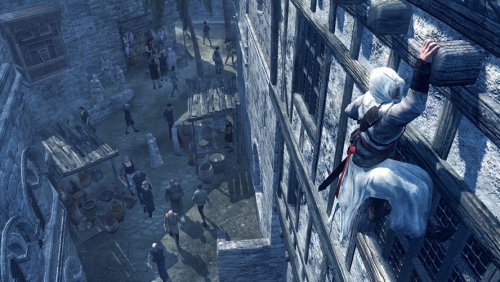
Figure 3.1: Altaïr demonstrating free-running by climbing the side of a building, a core mechanic for traversal.
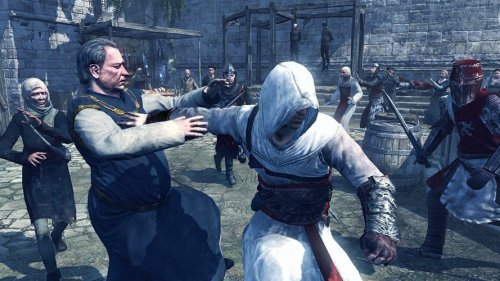
Figure 3.2: Altaïr interacting with a civilian, demonstrating the social stealth mechanic to avoid detection.

Figure 3.3: Altaïr engaged in close-quarters combat with an armored opponent, showcasing the game's sword fighting mechanics.
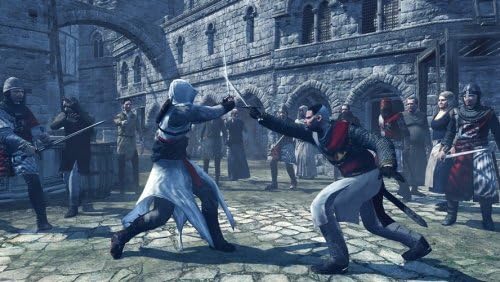
Figure 3.4: Another combat scenario, with Altaïr parrying an attack from a guard, highlighting the defensive aspects of combat.
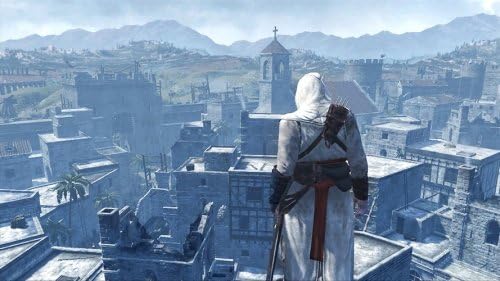
Figure 3.5: Altaïr observing the city from a high viewpoint, a common activity to synchronize the map and identify targets.
4. Maintenance
For a software product like Assassin's Creed 1, maintenance primarily involves ensuring your system is optimized for gaming.
- Driver Updates: Regularly update your graphics card drivers (NVIDIA, AMD) and sound drivers to the latest versions. This can significantly improve performance and stability.
- Operating System Updates: Keep your Windows operating system updated to ensure compatibility and security.
- Disk Space: Ensure you have sufficient free hard drive space. The game requires 8 GB, but additional space is recommended for system operations and save files.
- Game Patches: Check the official Ubisoft support website (support.ubi.com) for any official game patches or updates that may address bugs or improve performance.
- Antivirus Software: Ensure your antivirus software is up-to-date and does not interfere with game files. Temporarily disabling it during installation might be necessary, but always re-enable it afterwards.
5. Troubleshooting
If you encounter issues while installing or playing Assassin's Creed 1, consider the following troubleshooting steps:
- Game Not Launching:
- Verify system requirements are met.
- Ensure graphics drivers are updated.
- Run the game as an administrator.
- Check for necessary redistributables (DirectX, Visual C++ Runtime) and install them if prompted.
- Performance Issues (Low FPS, Stuttering):
- Lower in-game graphics settings (resolution, texture quality, shadows).
- Close background applications to free up system resources.
- Ensure your system meets recommended specifications, not just minimum.
- Update graphics drivers.
- Installation Errors:
- Clean the game DVD for smudges or scratches.
- Ensure sufficient disk space.
- Temporarily disable antivirus software during installation.
- Try installing in Safe Mode if persistent issues occur.
- Sound Problems:
- Check in-game sound settings and system volume.
- Update sound card drivers.
- Ensure speakers/headphones are properly connected.
For further assistance, please visit the official Ubisoft support website: support.ubi.com.
6. Specifications
Detailed product specifications for Assassin's Creed 1:
- ASIN: B004LL5C84
- UPC: 0705381208624
- Type of Item: Video Game
- Item Weight: 8 ounces
- Package Dimensions: 5 x 5 x 0.1 inches
- Manufacturer: Ubi Soft
- Date First Available: January 31, 2011
7. Warranty and Support
For information regarding product warranty, technical support, and customer service, please refer to the official Ubisoft support channels.
- Official Support Website: support.ubi.com
- Manufacturer: Ubi Soft
Ubisoft provides support for their products, including troubleshooting guides, FAQs, and contact options for specific issues. Please retain your proof of purchase for any warranty claims.
Related documentsAssassin's Creed 1


Ask a question about this manual
Ask about setup, troubleshooting, compatibility, parts, safety, or missing instructions. Manuals+ will review the question and use this page’s manual context to help answer it.