
Introduction
The Neewer TT560 Flash Speedlite is a versatile and powerful external flash unit designed to enhance your photography lighting. It features manual power control, flexible angle adjustment, and broad compatibility with various DSLR cameras. This manual provides detailed instructions for setting up, operating, maintaining, and troubleshooting your TT560 Speedlite.
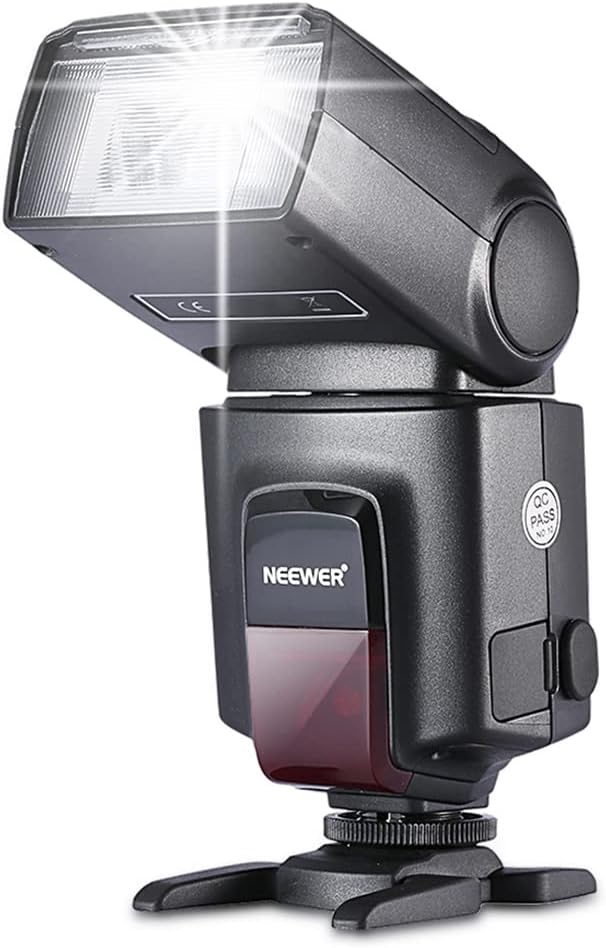
Figure 1: Front view of the Neewer TT560 Flash Speedlite.
Setup
1. Battery Installation
The TT560 Speedlite requires four (4) AA batteries for operation. To install the batteries:
- Locate the battery compartment on the side of the flash unit.
- Open the battery compartment cover.
- Insert four AA batteries, ensuring correct polarity (+/-) as indicated inside the compartment.
- Close the battery compartment cover securely.

Figure 2: Open battery compartment for AA battery insertion.
2. Mounting on Camera
The TT560 Speedlite is equipped with a standard hot shoe for mounting on compatible DSLR cameras. It is compatible with Canon, Sony, Nikon, Panasonic, Olympus, Pentax, Fujifilm, and other DSLR cameras with a standard hot shoe. Note that it is NOT compatible with Canon EOS Rebel SL3/250D, Rebel T7/1500D/2000D, and Rebel T100/3000D/4000D models due to differing hot shoe electrical contacts.
- Ensure the flash unit is powered off.
- Slide the hot shoe foot of the flash into the camera's hot shoe mount.
- Tighten the locking ring at the base of the flash unit to secure it firmly to the camera.

Figure 3: The TT560 Speedlite securely mounted on a camera's hot shoe.

Figure 4: Hot shoe compatibility details, highlighting the need for electrical contacts.
Operating Instructions
1. Power On/Off and Charging
To power on the flash, switch the power button to the "ON" position. The flash will begin charging, indicated by a dim charging indicator light. Once fully charged, the indicator will become steady. To power off, switch the button to "OFF".
2. Test Flash
Press the "TEST" button on the control panel to fire a test flash. This allows you to verify the flash's functionality and observe its output.
3. Flexible Angle Adjustment
The flash head offers flexible rotation for various shooting needs:
- Vertical Rotation Angle: 0 to 90 degrees.
- Horizontal Rotation Angle: 0 to 270 degrees.

Figure 5: Multi-angle rotation capabilities of the TT560 Speedlite.
4. Power Output Control
The flash unit has 8 steps of power output control, ranging from full power (1/1) down to 1/128th power. These levels are indicated by 8 LED pieces on the control panel. Use the '+' and '-' buttons to adjust the power output.
5. Mode Selection (M, S1, S2)
Press the "MODE" button to cycle through the available modes:
- M (Manual Mode): The flash fires at the manually set power output.
- S1 (Slave Mode 1): The flash will fire in sync with the first flash detected from a master flash. This is suitable for cameras that do not use a pre-flash.
- S2 (Slave Mode 2): The flash will ignore the pre-flash from a master flash and fire in sync with the second, main flash. This mode is ideal for cameras that use a pre-flash for red-eye reduction or TTL metering.

Figure 6: Control panel with power output indicators and mode selection buttons.
6. Operational Video Guide
Video 1: A demonstration of the Neewer TT560 Flash Speedlite's features and operation, including power adjustment and mode selection. This video is provided by the seller, iphotoxx.
Maintenance
Proper maintenance ensures the longevity and optimal performance of your Neewer TT560 Flash Speedlite.
- Cleaning: Use a soft, dry cloth to clean the exterior of the flash unit. For the flash tube and reflector, use a lens cleaning cloth or a soft, lint-free cloth. Avoid using harsh chemicals or abrasive materials.
- Battery Care: Remove batteries from the flash unit if it will not be used for an extended period to prevent battery leakage and potential damage.
- Storage: Store the flash in a cool, dry place, away from direct sunlight, high temperatures, and excessive humidity. Use the provided velvet-like storage bag to protect it from dust and scratches.
Troubleshooting
If you encounter issues with your TT560 Speedlite, refer to the following common problems and solutions:
| Problem | Possible Cause | Solution |
|---|---|---|
| Flash does not power on. | Dead or incorrectly inserted batteries. | Check battery polarity and replace with fresh AA batteries. |
| Red charging indicator flickers every second. | Low battery. | Replace batteries with fresh ones. |
| Flash does not fire when mounted on camera. | Loose hot shoe connection; camera incompatibility; flash not charged. | Ensure flash is securely mounted and locking ring is tightened. Verify camera hot shoe compatibility (check for electrical contacts). Allow flash to fully charge. |
| Flash does not fire in S1/S2 slave mode. | Insufficient light from master flash; incorrect S1/S2 mode for camera's pre-flash. | Ensure the optical sensor on the TT560 is facing the master flash. If your camera uses a pre-flash, switch the TT560 to S2 mode. If not, use S1 mode. |
| Loose contact in battery compartment. | Manufacturing defect or wear. | Gently adjust battery contacts if accessible. If problem persists, contact customer support. |
Specifications
| Feature | Detail |
|---|---|
| Brand | NEEWER |
| Model Number | TT560 (Item model number: 10003635) |
| Product Dimensions | 4 x 3.15 x 8.7 inches |
| Item Weight | 1 pounds |
| Batteries Required | 4 AA batteries |
| Vertical Rotation Angle | 0~90 degrees |
| Horizontal Rotation Angle | 0~270 degrees |
| Power Output Control | 8 steps (1/1 to 1/128) |
| Flash Sync Speed | 1/20000 seconds |
| Compatible Mountings | Standard Hot Shoe (for Canon, Sony, Nikon, Panasonic, Olympus, Pentax, Fujifilm DSLR cameras) |
| Included in Box | TT560 Speedlite, Mini Stand, Storage Bag |

Figure 7: Package contents of the Neewer TT560 Flash Speedlite.
Warranty and Support
For warranty information and customer support, please refer to the official Neewer website or contact their customer service directly.
- Official Website: https://neewer.com/
- Customer Service: http://cs.neewer.com
- A digital version of this user manual is available at: User Manual (PDF)

Figure 8: Product packaging with QR codes for Neewer's official website and customer service.