
1. Introduction
This manual provides detailed instructions for the operation and maintenance of your AudioSonic CL-1486 Alarm Clock Radio. Please read this manual thoroughly before use to ensure proper function and safety. Keep this manual for future reference.
2. Important Safety Instructions
- Read all instructions before operating the appliance.
- Do not expose this appliance to rain or moisture to reduce the risk of fire or electric shock.
- Do not expose the appliance to dripping or splashing. No objects filled with liquids, such as vases, shall be placed on the appliance.
- Do not block any ventilation openings. Install in accordance with the manufacturer's instructions.
- Do not install near any heat sources such as radiators, heat registers, stoves, or other apparatus (including amplifiers) that produce heat.
- Protect the power cord from being walked on or pinched, particularly at plugs, convenience receptacles, and the point where they exit from the appliance.
- Only use attachments/accessories specified by the manufacturer.
- Unplug this appliance during lightning storms or when unused for long periods of time.
- Refer all servicing to qualified service personnel. Servicing is required when the appliance has been damaged in any way, such as power-supply cord or plug is damaged, liquid has been spilled or objects have fallen into the appliance, the appliance has been exposed to rain or moisture, does not operate normally, or has been dropped.
3. Product Overview
The AudioSonic CL-1486 is a versatile alarm clock radio with a large display and projection feature. Familiarize yourself with the main components and controls:
3.1 Front View

Figure 1: Front view of the AudioSonic CL-1486, highlighting the 1.8-inch jumbo display.
The front panel features a large, clear 1.8-inch digital display for time, date, and radio frequency. It also shows indicators for alarm status, temperature, and day of the week.
3.2 Top View - Control Buttons
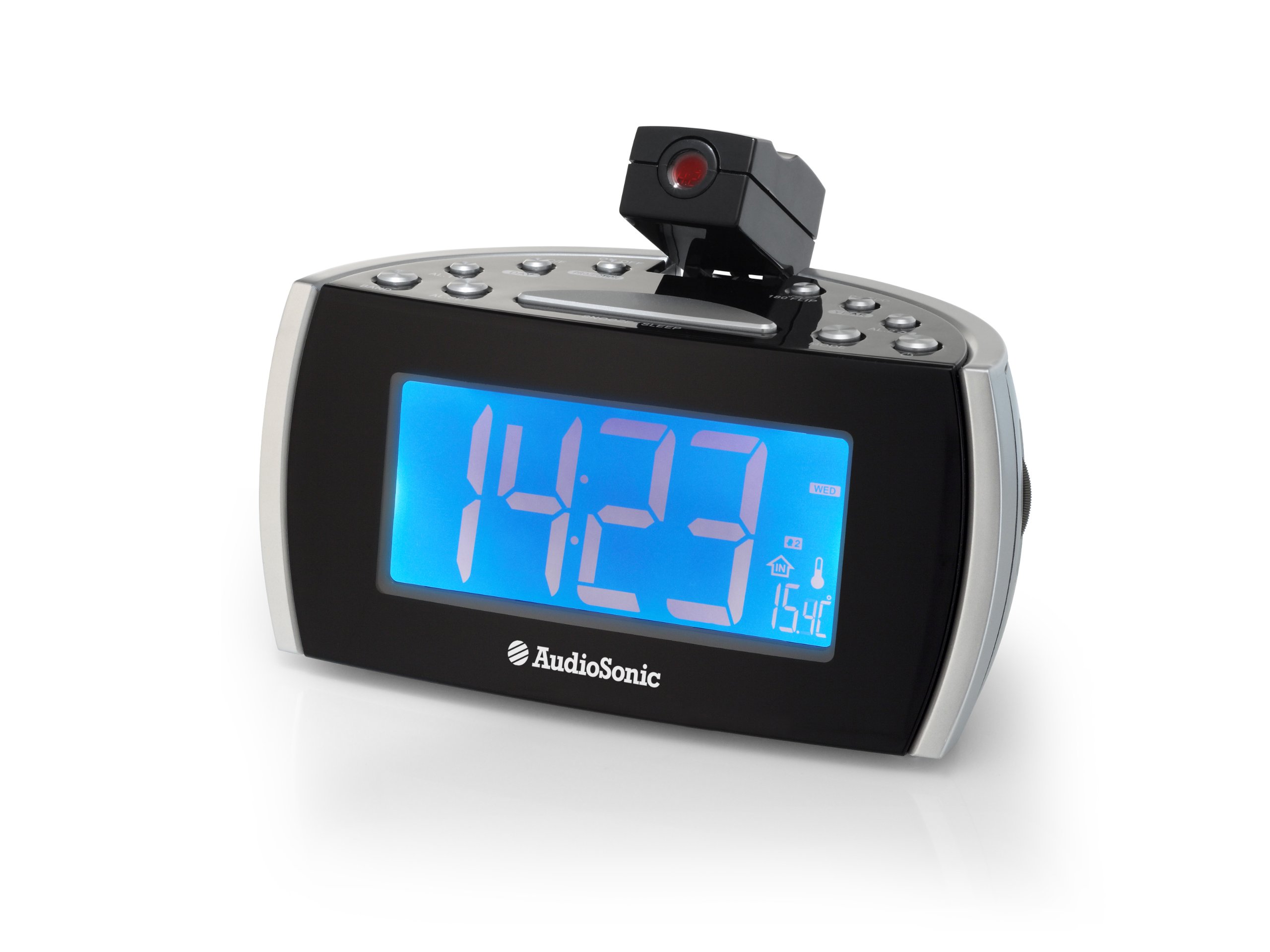
Figure 2: Top view of the control panel and projection unit.
The top panel houses all functional buttons and the adjustable projection lens. Refer to the table below for button functions:
| Button | Function |
|---|---|
| ON/OFF | Powers the unit on or off (standby). |
| C/F | Switches temperature display between Celsius and Fahrenheit. |
| PROJECTION | Activates or deactivates the time projection. |
| 180 FLIP | Rotates the projected image by 180 degrees. |
| DST | Adjusts for Daylight Saving Time. |
| YEAR | Used for setting the year in time/date setting mode. |
| AL.1 | Activates/deactivates or selects Alarm 1. |
| DAY | Used for setting the day in time/date setting mode. |
| AL.2 | Activates/deactivates or selects Alarm 2. |
| BAND | Selects between FM and MW (AM) radio bands. |
| AL.SET | Enters alarm setting mode or confirms settings. |
| SNOOZE/SLEEP | Press for snooze function; hold for sleep timer. |
| MODE | Cycles through display modes (time, date, temperature) or enters setting modes. |
3.3 Projection Feature

Figure 3: Time projection in action.
The integrated projector allows you to display the time onto a wall or ceiling. The projection angle can be adjusted manually, and the 180 FLIP button allows for orientation correction.
4. Setup
4.1 Power Connection
- Uncoil the FM antenna wire completely for optimal radio reception.
- Plug the AC power adapter into a standard wall outlet.
- The unit will power on and the display will illuminate.
4.2 Initial Time Setting
- Press and hold the MODE button until the time display starts flashing.
- Use the YEAR and DAY buttons to adjust the hour and minute. Press MODE to cycle between setting hours, minutes, year, and day.
- Press MODE again to confirm the settings and exit time setting mode.
5. Operating Instructions
5.1 Setting the Alarm (AL.1 / AL.2)
The CL-1486 features two independent alarms with a weekend mode function.
- Press the AL.SET button once to enter Alarm 1 setting mode. The AL.1 indicator will flash.
- Use the YEAR and DAY buttons to set the desired alarm time (hour and minute).
- Press AL.SET again to select the alarm source (Buzzer or Radio). Use YEAR or DAY to choose.
- Press AL.SET a third time to set the weekend mode (on/off). When active, the alarm will not sound on Saturdays and Sundays.
- Press AL.SET a fourth time to confirm Alarm 1 settings.
- Repeat steps 1-5 for Alarm 2 by pressing AL.SET twice initially to enter Alarm 2 setting mode.
- To activate or deactivate an alarm, press the respective AL.1 or AL.2 button. The alarm indicator will appear/disappear on the display.
5.2 Radio Operation
- Press the ON/OFF button to turn on the radio.
- Press the BAND button to switch between FM and MW (AM) bands.
- To tune to a station, press and hold the YEAR or DAY button for automatic scanning to the next available station. For manual tuning, short press the YEAR or DAY button.
- Adjust the volume using the volume control knob, typically located on the side of the unit.
- To turn off the radio, press the ON/OFF button.
5.3 Time Projection
- Press the PROJECTION button to turn the time projection on or off.
- Adjust the angle of the projection lens manually to direct the time onto a wall or ceiling.
- If the projected image is upside down, press the 180 FLIP button to rotate it.
- To adjust the clarity of the projected image, rotate the focus ring around the projection lens (if available).
5.4 Snooze and Sleep Functions
- Snooze: When an alarm sounds, press the large SNOOZE/SLEEP bar to temporarily silence the alarm. The alarm will sound again after a few minutes (default snooze time).
- Sleep Timer: While the radio is playing, press and hold the SNOOZE/SLEEP bar to activate the sleep timer. Repeated presses will cycle through available sleep times (e.g., 90, 60, 30, 15 minutes, OFF). The radio will automatically turn off after the selected duration.
6. Maintenance
To ensure the longevity and proper functioning of your AudioSonic CL-1486, follow these simple maintenance guidelines:
- Cleaning: Wipe the unit with a soft, dry cloth. Do not use abrasive cleaners, waxes, or solvents as they may damage the cabinet.
- Dust: Keep the unit free from dust, especially the projection lens, to maintain clear projection.
- Environment: Avoid placing the unit in direct sunlight, near heat sources, or in areas with high humidity.
7. Troubleshooting
| Problem | Possible Cause | Solution |
|---|---|---|
| No power / Display off | Power cord not connected properly. | Ensure the AC power adapter is securely plugged into the unit and a working wall outlet. |
| Alarm does not sound | Alarm is not activated or set incorrectly. | Check that the AL.1 or AL.2 indicator is visible on the display. Verify alarm time and source settings. Ensure volume is not set to minimum if radio alarm is selected. |
| Poor radio reception | Antenna not extended or unit is in a poor reception area. | Fully extend the FM antenna wire. Reposition the unit for better reception. |
| Projection is unclear or distorted | Projection lens is out of focus or dirty. | Adjust the focus ring around the projection lens. Clean the lens with a soft, dry cloth. Ensure the projection surface is flat and clear. |
| Time/Date incorrect | Time/Date not set or power interruption. | Reset the time and date following the instructions in section 4.2. |
8. Specifications
- Model Number: CL-1486
- Brand: AudioSonic
- Display Type: Digital
- Display Size: 1.8 Inch
- Color: Black
- Power Source: Corded Electric
- Product Dimensions: 18.5 x 9.5 x 9 cm
- Weight: 630 g
- Special Features: Projection, Two Alarm Times, Weekend Mode, Digital Frequency Display
- Mounting Type: Tabletop
- Indoor/Outdoor Use: Indoor
9. Warranty and Support
For warranty information and customer support, please refer to the documentation provided at the time of purchase or contact your retailer. Keep your proof of purchase for any warranty claims.