
1. Product Overview
The PointZero Dual-Action 7cc Gravity-Feed Airbrush is a precision-crafted tool designed for both beginners and advanced users. It features a balanced design and internal-mix functionality, making it suitable for a wide range of applications including models, crafts, auto & cycle graphics, taxidermy, photo retouching, t-shirts, murals, fine art, and illustrations.
This airbrush kit includes three interchangeable stainless steel needles, fluid tips, and air caps in sizes 0.2mm, 0.3mm, and 0.5mm. These options allow for spray patterns varying from hairline details to broader coverage up to 1.75 inches. The 7cc gravity-feed color cup comes with a vented, anti-spill cover for convenient paint handling.
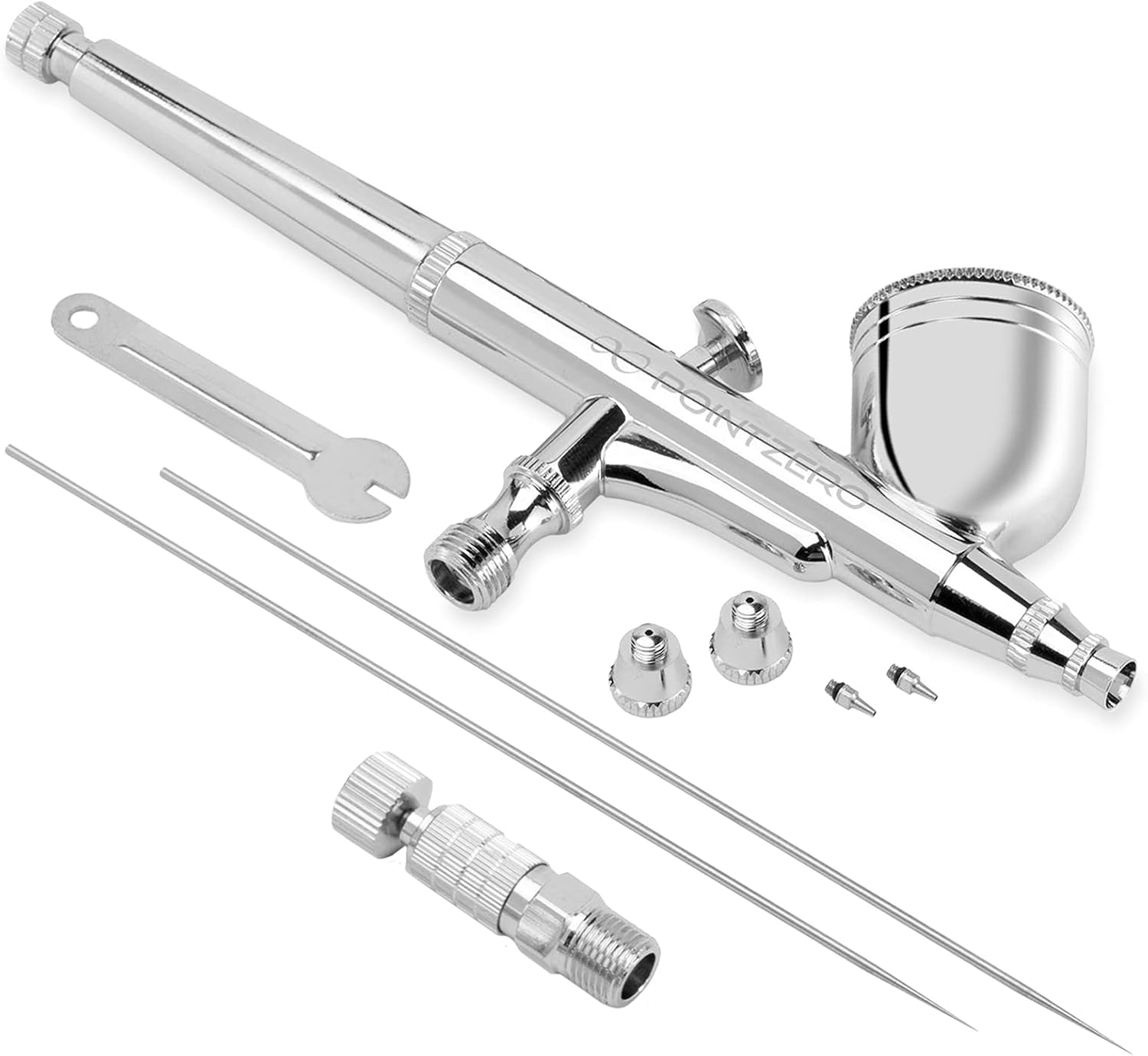
Figure 1: PointZero Dual-Action Airbrush with 0.2mm, 0.3mm, and 0.5mm needles, nozzles, and a wrench.

Figure 2: The PointZero airbrush kit presented in its protective case, showcasing the airbrush, multiple needles, and other components.
2. Setup
Before using your PointZero airbrush, ensure all components are clean and properly assembled. The airbrush is designed for gravity-feed operation, meaning paint is loaded into the cup on top of the airbrush.
- Unpack Components: Carefully remove the airbrush and all accessories from the packaging.
- Select Nozzle/Needle: Choose the appropriate 0.2mm, 0.3mm, or 0.5mm nozzle and needle set for your desired spray pattern. The 0.2mm is for fine details, 0.3mm for general work, and 0.5mm for broader coverage.
- Assemble Airbrush: Ensure the selected nozzle, needle, and air cap are correctly installed. Refer to the maintenance section for detailed instructions on changing these components.
- Connect to Air Source: Attach the airbrush to your air compressor using a compatible air hose. Ensure a secure connection to prevent air leaks.
- Adjust Air Pressure: Set your air compressor to the recommended working pressure, typically between 15-50 PSI. You can further fine-tune the air pressure directly on the airbrush using the pressure regulator if available.
For a visual guide on setting up your airbrush, please refer to the video below:
Video 1: This video demonstrates the unboxing and initial assembly of a similar airbrush, including how to attach the paint cup and connect to an air compressor.
3. Operating Instructions
The PointZero airbrush features dual-action control, allowing independent control over both air and paint flow for precise application.
- Load Paint: Pour your desired airbrush-ready paint into the 7cc gravity-feed cup. Ensure the paint is properly thinned for airbrush use to prevent clogging.
- Initiate Airflow: Press down on the trigger to release air. This should be done before pulling back for paint to ensure a smooth start.
- Control Paint Flow: While maintaining downward pressure on the trigger for airflow, gently pull the trigger backward to release paint. The further back you pull, the more paint will be released.
- Adjust Spray Pattern: The combination of air pressure, trigger pull, and distance from the surface will determine your spray pattern. Practice on a scrap surface to achieve desired effects.
- Stop Spraying: To stop spraying, release the trigger forward to cut off paint flow, then release upward to stop airflow. Always stop paint flow before stopping airflow to prevent paint from drying on the needle tip.
Observe the airbrush in action and various spray effects in the following video:
Video 2: This video demonstrates different airbrushing effects and applications, showcasing the versatility of the tool.
4. Maintenance
Proper cleaning and maintenance are crucial for the longevity and optimal performance of your airbrush. Always clean your airbrush immediately after each use, especially when changing colors or finishing a session.
General Cleaning:
- Empty any remaining paint from the cup.
- Add a small amount of appropriate airbrush cleaner or solvent to the cup.
- Back-flush the airbrush by covering the nozzle with your finger or a cap and pressing the trigger for air. This will bubble the cleaner back into the cup, dislodging paint.
- Spray the cleaner through the airbrush onto a paper towel until it sprays clear.
- Repeat steps 2-4 until the airbrush is thoroughly clean.
Nozzle and Needle Replacement:
The airbrush comes with 0.2mm, 0.3mm, and 0.5mm nozzle and needle sets. To change them:
- Unscrew the back handle of the airbrush.
- Loosen the needle chucking nut and carefully pull out the needle from the back.
- Unscrew the nozzle cap and then the nozzle itself from the front of the airbrush.
- Insert the new nozzle into the nozzle cap and screw them onto the airbrush body.
- Carefully insert the new needle from the back of the airbrush until it stops.
- Tighten the needle chucking nut and screw the back handle back on.
For a detailed demonstration on how to replace the nozzle, please watch the video below:
Video 3: This video provides step-by-step instructions on how to safely replace the nozzle and needle of your airbrush.
5. Troubleshooting
| Problem | Possible Cause | Solution |
|---|---|---|
| No paint flow | Clogged nozzle/needle, paint too thick, low air pressure, bent needle. | Clean nozzle/needle, thin paint, increase air pressure, straighten or replace needle. |
| Inconsistent spray / Spattering | Partially clogged nozzle, loose nozzle/air cap, damaged needle tip, paint too thin. | Thoroughly clean airbrush, tighten components, replace damaged parts, thicken paint. |
| Air bubbles in paint cup | Loose nozzle, damaged nozzle, dirty air cap. | Tighten nozzle, replace nozzle, clean air cap. |
| Air leaks | Loose connections, worn O-rings. | Check all connections, replace O-rings if necessary. |
If you encounter issues not listed here or if the suggested solutions do not resolve the problem, please contact customer support for further assistance.
6. Specifications
- Brand: PointZero
- Model Number: 4336951490
- ASIN: B004KNHGG4
- UPC: 609728824488
- Style: Dual Action
- Feed Type: Gravity-Feed
- Color Cup Capacity: 7cc
- Nozzle/Needle Sizes: 0.2mm, 0.3mm, 0.5mm
- Material: Metal (Silver finish)
- Item Weight: 8 ounces
- Product Dimensions: 5"W x 1"H
- Power Source: Air Powered
- Maximum Pressure: 50 PSI
7. Safety Information
Always use with proper ventilation. Do not point at face or eyes. Keep away from heat and open flames. Do not use with incompatible materials. Clean after each use. Store in a cool, dry place. Dispose of according to local regulations. Always follow manufacturer's instructions for safe operation and maintenance.
8. Warranty and Support
For warranty information and customer support, please refer to the documentation included with your product or visit the official PointZero website. If you have any questions or require assistance, please contact the seller or manufacturer directly.