
Introduction
The JOYO JMT-2009 is a versatile musical instrument accessory designed to assist musicians with accurate tuning, rhythm practice, and tone generation. This device combines a tuner, metronome, and tone generator into a single compact unit, featuring a backlit display for clear visibility.
This manual provides detailed instructions on how to set up, operate, and maintain your JMT-2009 to ensure optimal performance.
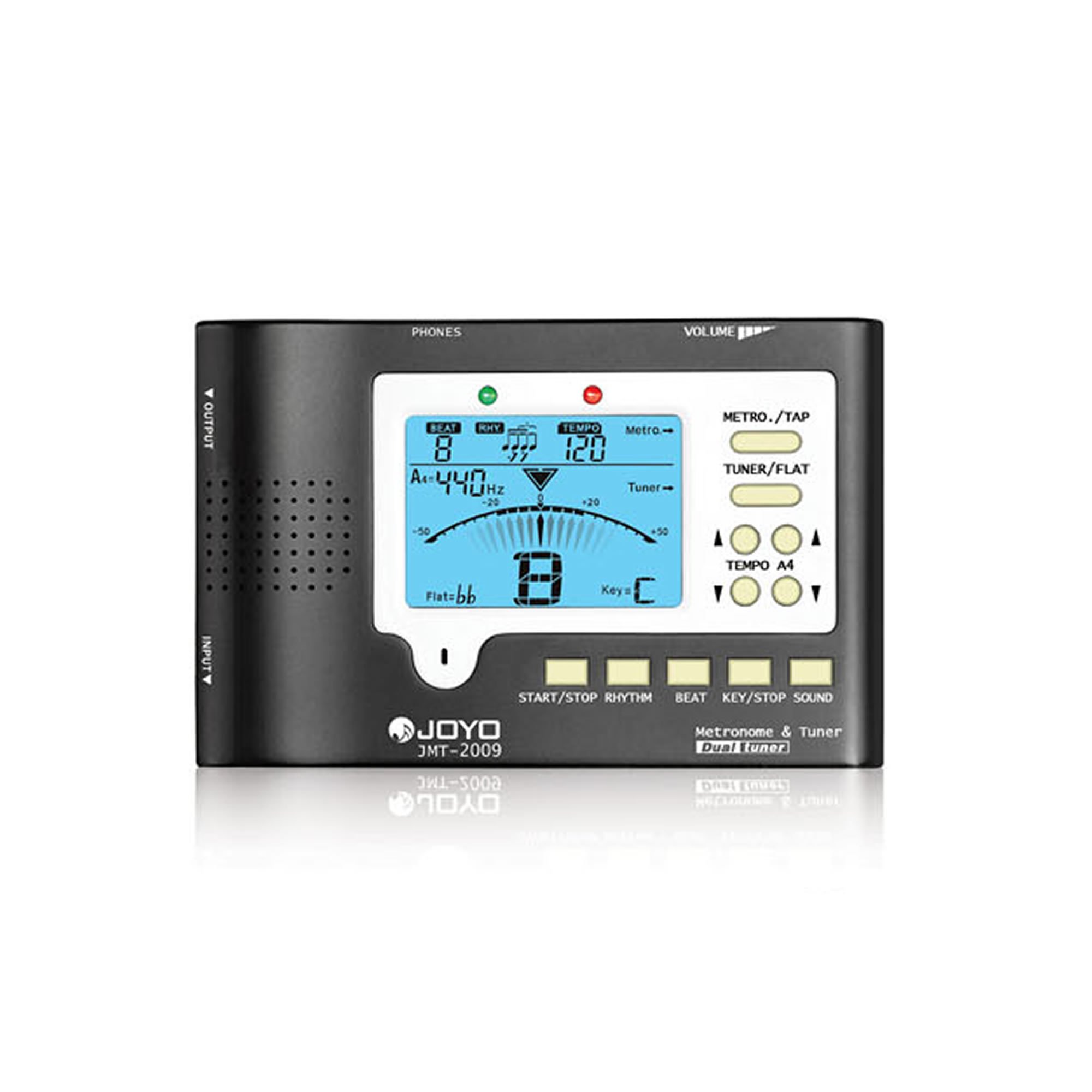
Figure 1: The JOYO JMT-2009 Tuner and Metronome. This image shows the front view of the device, highlighting its compact design and display screen.
Setup
1. Battery Installation
The JMT-2009 requires two (2) AAA batteries for operation. These are typically included with the device.
- Locate the battery compartment cover on the back of the device.
- Slide or lift the cover to open the compartment.
- Insert two AAA batteries, ensuring the correct polarity (+ and -) as indicated inside the compartment.
- Replace the battery compartment cover securely.
Figure 2: Illustrative image of the JOYO JMT-2009's rear, showing the battery compartment. Ensure correct battery orientation during installation.
2. Powering On/Off
Press and hold the power button (usually marked with a power symbol) for a few seconds to turn the device on or off. The backlit display will illuminate upon activation.
3. Connecting to Instrument (Tuner Mode)
For acoustic instruments, the JMT-2009 features a built-in microphone. For electric instruments or enhanced accuracy, use the included microphone clip to attach the device directly to the instrument's headstock or soundboard. This clip detects vibrations directly from the instrument.
Operating Instructions
1. Tuner Mode
To enter Tuner Mode, press the 'Mode' button until 'Tuner' or a similar indicator appears on the display. The device will automatically detect the pitch of the note played.
- Display Interpretation: The display will show the note name (e.g., E, A, D, G, B, e) and an indicator (needle or LEDs) to show if the note is flat, sharp, or in tune. Adjust your instrument until the indicator is centered and the note name is correct.
- Tuning Range: The JMT-2009 offers a wide tuning range suitable for various instruments.
- Duel Tuner Feature: This feature allows for precise tuning by comparing two inputs or offering enhanced sensitivity. Refer to the on-screen prompts for specific usage.
Figure 3: Example of the JMT-2009 display in Tuner Mode. The central indicator shows the note is in tune, with the note name clearly visible.
2. Metronome Mode
Press the 'Mode' button to switch to Metronome Mode. The display will show tempo and beat settings.
- Tempo Adjustment: Use the '+' and '-' buttons to increase or decrease the beats per minute (BPM).
- Beat Pattern: Select different beat patterns (e.g., 4/4, 3/4, 2/4) using the 'Beat' or 'Pattern' button.
- Volume Control: Adjust the metronome click volume using dedicated volume buttons or a combination of other buttons.
- Backlit Metronome: The display remains backlit for visibility in various lighting conditions.
Figure 4: The JMT-2009 display in Metronome Mode, showing a tempo setting and a selected beat pattern.
3. Tone Generator Mode
Activate Tone Generator Mode by cycling through the modes with the 'Mode' button. This feature produces a reference tone for manual tuning or ear training.
- Note Selection: Use the navigation buttons to select the desired note (e.g., A4, C5).
- Octave Adjustment: Adjust the octave of the generated tone as needed.
- Simultaneous Operation: The tone generator can often work simultaneously with other features, allowing for flexible practice.
Maintenance
- Cleaning: Wipe the device with a soft, dry cloth. Do not use abrasive cleaners or solvents.
- Battery Replacement: Replace batteries promptly when the low battery indicator appears or if the device malfunctions. Remove batteries if the device will not be used for an extended period to prevent leakage.
- Storage: Store the JMT-2009 in a cool, dry place away from direct sunlight and extreme temperatures.
Troubleshooting
| Problem | Possible Cause | Solution |
|---|---|---|
| Device does not power on. | Dead or incorrectly installed batteries. | Check battery polarity. Replace with new AAA batteries. |
| Tuner is inaccurate. | External noise interference; improper instrument connection. | Ensure a quiet environment. Use the microphone clip for direct vibration detection. |
| Metronome sound is too low/high or absent. | Volume setting is incorrect. | Adjust the volume using the dedicated controls. |
Specifications
| Feature | Detail |
|---|---|
| Model Number | JMT-2009 |
| Dimensions (Package) | 14.4 x 14.4 x 3.2 cm |
| Weight (Product) | 140 g |
| Batteries | 2 x AAA (included) |
| Battery Type | Alkaline |
| Functions | Tuner, Metronome, Tone Generator |
| Display | Backlit |
Warranty and Support
For warranty information, please refer to the documentation provided with your purchase or visit the official JOYO website. For product support, frequently asked questions, or to contact customer service, please visit the JOYO Brand Store on Amazon.