
Introduction
The Keurig B70 Platinum K-Cup Brewer is designed to provide a convenient and quick way to enjoy coffee, tea, or hot cocoa. This single-serve brewing system utilizes K-Cup pods to deliver a fresh beverage in under a minute. This manual provides essential information for setting up, operating, maintaining, and troubleshooting your brewer to ensure optimal performance and longevity.
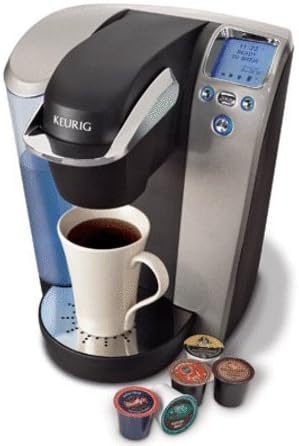
Image: The Keurig B70 Platinum K-Cup Brewer, a sleek black and silver machine, is shown with a white mug filled with coffee on its drip tray. Several colorful K-Cup pods are scattered in front of the machine, indicating its single-serve functionality. The brewer features a digital display and control buttons on its front panel.
Setup
Unpacking: Carefully remove the brewer from its packaging. Retain all packing materials for future transport or storage. Place the brewer on a stable, flat surface.
Initial Rinse: Before first use, perform an initial rinse cycle. Fill the water reservoir with fresh water. Place a large mug on the drip tray. Do not insert a K-Cup pod. Close the handle and press the brew button for the largest cup size. Discard the hot water.
Water Reservoir Filling: Remove the water reservoir lid and fill the reservoir with fresh, filtered water up to the 'MAX' fill line. Replace the lid securely.
Operating Instructions
Power On: Plug the brewer into a grounded electrical outlet. Press the power button to turn on the brewer. The display will illuminate.
Brewing a K-Cup:
- Lift the handle to open the K-Cup holder.
- Insert a K-Cup pod into the holder, ensuring it is seated properly.
- Lower the handle firmly until it clicks into place.
- Place a mug on the drip tray.
- Select your desired brew size from the options on the control panel.
- The brewer will begin the brewing process. Once complete, carefully remove the hot mug.
- Lift the handle to eject the used K-Cup pod into a waste bin.
Adjusting Brew Size: The Keurig B70 Platinum offers multiple brew size options. Use the dedicated buttons on the control panel to select your preferred cup size (e.g., 6 oz, 8 oz, 10 oz, 12 oz).
Hot Water Dispensing: To dispense hot water, ensure no K-Cup pod is in the holder. Close the handle, place a mug on the drip tray, and select a brew size. The brewer will dispense hot water.
Maintenance
Regular cleaning and maintenance are crucial for the optimal performance and longevity of your Keurig brewer.
Cleaning the Brewer:
- Exterior: Wipe the exterior with a damp, non-abrasive cloth.
- Drip Tray: The drip tray and its cover can be removed and washed with warm, soapy water. Rinse thoroughly and dry.
- K-Cup Holder: The K-Cup holder can be removed by lifting the handle and pushing up on the holder from underneath. Wash with warm, soapy water and rinse.
Descaling: Descale your brewer every 3-6 months, or more frequently if you have hard water. Use a Keurig descaling solution or white vinegar. Follow the descaling instructions provided with the descaling solution or refer to the Keurig website for detailed steps.
Water Filter Replacement: If your model includes a water filter, replace it every 2 months or 60 tank refills. Refer to the filter instructions for proper installation and replacement.
Troubleshooting
| Problem | Possible Cause | Solution |
|---|---|---|
| Brewer not turning on | Not plugged in; power outage; circuit breaker tripped | Ensure brewer is securely plugged in; check power outlet; reset circuit breaker. |
| No water dispensing | Water reservoir empty; air bubble in water line; clogged needle | Fill water reservoir; perform a cleansing brew without a K-Cup; clean the K-Cup holder needle. |
| Coffee grounds in cup | K-Cup pod not seated correctly; needle clogged | Ensure K-Cup is properly inserted; clean the K-Cup holder needle. |
| Brewing too slowly or partial brew | Mineral buildup (scaling) | Perform a descaling procedure. |
Specifications
- Model: Keurig B70 Platinum K-Cup Brewer
- ASIN: B004IA2OSY
- Date First Available: January 7, 2011
- Brewing System: Single-serve K-Cup pod system
- Brew Sizes: Multiple programmable brew sizes
- Water Reservoir: Removable, large capacity
- Display: Digital LCD with blue backlight
Warranty and Support
For warranty information and customer support, please refer to the official Keurig website or contact Keurig customer service directly. Keep your purchase receipt as proof of purchase for warranty claims.
Note: Product specifications and features are subject to change without notice.