
Digiflex AA88
Digiflex 3-LED Hand Press Flashlight User Manual
Model: AA88 | Brand: Digiflex
Introduction
Thank you for choosing the Digiflex 3-LED Hand Press Flashlight. This innovative, battery-free flashlight is designed for convenience and reliability, making it ideal for camping, hiking, power outages, car breakdowns, and other emergency situations. Its unique hand-press charging mechanism ensures you always have light when you need it, without the hassle of replacing batteries or finding a power source.

Image: The Digiflex 3-LED Hand Press Flashlight, showcasing its compact blue and grey design with three bright LED bulbs.
Safety Information
- Do not look directly into the LED light as it can cause temporary vision impairment.
- Keep out of reach of small children to prevent accidental injury or ingestion of small parts.
- Do not attempt to disassemble or modify the flashlight. This may void the warranty and cause damage.
- Avoid exposing the flashlight to extreme temperatures or direct sunlight for prolonged periods.
- While designed for outdoor use, avoid submerging the flashlight in water.
Setup
Unpacking
Carefully remove the flashlight from its packaging. Inspect the device for any visible damage. If any damage is found, contact customer support immediately.
Initial Charging
The Digiflex flashlight operates without traditional batteries, relying on a manual hand-press mechanism to generate power. Before first use, or if the light is dim, you will need to charge it by pressing the handle.
- Locate the hand-press handle on the side of the flashlight.
- Release the handle by sliding the lock/unlock switch (if present) to the unlock position.
- Repeatedly press and release the handle firmly. Each press generates kinetic energy that is converted into electrical energy to power the LEDs.
- Continue pressing for approximately 30-60 seconds for initial charge, or until the desired brightness is achieved. A few presses are usually sufficient for a short burst of light.
- Once charging is complete, fold the handle back into its resting position and slide the lock/unlock switch to the lock position to secure it.
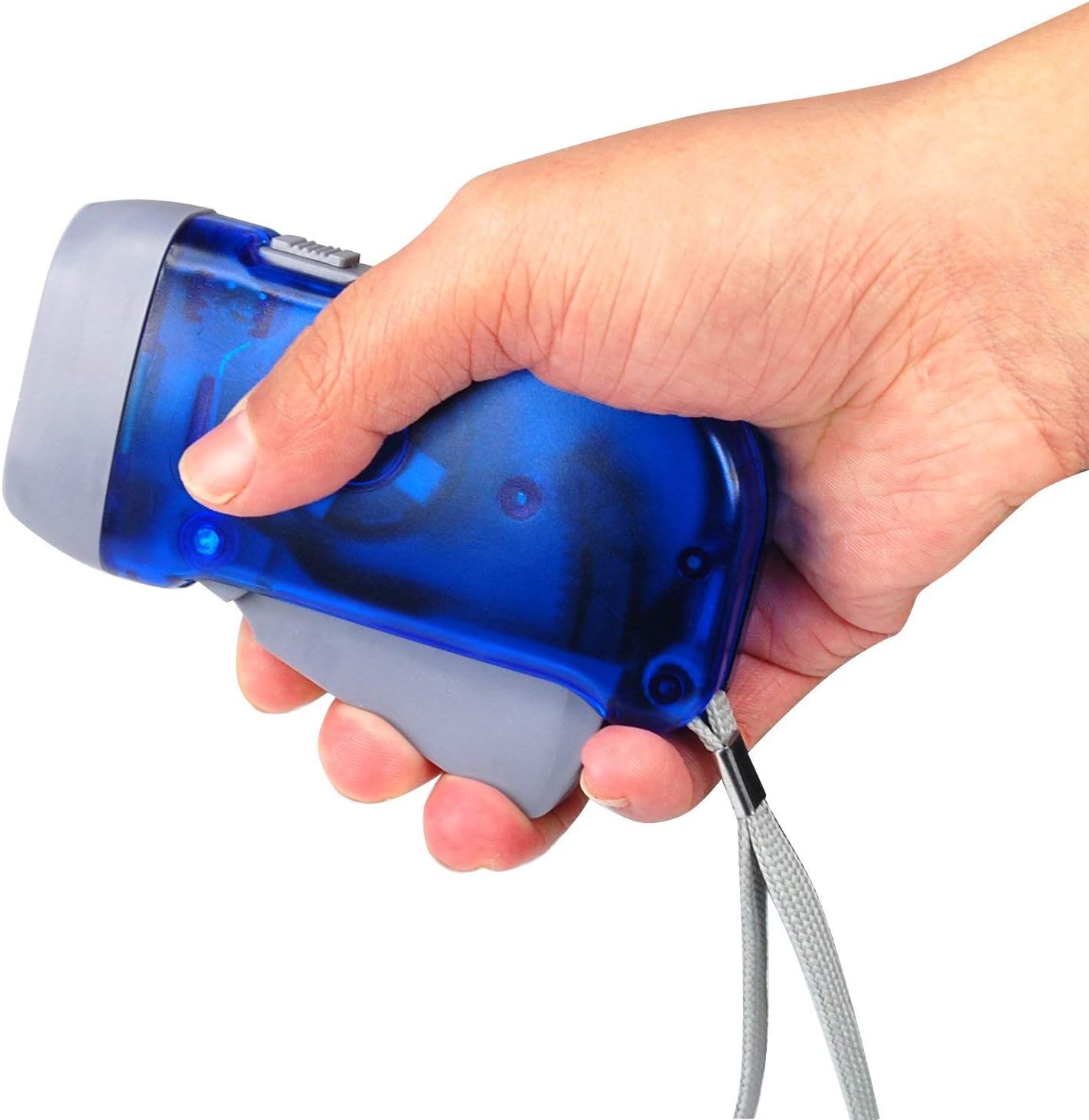
Image: A hand demonstrating the pressing action on the flashlight's handle to generate power.
Operating Instructions
Turning On/Off
After charging the flashlight, locate the ON/OFF switch, typically found near the handle or on the top surface. Slide the switch to the 'ON' position to illuminate the 3 LED bulbs. Slide it back to 'OFF' to turn off the light.

Image: A side view of the Digiflex flashlight, highlighting the location of the ON/OFF switch and the hand-press mechanism.
Usage Tips
- For continuous light, periodic pressing of the handle may be required, especially during extended use.
- The flashlight provides up to 30 minutes of non-stop brightness on a full charge, illuminating up to 5 meters.
- The integrated wrist strap can be used for secure carrying and to prevent accidental drops.

Image: The Digiflex flashlight in operation, casting a bright beam of light in a dark setting.
Maintenance
Cleaning
To clean the flashlight, wipe it with a soft, damp cloth. Do not use abrasive cleaners or solvents, as these can damage the plastic and aluminum components. Ensure the flashlight is dry before storing.
Storage
Store the flashlight in a cool, dry place away from direct sunlight and extreme temperatures. Since it does not rely on traditional batteries, there is no concern about battery degradation over time.
Troubleshooting
| Problem | Possible Cause | Solution |
|---|---|---|
| Flashlight does not turn on. | Insufficient charge. | Repeatedly press the hand-press handle for at least 30-60 seconds to generate sufficient power. Ensure the ON/OFF switch is in the 'ON' position. |
| Light is dim or flickers. | Low power reserve. | Press the hand-press handle more frequently or for a longer duration to build up the power reserve. |
| Hand-press handle is stuck or not moving freely. | Handle is locked or obstructed. | Ensure the lock/unlock switch is in the 'unlock' position. Check for any debris obstructing the handle's movement. Do not force the handle. |
Specifications
| Feature | Detail |
|---|---|
| Brand | Digiflex |
| Model Number | AA88 |
| Dimensions | 21.21 x 12.19 x 4.8 cm |
| Weight | 69 grams |
| Material | ABS, Aluminum |
| Light Source Type | LED (3 bulbs) |
| Luminous Flux | 300 lumens |
| Power Source | Manual (Hand-press Dynamo) |
| Color | Blue |
| Special Feature | Hand flashlight, LED |

Image: The Digiflex flashlight with its approximate dimensions (10cm length, 5cm width, 2.5cm height) indicated.
Warranty and Support
For information regarding product warranty, please refer to the documentation provided at the time of purchase or visit the official Digiflex website. For technical support or further assistance, please contact Digiflex customer service through their official channels.
This product is designed for durability and reliability. Should you encounter any issues not covered in the troubleshooting section, please reach out to the manufacturer for guidance.
Ask a question about this manual
Ask about setup, troubleshooting, compatibility, parts, safety, or missing instructions. Manuals+ will review the question and use this page’s manual context to help answer it.