
Sony DSCHX100V/B
Sony Cyber-Shot DSC-HX100V Digital Still Camera
Model: DSCHX100V/B
Instruction Manual
Introduction
This manual provides essential information for the safe and effective operation of your Sony Cyber-Shot DSC-HX100V digital still camera. Please read this manual thoroughly before using the camera and retain it for future reference. The DSC-HX100V combines advanced imaging technology with user-friendly features to deliver high-quality photographs and Full HD video.
What's in the Box
Verify that all items listed below are included in your product package:
- Sony Cyber-shot DSC-HX100V Digital Camera (Black)
- NP-FH50 H-Series Info-Lithium Battery Pack
- AC Adapter AC-LS200
- USB Cable
- Power Cord
- Neck Strap
- Lens Cap
- CD-ROM (containing Picture Motion Browser Software ver. 5.5)
- Warranty Card
Setup
1. Charging the Battery
Insert the supplied NP-FH50 battery pack into the AC Adapter AC-LS200. Connect the AC adapter to a power outlet using the power cord. The charge indicator will illuminate during charging and turn off when charging is complete. A full charge typically takes approximately 3 hours.
2. Inserting the Battery and Memory Card
Open the battery/memory card cover on the bottom of the camera. Insert the charged battery pack firmly until it clicks into place. Insert a compatible memory card (SD, SDHC, SDXC, or Memory Stick PRO Duo) into the memory card slot with the correct orientation until it clicks. Close the cover securely.

Figure 1: Rear view of the camera, highlighting the LCD and control layout.
3. Attaching the Neck Strap and Lens Cap
Thread the neck strap through the strap eyelets on the camera body and secure it. Attach the lens cap to the lens to protect it when not in use. The lens cap can be tethered to the neck strap to prevent loss.
Operating the Camera
Basic Photography
To power on the camera, slide the ON/OFF switch. The camera features a 16.2 megapixel "Exmor R" CMOS image sensor for high resolution and low-light sensitivity. The Carl Zeiss Vario-Sonar T lens offers a 30x optical zoom and a 27mm equivalent wide-angle for versatile shooting.
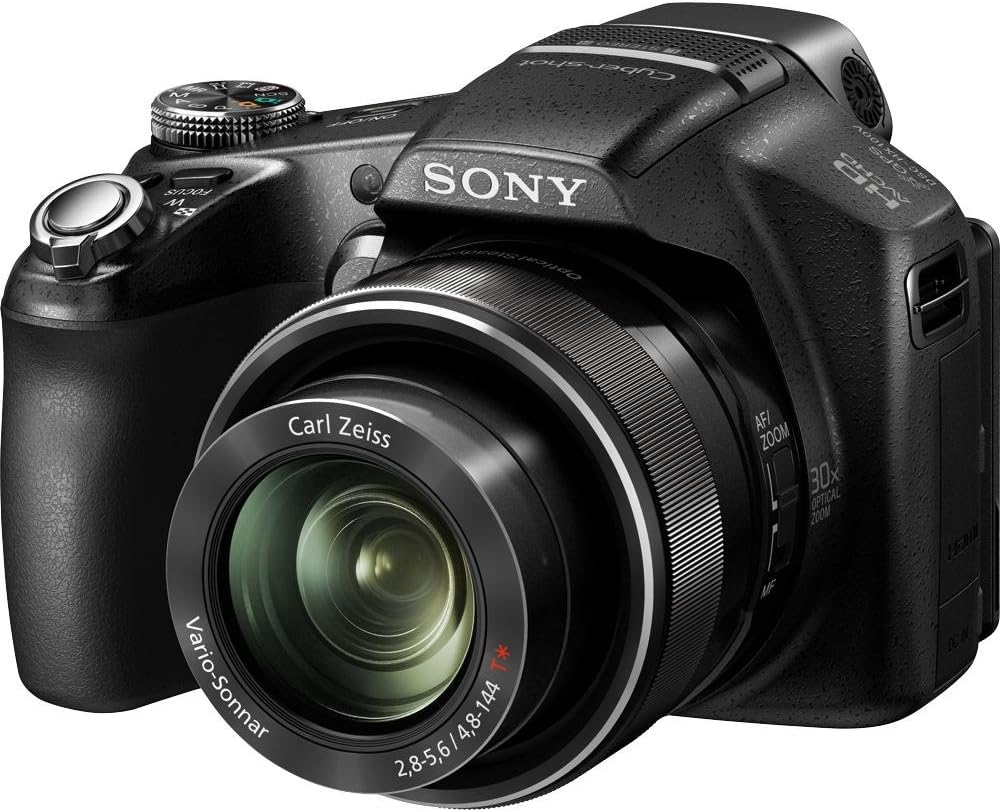
Figure 2: Front view of the camera, showcasing the Carl Zeiss Vario-Sonar T lens.
Zoom Function
Utilize the zoom lever located around the shutter button or rotate the ring on the lens barrel to adjust the optical zoom up to 30x. This allows for bringing distant subjects closer without significant loss of image quality. Digital zoom can extend this further, but may reduce image clarity.
Video Recording
The DSC-HX100V supports Full HD 1080/60p video recording, providing smooth, high-resolution footage. Press the dedicated MOVIE button to start and stop recording. Recording is limited to 29-minute segments.
Advanced Shooting Modes and Features
- Backlight Correction HDR: This feature takes multiple exposures and combines them to create a single image with balanced lighting, ideal for high-contrast scenes.
- Hi-speed Linear Focus: Ensures rapid and accurate autofocus, capturing fast-moving subjects with clarity.
- 3D Still Images and Panorama: Capture immersive 3D photos and panoramic scenes. Viewing 3D content requires a compatible 3D HDTV and glasses.
- High Resolution iSweep Panorama: Automatically stitches multiple frames into a single high-resolution panoramic image.
- Background Defocus: Mimics DSLR-like effects by blurring the background to emphasize the subject.
- Superior Auto Mode: Automatically detects the scene type (33 for stills, 44 for movies) and optimizes settings for the best possible shot, combining multiple exposures for improved clarity and reduced noise.
- Optical SteadyShot Image Stabilization: Reduces blur caused by camera shake, especially useful at longer zoom settings or in low light.
- Soft Skin Mode: Enhances portraits by reducing the appearance of blemishes and wrinkles.
- Natural Flash: Corrects flash color for more lifelike images by taking a reference shot without flash.
- HDMI Output: Connect your camera to an HDTV using an HDMI cable (sold separately) to view photos and videos in high definition.
- Smile Shutter Technology: Automatically captures a photo when a smile is detected. Sensitivity can be adjusted.
- Face Detection Technology: Detects up to eight faces and optimizes focus, exposure, and white balance.
- Motion Detection: Adjusts ISO and shutter speed to reduce blur in moving subjects.
- Anti-blink Function: Captures multiple images and selects the one with the least blinking.
- Sweep Multi Angle Mode: Captures 15 images at different angles for a 3D-like view on the camera's LCD when tilted.
- Anti-Motion Blur Mode: Combines six images taken at high shutter speed to reduce subject blur in low light.
- TransferJet Technology: Allows wireless transfer of files between compatible TransferJet enabled devices by touching their logos together (requires TransferJet enabled media, sold separately).
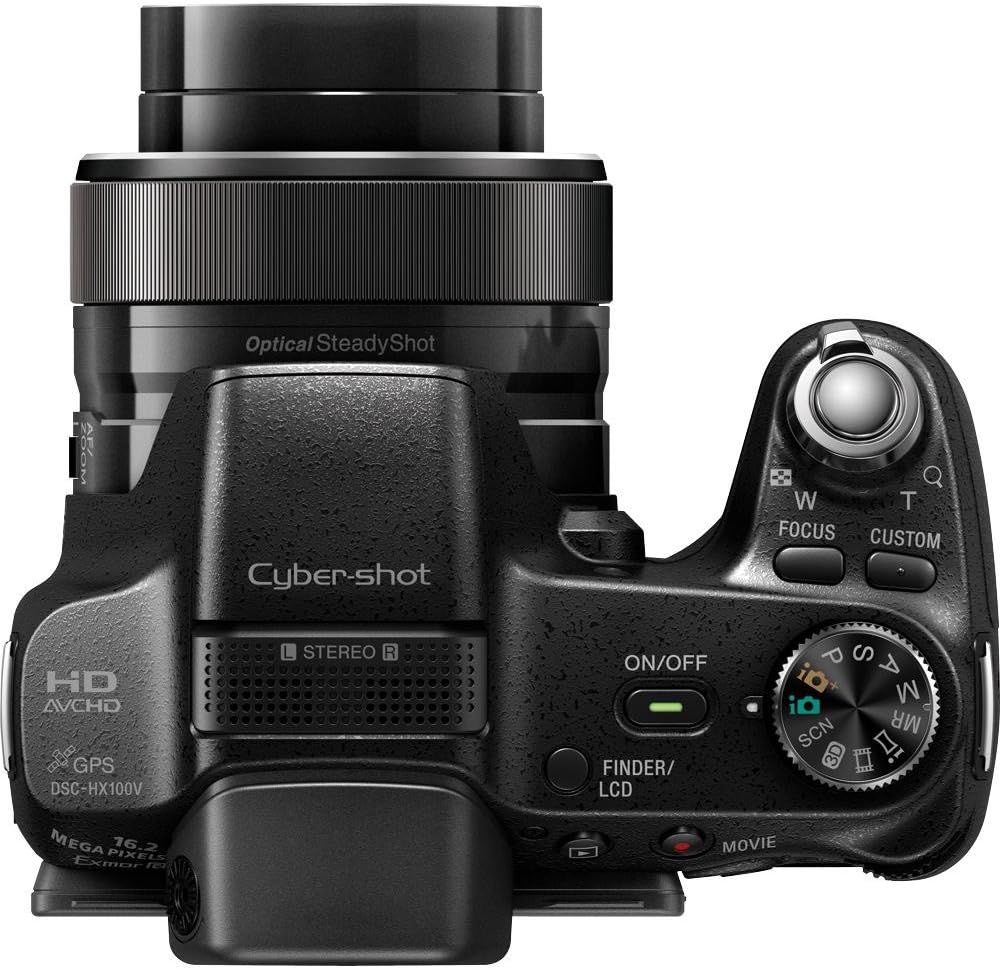
Figure 3: Top view of the camera, illustrating the control dial and GPS module.
Maintenance
Cleaning the Camera
- Camera Body: Wipe the camera body with a soft, dry cloth. For stubborn dirt, use a cloth lightly dampened with water or a mild detergent, then wipe dry.
- Lens: Use a lens brush to remove dust, then gently wipe with a lens cleaning cloth. Avoid touching the lens surface with your fingers.
- LCD Screen: Gently wipe the LCD screen with a soft, lint-free cloth. Avoid applying excessive pressure.
Storage
When not in use for extended periods, remove the battery from the camera. Store the camera in a cool, dry place, away from direct sunlight, high temperatures, and humidity. Use a desiccant if storing in a humid environment.
Troubleshooting
| Problem | Solution |
|---|---|
| Camera does not turn on. | Ensure the battery is fully charged and inserted correctly. Check if the battery terminals are clean. |
| Images are blurry. | Check if Optical SteadyShot is enabled. Ensure sufficient lighting. Hold the camera steady or use a tripod. Clean the lens. |
| Flash does not fire. | Check flash settings (e.g., ensure it's not set to "Flash Off"). Ensure the subject is within flash range. |
| Memory card error. | Ensure the memory card is inserted correctly. Try reformatting the card (this will erase all data). Use a compatible memory card. |
| Cannot connect to computer. | Ensure the USB cable is securely connected to both the camera and the computer. Check USB connection settings on the camera. Install the Picture Motion Browser software if necessary. |
Specifications
| Feature | Detail |
|---|---|
| Model Number | DSCHX100V/B |
| Dimensions (W x H x D) | 4.6 x 3.6 x 3.5 inches (approx.) |
| Weight | 1.3 pounds (approx.) |
| Image Sensor | 16.2 MP Exmor R CMOS |
| Lens | Carl Zeiss Vario-Sonnar T, 30x Optical Zoom |
| Maximum Focal Length | 810 Millimeters |
| Maximum Aperture | f/5.6 |
| Image Stabilization | Optical SteadyShot |
| Video Recording | Full HD 1080/60p |
| Supported File Formats | JPEG, RAW |
| Battery Type | NP-FH50 Lithium Ion (included) |
| Connectivity | USB, HDMI, TransferJet |
Warranty and Support
Warranty Information
This product is covered by a limited warranty. Please refer to the included Warranty Card for detailed terms and conditions, including warranty period and coverage. Retain your proof of purchase for warranty claims.
Customer Support
For technical assistance, troubleshooting, or service inquiries, please visit the official Sony support website or contact Sony customer service. Contact information can typically be found on the Sony website or on the warranty card.
Online Resources: For the latest drivers, software updates, and detailed FAQs, please visit the Sony support website.