
Introduction
The SeKi Grande is a universal learning remote control designed for simplicity and ease of use. It is an ideal solution for individuals who prefer a straightforward remote with large, clear buttons, such as seniors, children, or those with physical challenges.
This remote can learn commands from your existing infrared (IR) remote controls, allowing it to operate various IR-controlled devices like televisions, set-top boxes, and more. Please note that the SeKi Grande is compatible only with infrared remote controls. It cannot learn commands from Bluetooth or wireless remote controls. An original infrared remote is required for the learning process.
Product Overview
The SeKi Grande features a minimalist design with 18 extra-large, clearly labeled buttons for essential functions. Its ergonomic shape ensures comfortable handling.

Figure 1: Front view of the SeKi Grande Universal Learning Remote Control. This image shows the remote's silver and black design with its large, clearly visible buttons.
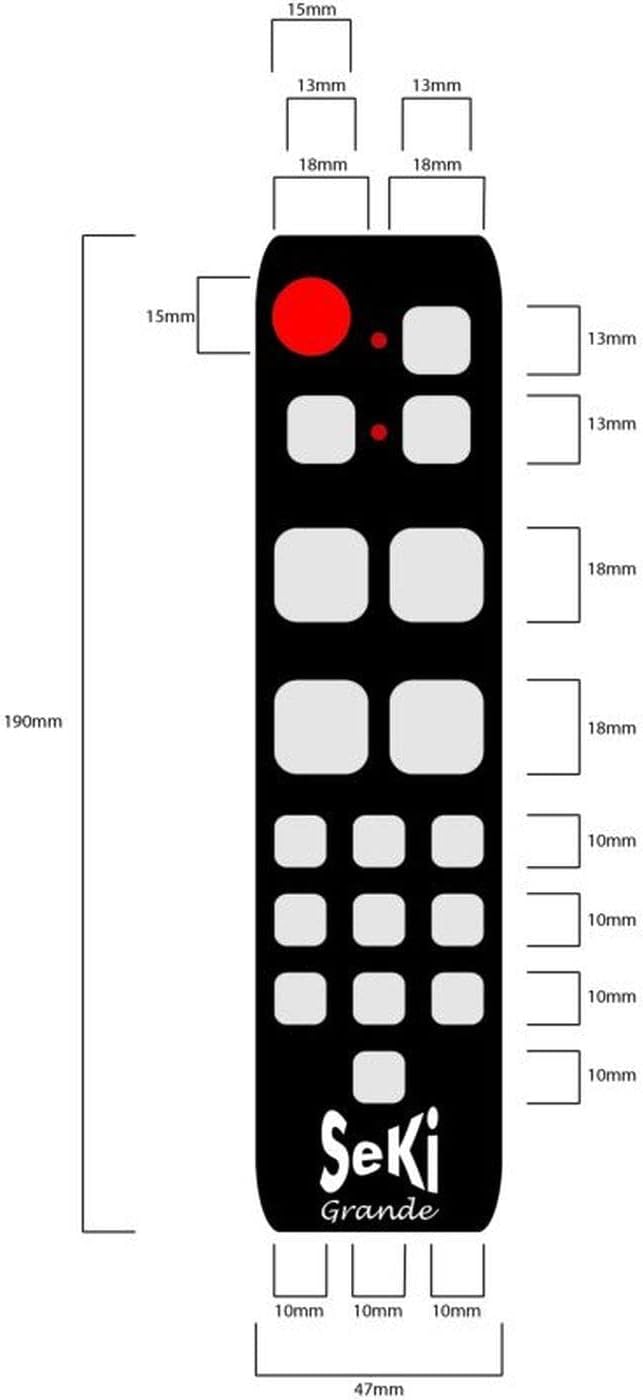
Figure 2: Close-up of the SeKi Grande remote control, highlighting the layout and labels of its 18 buttons, including power, volume, channel, and number keys.
The remote measures approximately 190 mm in length and 47 mm in width.

Figure 3: Diagram illustrating the dimensions of the SeKi Grande remote control, showing its length of 190mm and width of 47mm, along with button spacing.
Setup
1. Battery Installation
The SeKi Grande remote requires two (2) AAA batteries (not included).
- Open the battery compartment cover on the back of the remote.
- Insert two AAA batteries, ensuring correct polarity (+ and -).
- Close the battery compartment cover securely.
Note: The remote retains its learned settings even when batteries are changed.
2. Learning Commands from Your Original Remote
To program the SeKi Grande, you will need your original infrared remote control.
- Prepare Remotes: Place the SeKi Grande and your original remote control on a flat surface, facing each other, with their IR emitters aligned and approximately 1-3 cm apart.
- Enter Learning Mode: Press and hold the SET button (or a similar designated learning button, if present, otherwise refer to the manual for your specific model) on the SeKi Grande until the indicator light (usually red) illuminates and stays solid. This indicates it's in learning mode.
- Select Button to Learn: Press the button on the SeKi Grande that you wish to program (e.g., "Power"). The indicator light may start blinking slowly.
- Transmit Command: Press and hold the corresponding button on your original remote control (e.g., "Power") until the indicator light on the SeKi Grande blinks rapidly, then stays solid again. This signifies that the command has been successfully learned.
- Repeat for All Buttons: Repeat steps 3 and 4 for all other buttons you wish to program on the SeKi Grande (e.g., Volume Up/Down, Channel Up/Down, Number keys).
- Exit Learning Mode: Once all desired buttons are programmed, press the SET button again on the SeKi Grande to exit learning mode. The indicator light should turn off.
Tip: If a command is not learned correctly, the indicator light might flash differently or turn off. Simply repeat the learning process for that specific button.
Operating Instructions
After successfully programming the SeKi Grande, you can use it to control your devices.
- Power On/Off: Press the Power button to turn your device on or off.
- Volume Control: Use the Volume + and Volume - buttons to adjust the sound level.
- Channel Navigation: Use the Channel Up and Channel Down buttons to change channels.
- Number Keys: Use the number buttons (0-9) to directly input channel numbers.
- Other Functions: Any other buttons you programmed will perform their respective functions as learned from your original remote.
The maximum operating range for the SeKi Grande is approximately 10 meters (33 feet), provided there are no obstructions between the remote and the device's IR receiver.
Maintenance
- Cleaning: To clean the remote, wipe it with a soft, dry cloth. Do not use abrasive cleaners or solvents.
- Battery Replacement: Replace batteries when the remote's performance diminishes. As mentioned, learned settings are retained during battery changes.
- Storage: Store the remote in a dry place, away from direct sunlight and extreme temperatures.
Troubleshooting
- Remote not responding:
- Check if the batteries are inserted correctly and have sufficient charge. Replace if necessary.
- Ensure there are no obstructions between the remote and the device you are trying to control.
- Verify that the remote is pointed directly at the device's IR receiver.
- Learning process fails or buttons don't work after learning:
- Ensure your original remote is an infrared (IR) remote. Bluetooth or wireless remotes are not compatible.
- Make sure the IR emitters of both remotes are perfectly aligned and very close (1-3 cm) during the learning process.
- Press and hold the buttons firmly and steadily on both remotes during the learning process.
- The SeKi Grande can be reprogrammed at any time. If a button is not working, try repeating the learning process for that specific button.
- Ensure the original remote's batteries are not low, as this can affect signal strength during learning.
- Limited range:
- Replace the batteries in the SeKi Grande.
- Ensure there are no objects blocking the line of sight between the remote and the device.
Specifications
| Brand | SeKi |
| Model Name | 71933 |
| Connectivity Technology | Infrared (IR) |
| Number of Buttons | 18 |
| Maximum Supported Commands | Up to 32 (for various devices/functions) |
| Compatible Devices | Any device controlled by an infrared remote (e.g., Televisions, DVD players, Set-top boxes) |
| Maximum Range | 10 meters (approx. 33 feet) |
| Power Source | 2 x AAA Batteries (not included) |
| Dimensions (L x W) | 190 mm x 47 mm |
| Special Features | Learnable, simple, clear button layout, settings retained during battery change |
Warranty and Support
For warranty information and technical support, please refer to the documentation provided with your purchase or contact your retailer. You may also visit the official SeKi website for further assistance.


