
1. Introduction
The Walimex pro XXL 190-465cm Background System is a professional-grade, highly stable, and versatile solution for photographers and videographers. Designed for both studio and mobile applications, this system provides a robust framework for various backdrops, including paper, fabric, vinyl, and canvas. Its impressive dimensions, with a height capacity of up to 4 meters and a width adjustable from 1.90 to 4.65 meters, accommodate a wide range of photographic and video needs, including large-scale productions and green screen setups.
Constructed from high-strength aluminum, the system combines durability with portability, making it easy to transport and set up. The design emphasizes stability, featuring 40mm diameter tripods and a sturdy plug-in crossbar, ensuring secure support even at maximum extension. This manual provides detailed instructions for assembly, operation, maintenance, and troubleshooting to ensure optimal performance and longevity of your background system.
2. Product Features
- Mobile and Expansive: Offers unlimited possibilities for both mobile and stationary use. The XXL format supports extra-large settings for photo, video, and streaming recordings, with a height up to 4m and width up to 4.65m.
- Superior Stability: Features 40mm diameter tripods and a robust plug-in crossbar. An extra-wide base of up to 122cm ensures a very secure stand, even at full height.
- Versatile Backdrop Suspension: Designed to perfectly suspend various backdrops, including giant muslin cotton canvases, background paper, and vinyl rolls.
- Easy and Safe Assembly: Quick and straightforward setup with pneumatic suspension for added comfort and safety during height adjustments.
- Lightweight Aluminum Construction: Made from a high-strength aluminum alloy, making the system stable yet portable despite its large size. Includes a high-quality carrying bag for easy transport and storage.
3. Components
The Walimex pro Background System XXL 190-465cm includes the following components:
- Two (2) Light Stands / Tripods (with 40mm diameter tubes)
- One (1) Telescopic Crossbar (adjustable width)
- One (1) Carrying Bag
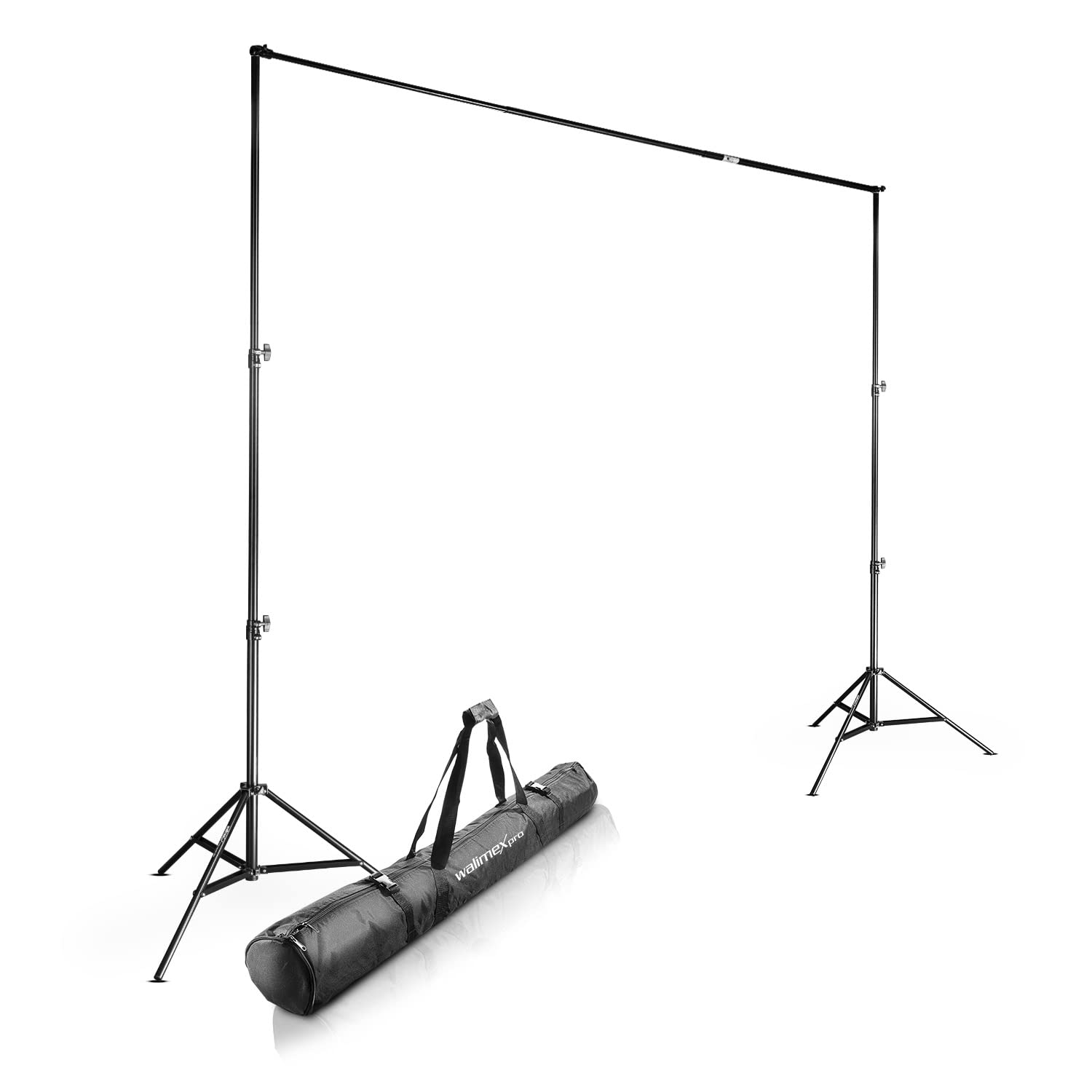
4. Setup Instructions
Follow these steps to assemble your Walimex pro Background System:
- Unpack Components: Carefully remove all components from the carrying bag and inspect them for any damage.
- Set Up Tripods:
- Place each tripod on a flat, stable surface.
- Extend the legs of each tripod fully to ensure maximum stability. Secure the leg locks.
- Loosen the height adjustment knobs on each tripod and extend the central column to your desired height. The pneumatic suspension will assist in smooth adjustment. Secure the knobs tightly once the desired height is reached.
- Assemble Crossbar: The crossbar consists of multiple sections. Slide the sections together to form the desired width. Ensure all sections are securely interlocked.
- Attach Crossbar to Tripods:
- Locate the mounting pins on top of each tripod.
- Carefully place each end of the assembled crossbar onto the mounting pins of the tripods. Ensure the crossbar is seated firmly and level.
- Adjust Height and Width: Make final adjustments to the height of the tripods and the width of the crossbar as needed for your specific backdrop and shooting requirements. Always ensure all locks are tightened before attaching a backdrop.
- Attach Backdrop: Secure your chosen backdrop (paper, fabric, vinyl, etc.) to the crossbar using appropriate clamps or clips (not included). Distribute the weight evenly.
5. Operating Instructions
Once assembled, operating the Walimex pro Background System is straightforward:
- Height Adjustment: To adjust the height, loosen the height adjustment knobs on the tripod legs. Slowly raise or lower the central column to the desired position. The pneumatic suspension will prevent sudden drops. Re-tighten the knobs securely.
- Width Adjustment: The crossbar's width can be adjusted by adding or removing sections, or by extending/retracting telescopic sections if applicable. Ensure all connections are firm before use.
- Backdrop Management: When changing backdrops, always ensure the system is stable. Remove the current backdrop before attaching a new one. Distribute the weight of the backdrop evenly across the crossbar to prevent sagging.
- Portability: For mobile use, disassemble the system by reversing the setup steps. Store all components neatly in the provided carrying bag.
6. Maintenance
Proper maintenance ensures the longevity and optimal performance of your background system:
- Cleaning: Wipe down the aluminum parts with a soft, dry cloth. For stubborn dirt, use a slightly damp cloth and mild soap, then dry thoroughly. Avoid abrasive cleaners or solvents.
- Lubrication: Periodically check the moving parts, such as the height adjustment mechanisms and leg locks. If they feel stiff, apply a small amount of silicone-based lubricant. Avoid over-lubrication.
- Storage: When not in use, disassemble the system and store it in its carrying bag in a cool, dry place, away from direct sunlight and extreme temperatures.
- Inspection: Regularly inspect all components for signs of wear, damage, or loose connections. Ensure all screws and locks are tight before each use.
7. Troubleshooting
Here are some common issues and their solutions:
| Problem | Possible Cause | Solution |
|---|---|---|
| System is unstable or wobbly. | Legs not fully extended; locks not tightened; uneven surface; excessive weight on crossbar. | Ensure tripod legs are fully extended and locked. Tighten all height adjustment knobs. Place system on a flat, level surface. Reduce backdrop weight if it exceeds capacity. |
| Crossbar sags in the middle. | Backdrop too heavy; crossbar sections not fully engaged. | Ensure crossbar sections are fully interlocked. Use a lighter backdrop or distribute weight more evenly. |
| Tripod height adjustment is stiff. | Lack of lubrication; dirt accumulation. | Clean the central column and apply a small amount of silicone-based lubricant. |
| Components do not fit into carrying bag. | Improper disassembly or packing. | Ensure all sections are fully collapsed and disassembled according to instructions. Pack components neatly. |
8. Specifications
- Brand: Walimex Pro
- Model Number: 16955
- Product Type: XXL Background System
- Color: Black
- Material: High-strength Aluminum Alloy
- Adjustable Width: 190 cm - 465 cm (approx. 6.2 ft - 15.2 ft)
- Maximum Height: Up to 400 cm (approx. 13.1 ft)
- Tripod Tube Diameter: 40 mm
- Maximum Base Width (Tripod): 122 cm (approx. 4 ft)
- Item Weight: 8.24 kg (8240 Grams)
- Country of Origin: China
9. Warranty and Support
Walimex Pro products are designed for durability and performance. While specific warranty details may vary by region and retailer, Walimex Pro stands behind the quality of its products.
For technical support, spare parts, or warranty inquiries, please contact your local Walimex Pro distributor or visit the official Walimex Pro website for customer service contact information. Please have your model number (16955) and purchase details ready when contacting support.


