
KODAK M577
KODAK EasyShare Touch M577 Digital Camera User Manual
Model: M577
Introduction
This manual provides detailed instructions for the KODAK EasyShare Touch M577 Digital Camera. The M577 features a 14-megapixel sensor, a 5x wide-angle optical zoom lens, and a 3.0-inch HVGA capacitive touchscreen LCD. It is designed for ease of use, offering features like Smart Capture and one-button sharing to various social networks and email.
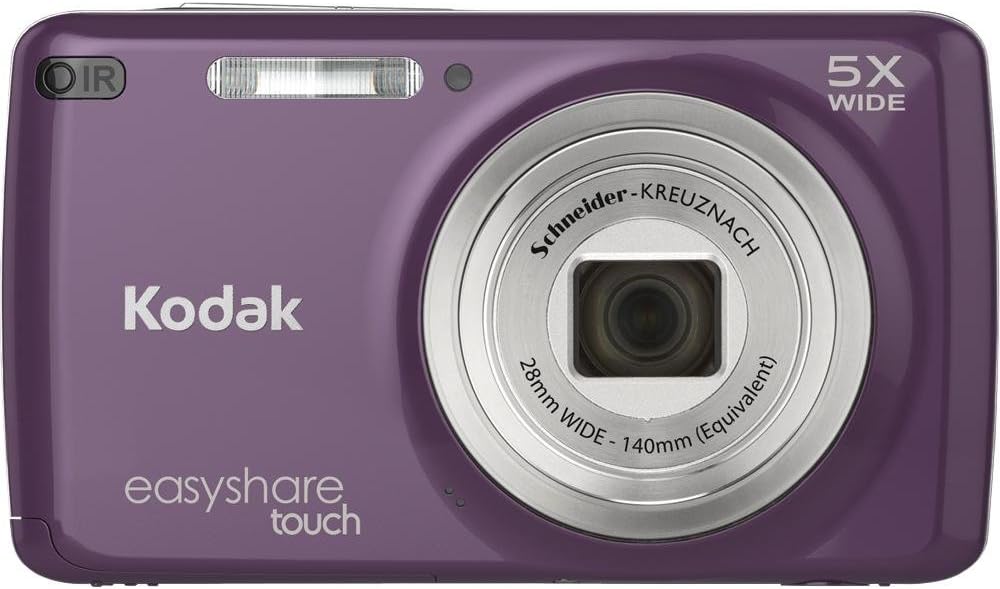
Figure 1: Front view of the KODAK EasyShare Touch M577 Digital Camera in purple. This image displays the camera's lens, flash, and the "Kodak EasyShare Touch" branding.
Setup
1. What's in the Box
Verify that all items are present in the packaging:
- KODAK EASYSHARE TOUCH Camera (M577)
- KODAK Rechargeable Li-Ion Battery KLIC-7006
- KODAK USB AC adapter for in-camera charging
- Wrist strap
- USB cable
- User Guide (this document)
2. Charging the Battery
The camera uses a KODAK Rechargeable Li-Ion Battery KLIC-7006. To charge the battery:
- Insert the battery into the camera.
- Connect the camera to the KODAK USB AC adapter using the provided USB cable.
- Plug the AC adapter into a wall outlet. The camera will charge while the battery is inside.
Note: The battery must be inside the camera for charging.
3. Inserting a Memory Card
The camera has 64 MB of internal memory, but it is recommended to use a microSD/microSDHC card for expanded storage.
- Locate the memory card slot on the camera (refer to the camera diagram in the User Guide for exact location).
- Insert the microSD/microSDHC card into the slot until it clicks into place.
- To remove, gently press the card until it ejects.
Operating the Camera
1. Powering On/Off
Press the power button located on the top of the camera to turn it on or off.
2. Taking Photos
To capture a still image:
- Frame your shot using the 3.0-inch HVGA touchscreen LCD.
- Press the shutter button halfway down to focus.
- Press the shutter button fully to take the picture.
3. Using the Touchscreen LCD
The 3.0-inch HVGA capacitive touchscreen LCD allows for intuitive navigation and interaction. It offers twice the resolution of standard displays for clear viewing.
- Navigation: Tap icons and swipe to navigate menus and review photos.
- Tagging: In review mode, tap on faces to tag people.
- Creative Effects: Apply frames, background blur or spot color effects directly on the camera.
4. Optical Zoom
The camera features a 5x wide-angle optical zoom lens. Use the zoom controls (typically a rocker switch near the shutter button) to adjust the focal length. The 28mm wide-angle capability helps capture broader scenes.
5. Smart Capture Feature
Kodak's Smart Capture feature automatically optimizes camera settings for various environments.
- Intelligent Scene Detection: Analyzes the scene and adjusts settings for optimal results.
- Intelligent Capture Control: Automatically sets camera parameters for clear, sharp pictures, even in low light.
- Intelligent Image Processing: Reduces noise and enhances details for vibrant, true-to-life colors.
6. Scene and Color Modes
Select from various scene modes and color modes to suit your photographic needs:
- Scene Modes: Sport, Portrait, Bright, Fireworks, Backlight, and more.
- Color Modes: Vivid, Full, Basic Color, Black & White, and Sepia.
7. Recording Videos
The camera can record 720p HD video.
- Press the dedicated video record button to start recording.
- Press the button again to stop recording.
- Videos can be reviewed and edited directly on the touchscreen.
- For viewing on an HDTV, an optional HDMI cable and remote control are required.
Video 1: An introductory video showcasing the features of the Kodak EasyShare Touch camera, including its touchscreen interface, sharing capabilities, and HD video recording.
8. Sharing Photos and Videos
The KODAK EasyShare Touch M577 features a dedicated Share button for easy uploading.
- In review mode, press the Share button.
- Select your desired sharing destinations (e.g., Facebook, email, KODAK Gallery, KODAK PULSE Digital Frames, YouTube).
- Connect your camera to a computer using the USB cable, or insert your memory card into a card reader.
- Your tagged photos and videos will automatically upload to the selected destinations.
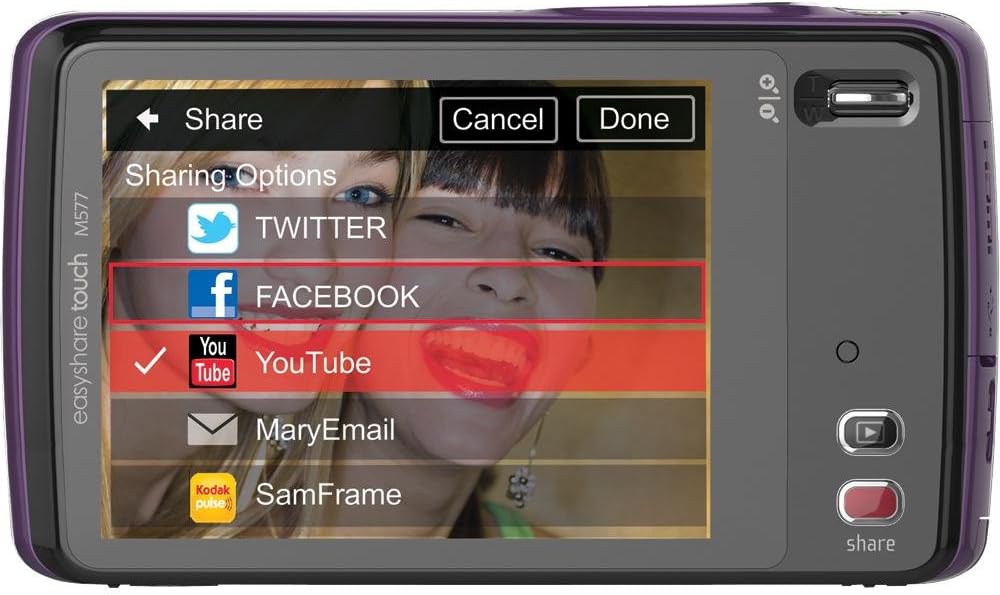
Figure 2: Rear view of the KODAK EasyShare Touch M577 Digital Camera, displaying the touchscreen interface with sharing options for social media platforms like Facebook and YouTube.
9. Face Detection
The camera's face detection feature automatically identifies faces in your shots and adjusts camera settings to ensure they are well-exposed and in focus.
Maintenance
- Cleaning: Use a soft, lint-free cloth to clean the camera body and screen. For the lens, use a specialized lens cleaning cloth and solution.
- Storage: Store the camera in a cool, dry place away from direct sunlight and extreme temperatures. Remove the battery if storing for extended periods.
- Battery Care: Avoid fully discharging the battery frequently. Charge it regularly to maintain its lifespan.
Troubleshooting
This section addresses common issues you might encounter with your KODAK EasyShare Touch M577 camera.
Camera Freezes or Becomes Unresponsive
If the camera freezes or does not respond to commands:
- Remove the battery from the camera.
- Wait for a few seconds.
- Reinsert the battery and power on the camera.
Slow Response Time (e.g., after taking a picture, deleting)
Some operations, such as reviewing a picture immediately after capture or deleting a photo, may exhibit a slight delay.
- For faster shooting, you can tap the shutter button again to dismiss the review screen quickly.
- For deleting multiple unwanted photos, it may be more efficient to transfer them to a computer and delete them there.
Battery Not Charging
Ensure the battery is correctly inserted into the camera and the USB cable is securely connected to both the camera and the KODAK USB AC adapter, which is plugged into a functional wall outlet.
Specifications
| Feature | Detail |
|---|---|
| Model Name | M577 |
| Megapixels | 14 MP Effective Still Resolution |
| Optical Zoom | 5x SCHNEIDER-KREUZNACH VARIOGON (28-140mm equivalent) |
| Digital Zoom | 5x |
| Display | 3.0 in. HVGA High-Resolution Touchscreen LCD |
| Image Stabilization | Digital, Optical |
| Internal Memory | 64 MB (approx. 10.9 MB available for storage) |
| Storage Expansion | microSD/microSDHC card slot |
| Video Resolution | 720p HD (1280 x 720 at 30 fps) |
| Battery Type | KODAK Rechargeable Li-Ion Battery KLIC-7006 |
| Connectivity | USB 2.0, HDMI (optional cable) |
| Face Detection | Yes |
| Smart Capture | Yes |
| Color | Purple (for this specific model variant) |
| Weight | 0.33 Pounds |
System Requirements for PC Connection
- Windows: WINDOWS XP SP2, VISTA, WINDOWS 7 or later; INTERNET EXPLORER 6.0 or higher.
- Macintosh: MACINTOSH 10.4, 10.5, 10.6 or higher; SAFARI 1.1 or higher.
- Hardware: PENTIUM 4, 2.8 GHz processor or higher; 1 GB RAM and 64 MB video RAM; 300 MB hard drive space available; CD-ROM drive; Available USB port (1.1 or higher); 1024 x 768 display resolution.
Warranty and Support
For warranty information, technical support, or service inquiries, please refer to the official KODAK website or contact KODAK customer service. Keep your purchase receipt as proof of purchase.
Disclaimer: Product specifications and features are subject to change without notice.
Related documentsM577


Ask a question about this manual
Ask about setup, troubleshooting, compatibility, parts, safety, or missing instructions. Manuals+ will review the question and use this page’s manual context to help answer it.