
Audio 2000S AKJ-7046
Audio 2000S AKJ-7046 Karaoke Mixing Amplifier User Manual
Model: AKJ-7046
Introduction
This manual provides comprehensive instructions for the setup, operation, and maintenance of your Audio 2000S AKJ-7046 Karaoke Mixing Amplifier. Please read this manual thoroughly before using the amplifier to ensure proper functionality and to maximize your enjoyment of its features. The AKJ-7046 is a digital key and echo mixing amplifier designed for high-fidelity audio performance in karaoke and DJ applications.
Key Features
- Power Output: 150W + 150W Max. Power Output (8 Ohms)
- Digital Echo: Advanced digital echo microphone tone controls for enhanced vocal effects.
- Microphone Inputs: Three microphone inputs with digital echo and digital key changer.
- Audio/Video Inputs: Three channel video and audio inputs for versatile connectivity.
- Display: Clear V.F.D. (Vacuum Fluorescent Display) for easy monitoring of settings.
- Key Control: Quality key control with extremely low key-shift distortion.
- Voice Canceling: Function for karaoke multiplex discs.
- Sub-woofer Output: Dedicated output for connecting a self-powered subwoofer.
- Video Outputs: Two video output jacks for connecting to multiple displays.
Package Contents
Please check the package carefully to ensure all items are present:
- Audio 2000S AKJ-7046 Karaoke Mixing Amplifier
- Microphone
- Power Cord
- Remote Control
- User Manual (This document)
Product Overview
Front Panel

The front panel features the power button, standby indicator, three microphone input jacks (MIC 1, MIC 2, MIC 3) with individual volume controls, master volume control, digital V.F.D. display, and various control buttons for mode, bass, treble, mute, source selection, echo, repeat, and key control (down/up).
Rear Panel
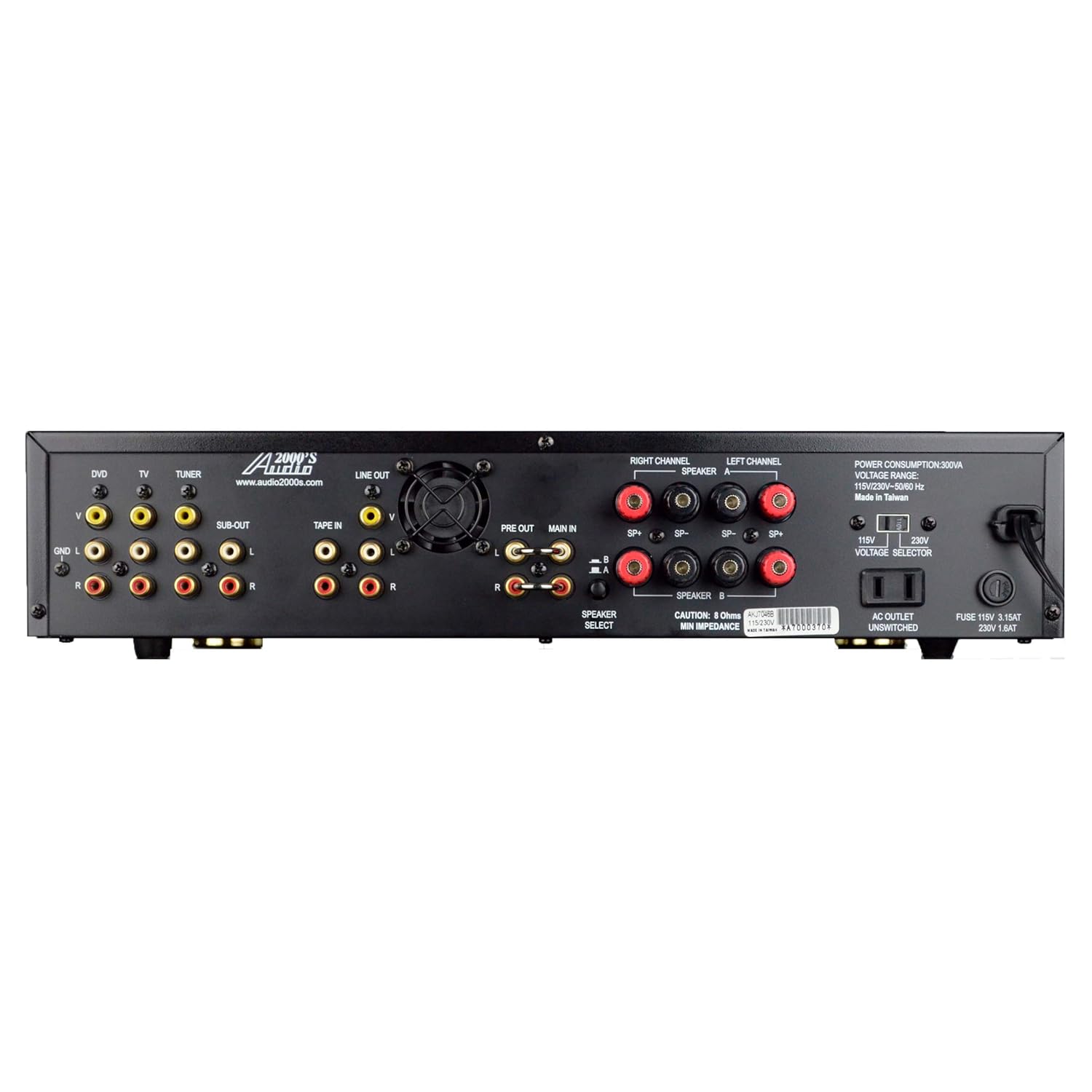
The rear panel includes various audio and video input/output terminals (DVD, TV, Tuner, Tape In, Line Out, Sub-Out, Pre Out, Main In), speaker output terminals (Right/Left Channel), a speaker select switch, voltage selection switch (110V/230V), AC power input, and fuse holder. It also shows power consumption details.
Setup Guide
1. Unpacking and Placement
- Carefully remove the amplifier and all accessories from the packaging.
- Place the amplifier on a stable, flat surface with adequate ventilation. Ensure there is enough space around the unit for heat dissipation.
- Keep the unit away from direct sunlight, heat sources, and moisture.
2. Power Connection
- Before connecting the power cord, ensure the voltage selection switch on the rear panel matches your local power supply (110V or 230V).
- Connect the supplied power cord to the AC power input on the rear panel of the amplifier and then to a suitable wall outlet.
3. Speaker Connection
- Connect your speakers to the SPEAKER OUTPUT terminals on the rear panel. Ensure correct polarity (+ to + and - to -) for both left and right channels.
- The amplifier supports 8 Ohm speakers.
- Use high-quality speaker cables for optimal sound performance.
4. Audio/Video Source Connection
- Connect your audio/video sources (e.g., DVD player, TV, Tuner) to the corresponding AUDIO and VIDEO INPUT terminals on the rear panel.
- For karaoke, connect your karaoke player to one of the available A/V inputs.
- If using a self-powered subwoofer, connect it to the SUB-OUT terminal.
5. Microphone Connection
- Plug your microphones into the MIC 1, MIC 2, or MIC 3 input jacks on the front panel.
Operating Instructions
1. Power On/Off
- Press the POWER button on the front panel to turn the amplifier on or off. The V.F.D. display will illuminate when powered on.
2. Source Selection
- Use the SOURCE buttons (< SOURCE >) on the front panel to select the desired audio/video input source (e.g., DVD, TV, Tuner, Tape).
3. Volume Control
- Adjust the overall sound level using the large MASTER VOLUME knob.
- For microphones, use the individual MIC VOLUME knobs (MIC 1, MIC 2, MIC 3) to adjust their respective levels.
4. Tone Controls
- Use the BASS and TREBLE controls to adjust the low and high frequencies of the music.
- For microphone tone, use the dedicated MIC TONE CONTROLS.
5. Echo and Key Control (Karaoke)
- Adjust the echo effect using the ECHO buttons (< ECHO >).
- Modify the musical key using the KEY buttons (< KEY >) to match your vocal range.
- The REPEAT function controls the number of echo repetitions.
- The VOICE CANCELING function can be used with karaoke multiplex discs to remove the lead vocal.
6. Mute Function
- Press the MUTE button to temporarily silence the audio output. Press again to unmute.
Maintenance
- Cleaning: Use a soft, dry cloth to clean the exterior of the amplifier. Do not use liquid cleaners or aerosols.
- Ventilation: Ensure that the ventilation openings are not blocked. Proper airflow is crucial to prevent overheating.
- Storage: If storing the unit for an extended period, disconnect it from power and store it in a cool, dry place.
- Power Surge Protection: Consider using a surge protector to safeguard the amplifier from electrical fluctuations.
Troubleshooting
| Problem | Possible Cause | Solution |
|---|---|---|
| No power | Power cord not connected; Power outlet faulty; Fuse blown. | Ensure power cord is securely connected. Try a different outlet. Check and replace fuse if necessary (refer to specifications for fuse type). |
| No sound output | Incorrect source selected; Volume too low; Speakers not connected properly; Mute function active. | Select the correct input source. Increase master volume. Check speaker connections and polarity. Deactivate mute function. |
| Microphone not working | Microphone not plugged in; Microphone volume too low; Faulty microphone. | Ensure microphone is securely plugged into the correct jack. Increase individual microphone volume. Test with another microphone if available. |
| Remote control not responding | Batteries dead/incorrectly inserted; Infrared path blocked; Power surge affecting remote functionality. | Replace batteries. Ensure no obstructions between remote and amplifier. Unplug amplifier power for 15 seconds, then replug (as per user review suggestion). |
| Fan is noisy | Normal operation; Dust accumulation. | Some fan noise is normal. Ensure ventilation is clear. If excessive, contact customer support. |
Specifications
| Model | AKJ-7046 |
| Brand | Audio 2000S |
| Power Output | 150W + 150W Max. (8 Ohms) |
| Microphone Inputs | 3 (with digital echo and key changer) |
| Audio Inputs | 4 (e.g., DVD, TV, Tuner, Tape) |
| Video Inputs | 3 |
| Video Outputs | 2 |
| Sub-woofer Output | 1 |
| Dimensions (L x W x H) | Approx. 52.83 x 40.64 x 17.78 cm |
| Weight | Approx. 6.44 kg |
| Power Source | AC 110V/230V Selectable |
| Compatible Devices | Microphone, Television, Karaoke Players, DVD Players, Tuners, Tape Decks |
Warranty and Support
For warranty information and technical support, please refer to the official Audio 2000S website or contact their customer service department. Keep your purchase receipt as proof of purchase for warranty claims.
Manufacturer: Audio 2000s
Date First Available: 2 December 2013