
Introduction
This manual provides detailed instructions for the installation, operation, and maintenance of your Dual DSA1014 In-Dash Car Stereo Receiver. Please read this manual thoroughly before using the product to ensure proper operation and to prevent damage.
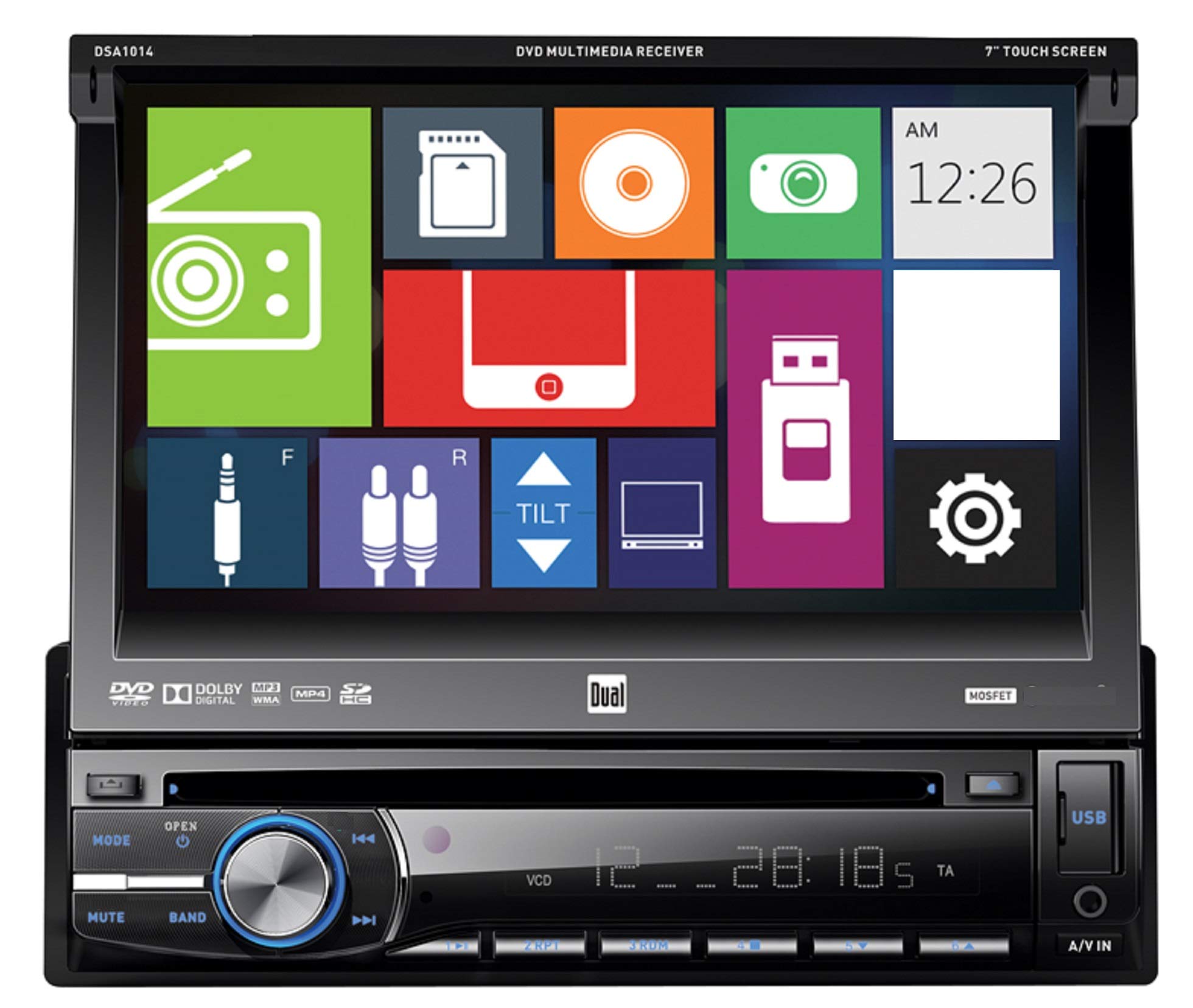
Front view of the Dual DSA1014 In-Dash Car Stereo Receiver, showing the 7-inch touchscreen display, control buttons, volume knob, USB port, and A/V input.
Safety Information
- Always consult a qualified professional for installation to avoid damage to the unit or vehicle.
- Do not operate the unit in a manner that distracts you from driving.
- Ensure all wiring is correctly connected to prevent short circuits or electrical hazards.
- Keep the detachable face plate clean and handle it with care.
Package Contents
Verify that all items are present in the package:
- Dual DSA1014 In-Dash Car Stereo Receiver
- Remote Control
- Wiring Harness
- Installation Hardware
- User Manual (this document)
Product Features
- 7-inch Digital LED Backlit LCD Touchscreen Display (800 x 480 resolution)
- Detachable Face Plate
- CD/CD-R/RW, DVD/DVD-R/RW, MP3, and WMA Playback
- AM/FM Tuner with 24FM/12AM Presets
- Direct USB Control for iPod/iPhone (iPod and iPhone Ready)
- Front USB Input (supports up to 64GB flash drive)
- Front SD Card Slot (located behind the screen, supports up to 2GB SD card)
- Front 3.5mm A/V Auxiliary Input
- 5 Equalizer Presets: Pop, Rock, Classic, Jazz, and Flat
- CEA-2006 Compliant Amplifier: Peak 60W x 4 channels, RMS 18W x 4 channels
- CD Text Information Display and MP3 ID3 Tag Display (Title/Artist/Album)
Setup and Installation
Installation of this car stereo receiver requires technical knowledge and experience. It is highly recommended to have the unit installed by a professional car audio technician. Incorrect installation can lead to damage to the unit, vehicle, or personal injury.
Wiring Connections
Refer to the wiring diagram provided with your unit for specific connections. Ensure all wires are securely connected and insulated to prevent short circuits. Common connections include:
- Power (Yellow): Constant 12V+
- Accessory (Red): Switched 12V+
- Ground (Black): Vehicle chassis ground
- Speaker Outputs: Connect to vehicle speakers (ensure correct polarity).
- Antenna: Connect to vehicle's radio antenna.
Mounting
Mount the unit securely in the vehicle's dashboard using the supplied mounting hardware. Ensure adequate clearance for the detachable face plate and disc insertion.
Operating Instructions
Basic Controls
The DSA1014 features a 7-inch touchscreen for primary control, supplemented by physical buttons on the front panel.
- Power/Mode Button: Press to turn the unit ON/OFF. Press briefly to cycle through available sources (Radio, Disc, USB, SD, AUX, iPod).
- Volume Knob: Rotate to adjust the volume level.
- Mute Button: Press to mute or unmute audio output.
- Band Button: In Radio mode, press to switch between FM1, FM2, FM3, AM1, and AM2 bands.
- Track/Seek Buttons (◀◀ / ▶▶): Skip tracks on media, or seek radio stations.
- Open Button: Press to open the faceplate and access the disc slot or SD card slot.
- USB Port: Located on the front panel for USB flash drives and iPod/iPhone connection.
- A/V IN (3.5mm): Front auxiliary input for external audio/video devices.
Disc Playback (CD/DVD)
- Press the OPEN button to tilt the faceplate.
- Insert a CD or DVD into the disc slot with the label side up. The unit will automatically load the disc and begin playback.
- Use the touchscreen controls or physical buttons to navigate tracks/chapters, pause, or stop playback.
Radio Operation
- Press the MODE button until "Radio" is selected.
- Press the BAND button to select FM1, FM2, FM3, AM1, or AM2.
- Use the seek buttons (◀◀ / ▶▶) to automatically search for strong stations.
- To manually tune, use the touchscreen controls.
- To store a preset, tune to the desired station, then press and hold one of the preset numbers on the touchscreen until you hear a beep.
USB/iPod/iPhone Connectivity
- Connect your USB flash drive or iPod/iPhone to the front USB port using a compatible cable.
- The unit will automatically detect the device and switch to USB or iPod mode.
- Use the touchscreen to browse and select audio files or control your iPod/iPhone.
- The USB port also provides charging for connected devices.
SD Card Operation
- Press the OPEN button to tilt the faceplate.
- Insert an SD card (up to 2GB) into the SD card slot.
- The unit will automatically detect the card and switch to SD mode.
- Use the touchscreen to browse and select audio files.
Auxiliary Input
- Connect an external audio/video device to the front 3.5mm A/V IN jack.
- Press the MODE button until "AUX" is selected.
- Control playback from the connected device.
Equalizer Settings
Access the audio settings via the touchscreen to select from 5 preset equalizer curves:
- Pop
- Rock
- Classic
- Jazz
- Flat
Maintenance
- Cleaning the Unit: Use a soft, dry cloth to clean the unit. For stubborn stains, dampen the cloth with water. Never use abrasive cleaners or solvents.
- Cleaning the Touchscreen: Gently wipe the touchscreen with a soft, lint-free cloth. Avoid excessive pressure.
- Detachable Face Plate: When detached, store the face plate in its protective case to prevent scratches and damage.
- Disc Care: Handle discs by their edges. Keep them clean and free of scratches.
Troubleshooting
| Problem | Possible Cause | Solution |
|---|---|---|
| No Power | Incorrect wiring; Blown fuse; Vehicle battery low. | Check power and ground connections; Replace fuse; Check vehicle battery. |
| No Sound | Volume too low; Mute activated; Speaker wires disconnected; Incorrect audio source. | Increase volume; Deactivate mute; Check speaker connections; Select correct audio source. |
| Disc Error | Disc dirty or scratched; Incorrect disc format; Disc inserted incorrectly. | Clean or replace disc; Ensure disc is compatible (CD/DVD); Reinsert disc correctly. |
| USB/SD Not Recognized | Incompatible format; Device not properly connected; SD card capacity exceeded. | Ensure files are MP3/WMA; Reconnect device; Use SD card up to 2GB; Check USB flash drive format. |
| Remote Control Not Working | Dead battery; Obstruction; Not pointing at receiver. | Replace battery; Remove obstruction; Point remote directly at the unit. |
Specifications
| Feature | Detail |
|---|---|
| Model Number | DSA1014 |
| Display | 7" Digital LED Backlit LCD Touchscreen (800 x 480) |
| Power Output (Peak) | 60 Watts x 4 channels |
| Power Output (RMS) | 18 Watts x 4 channels (CEA-2006 compliant) |
| Media Playback | CD/CD-R/RW, DVD/DVD-R/RW, MP3, WMA |
| Tuner | AM/FM with 24FM/12AM presets |
| USB Input | Front, supports up to 64GB flash drive, iPod/iPhone direct control and charging |
| SD Card Slot | Front (behind faceplate), supports up to 2GB SD card |
| Auxiliary Input | Front 3.5mm A/V |
| Equalizer | 5 Presets (Pop, Rock, Classic, Jazz, Flat) |
| Chassis Size | Single-DIN |
| Item Weight | 2.2 pounds (approx. 1 kg) |
| Product Dimensions | 7 x 7 x 2 inches |
Warranty and Support
Dual Electronics provides a limited warranty for this product. The warranty period is typically 1 year from the date of purchase. For specific warranty terms, conditions, and to register your product, please refer to the warranty card included in your package or visit the official Dual Electronics website.
For technical support, troubleshooting assistance, or service inquiries, please contact Dual Electronics customer support. Contact information can usually be found on the manufacturer's website or in the product packaging.
Online Resources: www.dualav.com


