
1. Introduction
The ONKYO WAVIO SE-U55SX2(B) is a USB Digital Audio Processor designed to enhance your computer's audio experience. It allows for high-quality playback of digital music files from your PC and enables the digital archiving of analog audio sources such as records, cassettes, and MDs. This unit can also function as a standalone Digital-to-Analog Converter (DAC) or an audio selector for various digital and analog devices.
2. Key Features
- High-Quality D/A Conversion: Equipped with a premium Burr-Brown PCM1796 DAC, achieving a signal-to-noise ratio (S/N) of 115dB for superior audio reproduction.
- VLSC (Vector Linear Shaping Circuitry): Incorporates Onkyo's proprietary VLSC technology to significantly reduce pulse noise generated during D/A conversion, resulting in smoother, more faithful audio signals.
- High-Precision Clock Circuit: Features an internal clock circuit with a frequency deviation of ±10PPM, drastically reducing jitter for high-fidelity music playback.
- 24bit/96kHz High-Resolution Audio Support: Supports high-resolution audio signals up to 24-bit/96kHz for both digital input and output, capturing fine nuances in sound.
- Versatile Input/Output Terminals: Offers a wide range of connectivity options including USB, 3 digital inputs (2 optical, 1 coaxial), 2 digital outputs (optical), 1 analog line input (RCA), 1 analog line output (RCA), a microphone input (3.5mm), and a headphone output (3.5mm).
- AC Adapter Power Supply: Utilizes an AC adapter for stable power delivery, ensuring consistent performance independent of PC power fluctuations.
- Bundled Software: Includes "DigiOnSound6 L.E. for ONKYO" software for easy recording, editing, and management of audio files.
3. Package Contents
Please ensure all items are present in the package:
- ONKYO WAVIO SE-U55SX2(B) Main Unit
- AC Power Adapter
- USB Cable
- RCA Stereo Audio Cable
- Optical Digital Cable
- Installation CD (DigiOnSound6 L.E. for ONKYO software, drivers)
- Instruction Manual (this document)
4. Safety Information
To ensure safe operation and prevent damage, please read and adhere to the following safety guidelines:
- Do not expose the unit to rain, moisture, or extreme temperatures.
- Avoid placing the unit in direct sunlight or near heat sources.
- Ensure proper ventilation around the unit to prevent overheating.
- Use only the provided AC adapter. Using an unauthorized adapter may cause malfunction or damage.
- Do not open the unit's casing. Refer all servicing to qualified personnel.
- Keep out of reach of children.
- Disconnect the power plug from the wall outlet if the unit will not be used for an extended period.
5. Setup
5.1. Unit Overview
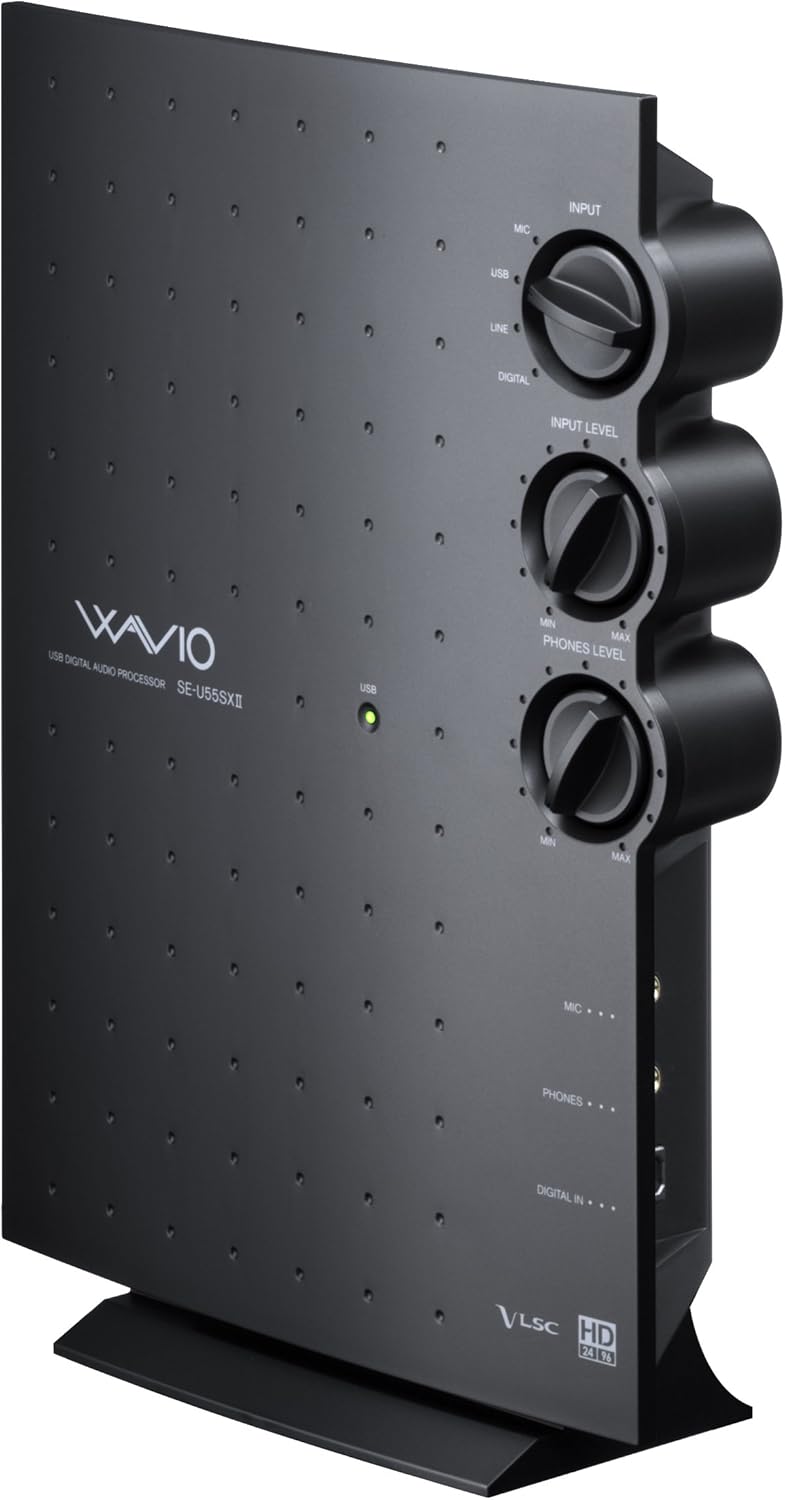
Figure 1: Front view of the ONKYO WAVIO SE-U55SX2(B) in vertical orientation, showing the main unit with its distinctive design and control knobs on the side.
5.2. Connecting to a Computer
- Connect the provided USB cable from the USB port (Type B) on the SE-U55SX2(B) to an available USB port on your computer.
- Insert the Installation CD into your computer's CD/DVD drive and follow the on-screen instructions to install the necessary drivers and software. While the device may be recognized automatically by some operating systems, installing the official drivers is recommended for optimal performance.
5.3. Power Connection
- Connect the AC adapter to the DC IN 5.0V port on the rear of the SE-U55SX2(B).
- Plug the AC adapter into a wall outlet. The unit will power on.
5.4. Audio Connections
The SE-U55SX2(B) offers a variety of input and output options. Refer to the rear panel diagram below for port locations.

Figure 2: Rear panel connections including analog RCA, digital optical/coaxial, USB, and power input.
- Analog Input (LINE IN): Connect analog audio sources (e.g., turntable pre-amp, cassette deck, MD player) using RCA cables.
- Analog Output (LINE OUT): Connect to an amplifier, powered speakers, or other audio playback systems using RCA cables.
- Digital Inputs (OPTICAL IN, COAXIAL IN): Connect digital audio sources such as CD players, digital TVs, or game consoles using optical or coaxial digital cables. The unit features an automatic digital input selector.
- Digital Outputs (OPTICAL OUT): Connect to external DACs or digital recording devices using optical digital cables.
- Microphone Input (MIC): Connect a 3.5mm mono microphone.
- Headphone Output (PHONES): Connect 3.5mm stereo headphones.
6. Operation
6.1. Audio Playback from PC
- Ensure the SE-U55SX2(B) is connected to your PC and powered on.
- On your computer, navigate to your sound settings (e.g., Windows Sound Control Panel).
- Select "ONKYO SE-U55SX2" or similar as your default playback device.
- Adjust the "PHONES LEVEL" knob on the unit for headphone volume or control the output volume from your connected amplifier/speakers.
6.2. Recording Analog Sources to PC
- Connect your analog audio source (e.g., record player, cassette deck) to the LINE IN (RCA) ports on the SE-U55SX2(B).
- Install and launch the bundled "DigiOnSound6 L.E. for ONKYO" software on your PC.
- In the software's settings, select "ONKYO SE-U55SX2" as the recording input device.
- Adjust the "INPUT LEVEL" knob on the SE-U55SX2(B) to set the recording level, ensuring it does not clip.
- Begin playback on your analog source and start recording in the software.
6.3. Using as a Standalone DAC or Audio Selector
The SE-U55SX2(B) can operate independently of a PC when powered by its AC adapter.
- Connect your digital audio source (e.g., CD player, digital TV) to the OPTICAL IN or COAXIAL IN ports.
- Connect the LINE OUT (RCA) ports to your amplifier or powered speakers.
- Use the "INPUT" selector knob on the unit to switch between connected sources (USB, LINE, DIGITAL). The digital input will automatically detect the active source.
- Adjust the "PHONES LEVEL" knob for headphone listening.
6.4. Controls

Figure 3: Top view of the unit highlighting the large control knobs for input selection, input level, and headphone level.
- INPUT Knob: Selects the active input source (MIC, USB, LINE, DIGITAL).
- INPUT LEVEL Knob: Adjusts the input gain for recording analog sources.
- PHONES LEVEL Knob: Controls the volume for the headphone output.
7. Maintenance
To maintain the performance and appearance of your SE-U55SX2(B):
- Cleaning: Wipe the unit with a soft, dry cloth. Do not use abrasive cleaners, waxes, or solvents.
- Storage: When not in use for extended periods, store the unit in a cool, dry place away from direct sunlight and dust.
- Cable Care: Ensure all cables are connected securely and are not bent or pinched, which can cause damage or signal degradation.
8. Troubleshooting
If you encounter issues with your SE-U55SX2(B), please refer to the following common problems and solutions:
- No Sound Output:
- Check all audio cable connections (LINE OUT, PHONES).
- Ensure the unit is powered on and the AC adapter is securely connected.
- Verify that the correct input source (USB, LINE, DIGITAL) is selected using the INPUT knob.
- On your computer, confirm that the SE-U55SX2 is selected as the default playback device and that the system volume is not muted.
- Adjust the PHONES LEVEL knob for headphone output.
- Popping or Clicking Noises:
- This can often be caused by electrical interference or unstable USB power. Try connecting the unit to a different USB port on your computer.
- If possible, use a high-quality, shielded USB cable.
- Ensure the AC adapter is firmly connected and functioning correctly. Consider trying a different power outlet.
- If using a USB hub, try connecting the unit directly to the PC or use a powered USB hub.
- Reinstall the device drivers from the provided CD or Onkyo's support website.
- Check for ground loops in your audio setup.
- Recording Issues:
- Ensure the analog source is properly connected to LINE IN.
- Verify that "ONKYO SE-U55SX2" is selected as the recording input device in your recording software.
- Adjust the INPUT LEVEL knob to an appropriate level.
- For copyright-protected digital data (SCMS-compliant devices), recording via digital input may not be possible.
- Compatibility with Newer Operating Systems:
- The unit is officially supported up to Windows 7 (32-bit/64-bit), Vista SP2 (32-bit), and XP SP3 (32-bit). While it may function with Windows 10 or 11, full compatibility and all features are not guaranteed. Performance may vary.
9. Specifications
| Feature | Specification |
|---|---|
| Brand | Onkyo |
| Model Number | SE-U55SX2(B) |
| Product Dimensions (W x H x D) | 6.7 x 16.9 x 24.4 cm |
| Item Weight | 700 g |
| Color | Black |
| Power Source | AC Power Adapter |
| Interface Type | USB |
| Supported OS | Windows 7 (32-bit/64-bit), Vista SP2 (32-bit), XP SP3 (32-bit) |
| Input Terminals | LINE IN ×1 (Stereo RCA), DIGITAL IN ×3 (Optical ×2, Coaxial ×1), USB Port ×1 (Type B), Microphone Jack ×1 (3.5mm/Mono) |
| Output Terminals | LINE OUT ×1 (Stereo RCA), DIGITAL OUT ×2 (Optical ×2), Headphone Jack ×1 (3.5mm/Stereo) |
| S/N Ratio (USB → LINE OUT) | 115 dB |
| Frequency Response (LINE OUT) | 0.3 Hz ~ 44 kHz |
10. Warranty and Support
This product comes with a standard manufacturer's warranty. Please refer to the warranty card included in your package for specific terms and conditions, including the warranty period and coverage details.
For technical support, troubleshooting assistance, or warranty claims, please contact Onkyo customer service through their official website or the contact information provided in your warranty documentation. Please have your model number (SE-U55SX2) and purchase details ready when contacting support.


