
1. Introduction
This manual provides essential information for the installation, operation, and maintenance of your KABA LR-1011-26D-41 Mechanical Push Button Lock. Designed for entry functions, this durable lock features a 5-button vandal-resistant keypad and a satin chrome finish. It is suitable for various environments, including those requiring fire rating and ADA compliance. Please read these instructions thoroughly before proceeding with installation or use.
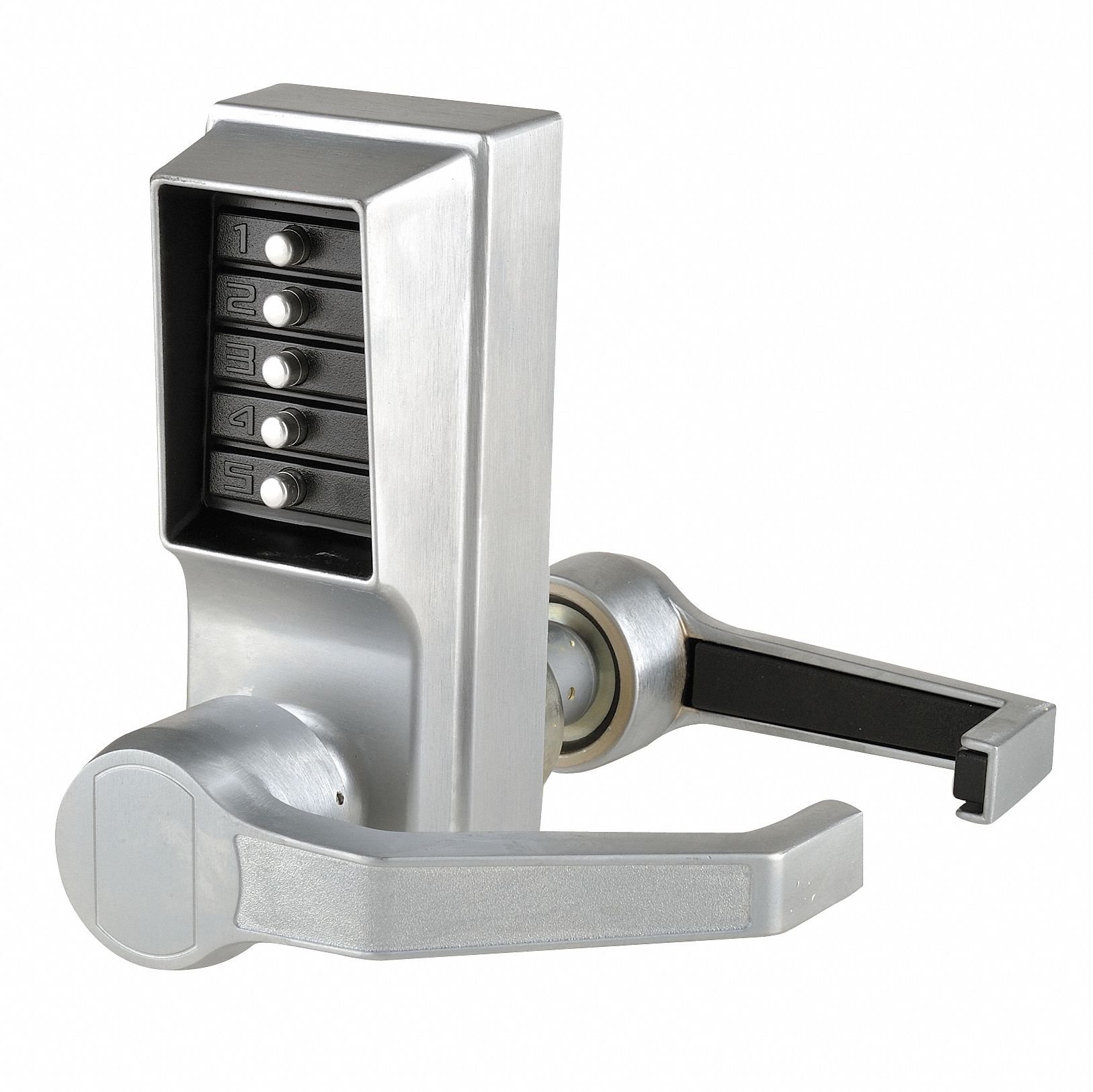
Image 1.1: KABA LR-1011-26D-41 Push Button Lock, featuring a lever handle and 5-button keypad in a satin chrome finish.
2. Product Overview
The KABA LR-1011-26D-41 is a robust mechanical push-button lockset designed for secure entry. Key features and included components are:
- Function: Entry
- Handle Type: Lever
- Keypad: 5 Button, Vandal Resistant
- Finish: Satin Chrome
- ADA Compliant: Yes
- Fire Rated: 3 hours
- Weather Resistant: Yes
- Max. User Codes: 1
- Included Components: Lock assembly, Installation Template, User Manual, Required Installation Hardware, Code Change Plug, and Access Key.
3. Setup and Installation
Proper installation is crucial for the optimal performance and security of your KABA lock. While the lock includes a template and all necessary hardware, professional installation is recommended to ensure correct alignment and function.
3.1 Pre-Installation Checks
- Verify your door thickness is between 1-3/8 inches and 2-1/4 inches.
- Confirm the backset measurement is 2-3/4 inches.
- Ensure the door is right-handed, as this lock is designed for right-hand applications.
3.2 Installation Steps
- Carefully review the detailed instructions provided in the included installation manual.
- Use the provided template to mark and drill holes on the door. Precision is essential.
- Install the latch mechanism into the door edge.
- Mount the exterior and interior lock assemblies, ensuring proper alignment and secure fastening with the provided hardware.
- Test the lock's operation before closing the door to ensure the lever engages and disengages smoothly.
4. Operating Instructions
The KABA LR-1011-26D-41 lock operates using a single, pre-set mechanical code. There is no key override option for this model.
4.1 Unlocking the Door
- Enter the correct 5-button code on the keypad.
- Once the code is entered, turn the lever handle to retract the latch.
- The door will now open.
4.2 Locking the Door
To lock the door, simply close it. The latch will automatically extend, securing the door. No code entry is required to lock the door from the outside, nor is it required to exit from the inside.
4.3 Changing the Code
The code for the KABA LR-1011-26D-41 lock can be changed using the included Code Change Plug and Access Key. Refer to the specific instructions in the separate code change manual or the detailed section within the main manual for this procedure. This process typically involves removing the lock from the door to access the internal mechanism for code reconfiguration.
5. Maintenance
Regular maintenance ensures the longevity and smooth operation of your KABA lock.
- Cleaning: Clean the exterior surfaces with a soft, damp cloth and mild soap. Avoid abrasive cleaners, solvents, or harsh chemicals, as these can damage the satin chrome finish.
- Lubrication: Periodically apply a small amount of graphite-based lubricant to the internal moving parts of the latch mechanism to ensure smooth operation. Do not use oil-based lubricants, as they can attract dust and debris.
- Inspection: Regularly check all mounting screws for tightness. Ensure the lever operates freely and the latch retracts and extends without obstruction.
6. Troubleshooting
If you encounter issues with your KABA LR-1011-26D-41 lock, refer to the following common troubleshooting tips:
- Code Not Working: Ensure you are entering the correct code. Press each button firmly and in the correct sequence. If the code was recently changed, verify the new code.
- Lever Not Engaging/Disengaging: Check for any obstructions around the latch or strike plate. Ensure the lock is properly installed and all screws are tightened. The internal mechanism might require lubrication.
- Difficulty Changing Code: Refer to the specific code change instructions. Ensure the Code Change Plug and Access Key are used correctly. If the mechanism feels stiff, it may require cleaning or lubrication.
- Sticking Buttons: Clean the keypad surface. If a button remains stuck, it may indicate internal debris or damage.
For persistent issues or complex problems, it is recommended to contact KABA customer support or a qualified locksmith.
7. Specifications
| Feature | Specification |
|---|---|
| Brand | KABA |
| Model Number | LR1011-26D-41 |
| Lock Type | Mechanical Push Button |
| Handle Type | Lever |
| Function | Entry |
| Finish | Satin Chrome |
| Door Thickness | 1-3/8 In. to 2-1/4 In. |
| Backset | 2-3/4 In. |
| Keypad | 5 Button, Vandal Resistant |
| Max. User Codes | 1 |
| ADA Compliant | Yes |
| Fire Rated | 3 hr. |
| Weather Resistant | Yes |
| Case Material | Zinc |
| Item Dimensions (L x W x H) | 11 x 10.3 x 8 inches |
| Item Weight | 9 pounds |
8. Warranty and Support
8.1 Warranty Information
The KABA LR-1011-26D-41 Push Button Lock comes with a 3-year manufacturer's warranty. This warranty covers defects in materials and workmanship under normal use. Please retain your proof of purchase for warranty claims.
8.2 Customer Support
For technical assistance, warranty claims, or further inquiries, please contact KABA customer service. Refer to the KABA official website or the packaging for the most current contact information.