
Introduction
The Argus Seventy-Five is a vintage medium format camera, notable for its simple design and fixed 75mm Lumar lens. Originally designed to use 620 roll film, this camera operates with a fixed focus and fixed shutter speed, making it a straightforward device for photography enthusiasts or collectors. This manual provides essential information for understanding and handling your Argus Seventy-Five camera.

This image displays the front of the Argus Seventy-Five camera, highlighting its distinctive design, the 'Argus Seventy-Five' inscription, the fixed 75mm Lumar lens, and the bright viewfinder window. The 'INST' and 'TIME' shutter settings are visible on the side.
Setup
Unpacking and Initial Inspection
- Carefully remove the camera from its packaging.
- Inspect the camera body and lens for any visible damage. While this is a vintage item, ensuring its physical integrity upon receipt is important.
- Confirm that the lens surfaces are clear of scratches or marks.
Film Loading
The Argus Seventy-Five uses 620 roll film, which is no longer commonly manufactured. To use this camera, you will typically need to re-spool 120 film onto 620 spools. This process requires working in complete darkness to avoid exposing the film.
- Open the camera back by sliding the latch located on the side or bottom of the camera.
- Insert a fresh roll of 620 film (or re-spooled 120 film) into the supply chamber.
- Thread the film leader onto an empty 620 take-up spool in the take-up chamber.
- Wind the film advance knob slightly to ensure the film is securely attached to the take-up spool.
- Close the camera back securely.
- Advance the film until the number '1' appears in the red window on the camera's back. This indicates the first frame is ready.
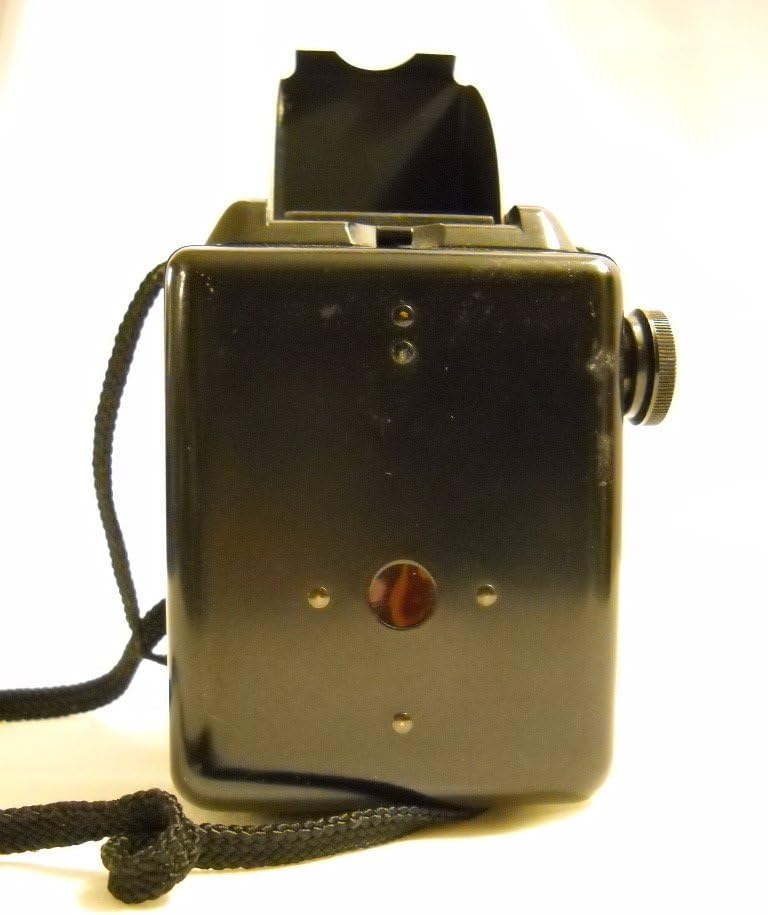
The rear view of the Argus Seventy-Five camera, illustrating the film advance knob on the right side and the small red window used to view film frame numbers. A wrist strap is also visible.
Operating the Camera
Basic Operation
The Argus Seventy-Five is designed for simplicity. It features a fixed focus lens, meaning there is no focusing mechanism to adjust. The camera also has a fixed shutter speed, typically around 1/50th of a second, and a 'Time' (T) setting for longer exposures.
- Viewfinder: Look through the top viewfinder to compose your shot. The viewfinder provides an approximate framing of the scene.
- Shutter Settings:
- INST (Instant): This is the standard setting for most photographs, providing a single, quick exposure.
- TIME (T): For longer exposures, such as in low light or for creative effects. Press the shutter release once to open the shutter, and press it again to close it.
Taking a Picture
- Select your desired shutter setting (INST or TIME).
- Frame your subject using the viewfinder.
- Press the shutter release button located on the side of the camera. For 'TIME' exposures, press once to open and once to close.
- After taking a picture, advance the film using the film advance knob until the next frame number appears in the red window. This prevents double exposures.
Maintenance
Cleaning
- Lens: Use a soft, lint-free cloth and a specialized lens cleaning solution to gently wipe the lens surfaces. Avoid abrasive materials that could scratch the lens.
- Body: Wipe the camera body with a soft, dry cloth to remove dust and fingerprints. For stubborn dirt, a slightly damp cloth can be used, followed by immediate drying.
- Interior: Periodically open the camera back and gently brush away any dust or film debris from the film chambers.
Storage
- Store the camera in a cool, dry place away from direct sunlight and extreme temperatures.
- Protect the camera from dust and moisture, ideally in a camera bag or display case.
- Avoid storing the camera with film loaded for extended periods if not in use.
Troubleshooting
- Camera Not Functioning: As a vintage item, the operational status of the Argus Seventy-Five may be unknown or limited. If the shutter mechanism does not fire, it may require professional servicing.
- Film Not Advancing: Ensure the film is correctly loaded and threaded onto the take-up spool. Check for any obstructions in the film path.
- Poor Image Quality: Due to the fixed focus and fixed shutter, image quality is dependent on lighting conditions and subject distance. For best results, shoot in bright, even light and ensure subjects are within the camera's optimal focus range (typically several feet to infinity).
- Light Leaks: Inspect the camera back seals for any deterioration. Light leaks can cause fogging on the film.
Specifications
| Feature | Detail |
|---|---|
| Brand | Argus |
| Model Number | Seventy-Five |
| Lens Type | Standard, Lumar |
| Focal Length | 75 mm |
| Focus | Fixed Focus |
| Shutter Speed | Fixed (approx. 1/50s) with 'Time' (T) setting |
| Film Type | 620 Roll Film (requires re-spooling 120 film) |
| Item Weight | 1.55 pounds |
| Package Dimensions | 8.4 x 8.4 x 6.8 inches |
| Date First Available | November 9, 2010 |
Warranty and Support
As a vintage collectible item, the Argus Seventy-Five camera typically does not come with a manufacturer's warranty or official product support. Its operational status is often sold "as-is." For repairs or restoration, it is recommended to consult with specialists in vintage camera maintenance.
