
1. Introduction
Thank you for purchasing the Onkyo CS-1045 Stereo System. This manual provides essential information for the proper setup, operation, and maintenance of your new audio system. Please read this manual thoroughly before using the system and retain it for future reference.
Package Contents
Verify that all items listed below are included in your package:
- R-1045 Stereo Receiver
- C-1045 Compact Disc Player
- D-145 Stereo Speakers (2 units)
- Remote Control (with 2 AAA batteries)
- AM Loop Antenna
- FM Indoor Antenna
- Speaker Cables (2 units)
- Cork Spacers (for speakers)
- User Manual (this document)
2. Safety Information
To ensure safe operation and prevent damage, observe the following precautions:
- Power Source: Connect the unit only to an AC power outlet of the voltage specified on the rear panel.
- Ventilation: Ensure adequate ventilation. Do not block ventilation openings. Maintain a minimum distance of 10 cm (4 inches) around the unit for proper airflow.
- Water and Moisture: Do not expose the unit to rain, moisture, dripping, or splashing. Do not place objects filled with liquids, such as vases, on the unit.
- Foreign Objects: Do not insert any objects into the unit's openings.
- Servicing: Do not attempt to service the unit yourself. Refer all servicing to qualified service personnel.
- Placement: Place the unit on a stable, level surface. Avoid direct sunlight, heat sources, excessive dust, and vibrations.
3. Setup
Follow these steps to set up your Onkyo CS-1045 Stereo System.
3.1 System Overview
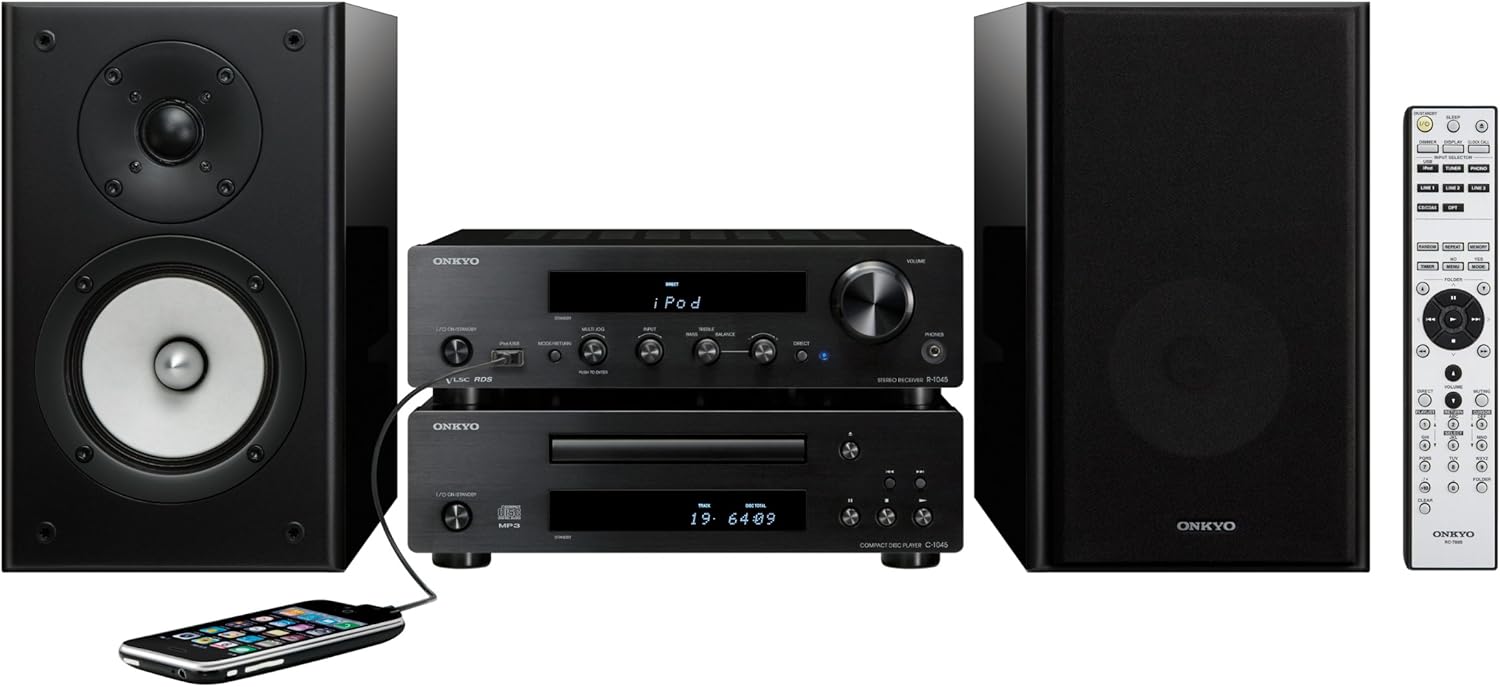
Figure 3.1: The Onkyo CS-1045 Stereo System, showing the R-1045 receiver, C-1045 CD player, D-145 speakers, and remote control. An iPod is connected to the receiver's front USB port.
3.2 Connecting Speakers
Use the provided speaker cables to connect the D-145 speakers to the R-1045 receiver.
- Identify the positive (+) and negative (-) terminals on both the speakers and the receiver. Speaker cables are typically marked to distinguish positive and negative wires.
- Connect the positive (+) terminal of the left speaker to the left positive (+) speaker terminal on the receiver.
- Connect the negative (-) terminal of the left speaker to the left negative (-) speaker terminal on the receiver.
- Repeat the process for the right speaker, connecting it to the right speaker terminals on the receiver.
- Ensure all connections are secure to prevent poor sound quality or short circuits.
3.3 Connecting Components
Stack the C-1045 CD player on top of the R-1045 receiver. Connect the audio output of the C-1045 CD player to an available audio input on the R-1045 receiver using an RCA audio cable (not included).
3.4 Connecting Antennas
For optimal radio reception, connect the supplied AM and FM antennas to the corresponding jacks on the rear of the R-1045 receiver.
- FM Antenna: Connect the FM indoor antenna to the FM ANTENNA jack. Extend the wire for better reception.
- AM Antenna: Assemble the AM loop antenna and connect its two wires to the AM ANTENNA terminals. Position the antenna away from the main unit for improved reception.
3.5 Power Connection
After all audio and antenna connections are made, connect the power cords of the R-1045 receiver and C-1045 CD player to a suitable AC power outlet.
4. Operating Instructions
This section details the basic operation of your Onkyo CS-1045 Stereo System.
4.1 Basic Operation
- Power On/Off: Press the POWER button on the R-1045 receiver or the remote control to turn the system on or off.
- Volume Control: Rotate the VOLUME knob on the R-1045 receiver or use the VOLUME +/- buttons on the remote control to adjust the sound level.
- Input Selection: Press the INPUT SELECTOR buttons on the R-1045 receiver or the corresponding input buttons (e.g., CD, TUNER, USB) on the remote control to select the desired audio source.
4.2 CD Playback
- Press the POWER button on the C-1045 CD player to turn it on.
- Press the OPEN/CLOSE button to open the disc tray.
- Place a CD, CD-R, or CD-RW disc with the label side up into the tray.
- Press the OPEN/CLOSE button again to close the tray.
- Select the 'CD' input on the R-1045 receiver.
- Press the PLAY button on the C-1045 or its remote control to start playback.
- Use the SKIP or SEARCH buttons for track navigation.
4.3 Radio Tuning (AM/FM)
- Select the 'TUNER' input on the R-1045 receiver.
- Press the BAND button to switch between FM and AM bands.
- Use the TUNING +/- buttons to manually tune to a station.
- For automatic tuning, press and hold the TUNING +/- buttons until the tuner starts scanning. It will stop at the next available station.
- To preset stations, tune to the desired station, then press MEMORY followed by a preset number button.
4.4 USB/iPod/iPhone Playback
The R-1045 receiver features a front USB port for direct playback from compatible USB devices, iPods, and iPhones.
- Connect your USB device, iPod, or iPhone to the front USB port of the R-1045 receiver.
- Select the 'USB' or 'iPod' input on the R-1045 receiver.
- Use the receiver's controls or the remote control to navigate and play audio files.
4.5 Using the Remote Control
The supplied remote control provides convenient access to all system functions.
Figure 4.5: The Onkyo remote control, featuring buttons for power, input selection, volume, playback controls, and tuner functions.
Ensure the batteries are correctly inserted (2 AAA batteries, included). Point the remote control directly at the receiver's front panel sensor. Refer to the remote control's specific button layout for detailed functions.
5. Maintenance
Proper care and maintenance will ensure the longevity of your stereo system.
5.1 Cleaning
- Disconnect the power cord before cleaning.
- Use a soft, dry cloth to wipe the exterior surfaces of the components.
- For stubborn dirt, lightly dampen the cloth with water or a mild, non-abrasive cleaner. Do not use harsh chemicals or solvents.
- Avoid spraying liquids directly onto the unit.
5.2 Storage
If you plan to store the system for an extended period, disconnect it from the power outlet and store it in a cool, dry place, away from direct sunlight and extreme temperatures.
6. Troubleshooting
If you experience issues with your Onkyo CS-1045 system, refer to the following common problems and solutions.
| Problem | Possible Cause | Solution |
|---|---|---|
| No power | Power cord disconnected; Power outlet faulty | Ensure power cord is securely connected; Try a different outlet. |
| No sound | Volume too low; Incorrect input selected; Speaker cables disconnected | Increase volume; Select correct input source; Check speaker cable connections. |
| CD not playing | Disc inserted incorrectly; Disc scratched or dirty; Incorrect input selected | Insert disc correctly; Clean or replace disc; Select 'CD' input. |
| Poor radio reception | Antenna not connected or poorly positioned | Connect antennas securely; Adjust antenna position for best reception. |
| Remote control not working | Batteries depleted or incorrectly inserted; Obstruction between remote and receiver | Replace batteries; Ensure correct polarity; Remove any obstructions. |
If the problem persists after trying these solutions, please contact Onkyo customer support.
7. Specifications
Detailed technical specifications for the Onkyo CS-1045 Stereo System.
| Feature | Specification |
|---|---|
| Brand | Onkyo |
| Model Name | CS-1045 (R-1045/C-1045/D-145) |
| Output Power | 2 x 70 Watts (at 4 ohms, 1 kHz, 0.4% THD) |
| Total Wattage | 140 Watts |
| Audio Output Mode | Stereo (2.0 Channel) |
| Supported Audio Formats | MP3, WAV, AAC, FLAC |
| Supported Media Types | CD, CD-R, CD-RW, CD-Audio |
| Connectivity | USB (front), iPod/iPhone direct control |
| Radio Bands | AM, FM |
| Signal-to-Noise Ratio | 100 dB |
| Dimensions (W x H x D) | 31.1 x 27.5 x 8.3 cm (approximate, for main unit) |
| Weight | 5.7 kg (approximate, for main unit) |
| Power Source | AC |
| Remote Control Batteries | 2 x AAA (included) |
| Compatible Devices | MP3 player, smartphone, tablet (via USB) |
8. Warranty and Support
For warranty information, please refer to the warranty card included with your product or visit the official Onkyo website. For technical support or service inquiries, please contact your local Onkyo dealer or authorized service center. Keep your purchase receipt as proof of purchase for warranty claims.