
Introduction
This manual provides comprehensive instructions for the proper use, installation, and maintenance of your Altura Photo 58MM 0.43x HD Wide Angle Lens with Macro. Please read this manual thoroughly before using the product to ensure optimal performance and longevity.
Product Overview
The Altura Photo 58MM 0.43x HD Wide Angle Lens with Macro is a versatile accessory designed to enhance your photographic capabilities. It functions as both a wide-angle converter, expanding your camera lens's field of view, and a macro lens for detailed close-up photography. The macro component is detachable, allowing for independent use.

Figure 1: Altura Photo 58MM 0.43x HD Wide Angle Lens with Macro. This image displays the complete lens assembly, including the wide-angle and macro components, along with its protective pouch.
Package Contents
- 0.43x HD Wide Angle Lens (with detachable Macro portion)
- Front Lens Cap
- Rear Lens Cap
- Protective Pouch
Compatibility
This 0.43x HD Wide Angle Lens is designed for use with camera lenses that have a 58MM filter thread size. It is crucial to verify your camera lens's filter thread size before attempting to attach this accessory.
To find your lens's filter thread size, look for a "Ø" (diameter) symbol followed by a number on the lens barrel or underneath the lens cap. For example, "Ø58" indicates a 58mm filter thread.

Figure 2: Locating the lens filter thread size. This image illustrates how to identify the filter thread size, marked with a 'Ø' symbol, on the front of a camera lens.
Compatible Lenses (58MM Filter Thread):
- Canon EF-S 18-55mm f/4-5.6 IS STM
- Canon EF-S 55-250mm f/4-5.6 IS STM
- Canon EF 75-300mm f/4-5.6 III USM
- Canon EF-S 18-55mm f/3.5-5.6 IS STM
- Canon EF 85mm f/1.8 USM
- Canon EF 50mm f/1.4 USM
- Nikon AF-P DX NIKKOR 70-300mm f/4.5-6.3G ED VR
- Nikon AF-S NIKKOR 50mm f/1.8G
- Nikon AF-S NIKKOR 50mm f/1.4G
- Olympus M.Zuiko Digital ED 40-150mm f/4-5.6 R
- Lumix G X Vario 12-35mm f/2.8 II
- Fujifilm XC 16-50mm f/3.5-5.6 OIS II
Compatible Cameras (when paired with a 58mm thread size lens):
- Canon EOS Rebel T7, T7i, T6i, T6, T6s, T5i, T5, T4i, T3i, T100, SL3, SL2, SL1
- Canon EOS 90D, 80D, 77D, 70D, 1100D, 700D, 650D, 600D, 550D
- Canon EOS 7D Mark II, 6D Mark II, 5DS, 5D Mark II, 1D Mark II
- Canon EOS M3, M5, M6, M10, M50, M100, M200, R, RP
Setup and Installation
- Verify Lens Thread Size: As detailed in the Compatibility section, confirm that your camera lens has a 58MM filter thread.
- Remove Lens Cap: Remove the front lens cap from your camera's primary lens.
- Attach Wide Angle Lens: Carefully align the Altura Photo 0.43x HD Wide Angle Lens with the filter threads on your camera lens. Gently screw the wide-angle lens clockwise until it is securely attached. Do not overtighten.

Figure 3: Wide-angle lens attachment process. This image illustrates how the wide-angle lens screws onto the front filter thread of an existing camera lens. It emphasizes that the accessory attaches to the lens, not directly to the camera body.
- Detaching Macro Lens (Optional): The "SUPER MACRO" portion of the wide-angle lens can be unscrewed from the main wide-angle element. This allows you to use the macro lens independently for extreme close-up photography.

Figure 4: Detachable macro lens. This image shows the wide-angle lens assembly and highlights the separate macro lens component that can be detached for dedicated close-up shots.
Operating Instructions
Using the Wide Angle Function
With the 0.43x HD Wide Angle Lens attached to your camera's primary lens, your field of view will be significantly expanded. This is ideal for capturing landscapes, architectural shots, or group photos where you need to fit more into the frame.
- Ensure the wide-angle lens is securely fastened.
- Use your camera's autofocus as normal. The lens attachment works with your existing lens's autofocus system.
- Experiment with different focal lengths on your primary lens to observe the varying wide-angle effects.

Figure 5: Comparison of a scene without and with the wide-angle lens. This image demonstrates the expanded perspective and increased area captured when the wide-angle lens is in use.
Using the Macro Function
To use the macro function, unscrew the "SUPER MACRO" portion from the wide-angle lens. This macro lens can then be attached directly to your camera's primary lens (assuming it has a 58MM filter thread).
- Attach the macro lens to your camera's primary lens.
- Move your camera very close to your subject to achieve focus. Macro photography often requires a very short working distance.
- Consider using manual focus for precise control over the focal point in macro photography.
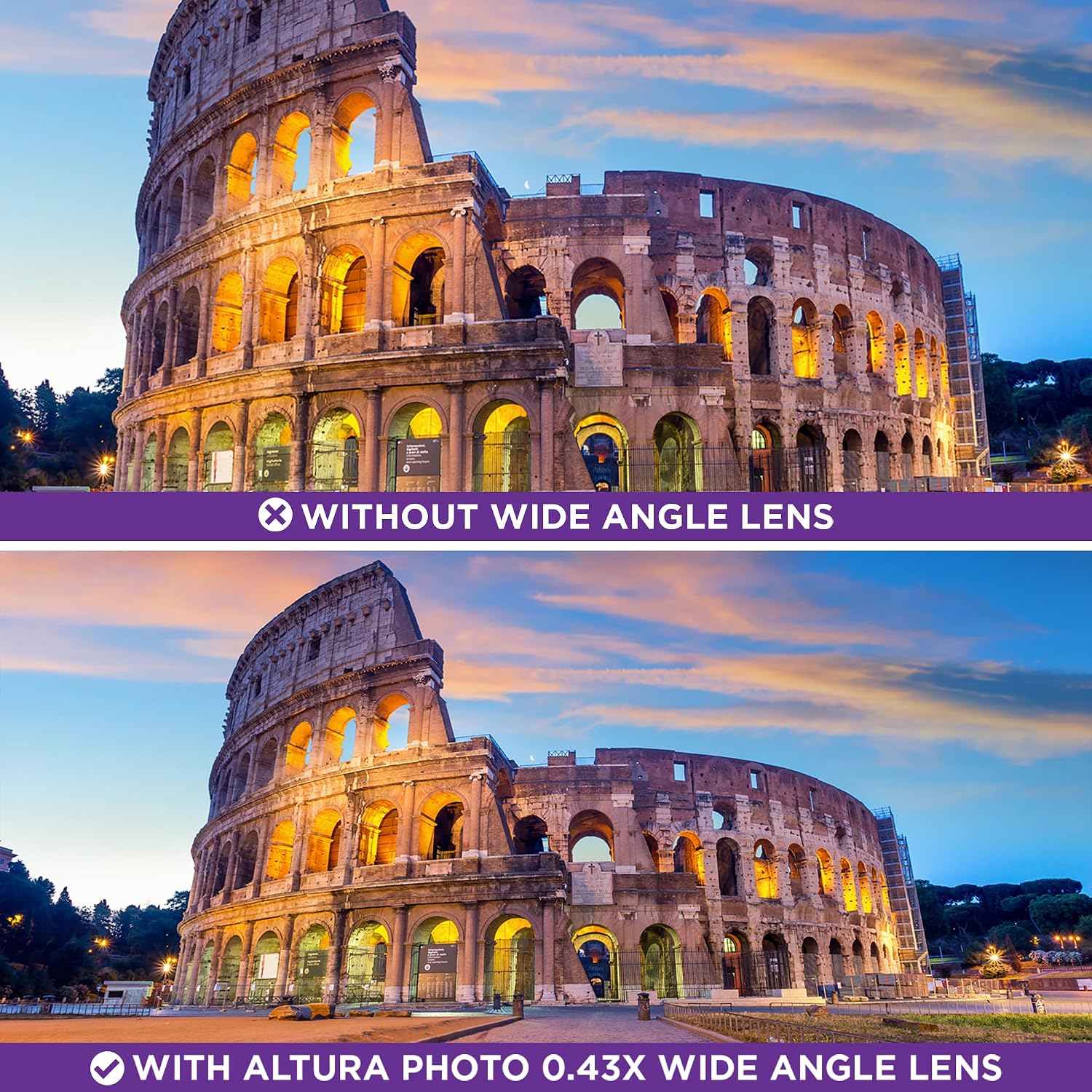
Figure 6: Comparison of a subject without and with the macro lens. This image highlights the ability of the macro lens to capture intricate details of small objects at close range.
Maintenance and Care
- Cleaning: Use a soft, lint-free microfiber cloth specifically designed for optical surfaces to clean the lens elements. For stubborn smudges, a small amount of lens cleaning solution can be applied to the cloth (not directly to the lens).
- Storage: When not in use, store the lens in its protective pouch to prevent dust accumulation and scratches. Keep it in a dry, cool place away from direct sunlight and extreme temperatures.
- Handling: Avoid touching the glass elements with your fingers. Always handle the lens by its barrel.
- Protection: Keep the front and rear lens caps on when the lens is not attached to a camera or in use.
Troubleshooting
| Problem | Possible Cause | Solution |
|---|---|---|
| Lens does not attach | Incorrect filter thread size. | Verify your camera lens has a 58MM filter thread (Ø58). This accessory is only compatible with 58MM threads. |
| Dark corners (vignetting) in wide-angle photos | Common with wide-angle attachments, especially at wider focal lengths or with certain camera/lens combinations. | Slightly zoom in with your primary lens to reduce vignetting. Some post-processing software can also correct this. |
| Difficulty focusing in macro mode | Macro photography requires very close proximity to the subject and precise focus. | Move closer to your subject. Consider switching to manual focus for greater control. Ensure adequate lighting. |
| Image quality appears soft or blurry | Lens not securely attached, dirty lens elements, or camera shake. | Ensure the lens is tightly screwed on. Clean the lens elements. Use a tripod or increase shutter speed to minimize camera shake. |
Specifications
- Model Number: QZ0009
- Magnification: 0.43x Wide Angle
- Lens Type: Wide Angle with Detachable Macro
- Filter Thread Size: 58MM
- Product Dimensions: 3.54 x 3.54 x 3.54 inches
- Item Weight: 10.9 ounces
- Manufacturer: Altura Photo
Warranty and Support
For warranty information or technical support, please refer to the official Altura Photo website or contact their customer service department. Details are typically provided with your purchase documentation or on the manufacturer's website.
Note: Specific warranty terms may vary by region and retailer. Please retain your proof of purchase.