
Introduction
This manual provides detailed instructions for the safe and efficient operation of your Quantum FX J-30U Radio CD/MP3 Player. Please read this manual thoroughly before using the device and retain it for future reference.
Product Features
- Top-loading CD/MP3 player for audio CDs and MP3 discs.
- USB and SD/MMC card slots for digital audio playback.
- AM/FM stereo radio tuner.
- LCD display with backlight for easy navigation.
- Remote control for convenient operation.
- AUX-IN jack for connecting external audio devices.
- Dual power operation: AC (120V 60Hz) or DC (8 x C batteries).
- Integrated carrying handle for portability.
- Double loud 4-speaker system.
Package Contents
Please check that all items are present:
- Quantum FX J-30U Radio CD/MP3 Player Unit
- AC Power Cord
- Remote Control
- Instruction Manual (this document)
Controls and Indicators
Familiarize yourself with the various controls and indicators on your unit.
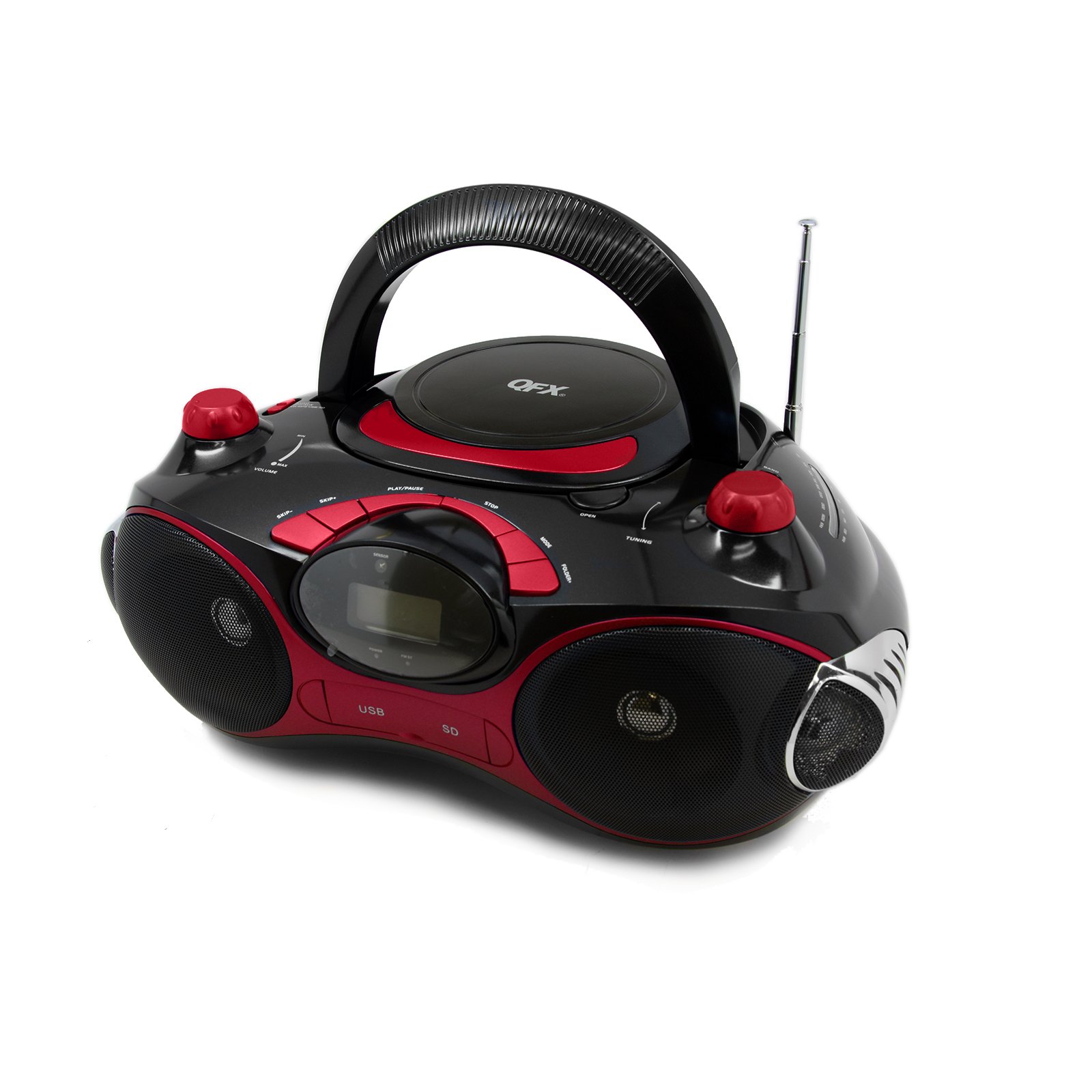
Figure 1: Front view of the Quantum FX J-30U unit. This image displays the top-loading CD compartment, the LCD screen, and various control buttons for playback, mode selection, and tuning. The USB and SD card slots are also visible on the front panel.
- Power Button: Turns the unit on or off.
- Mode Button: Switches between CD, USB, SD, FM, AM, and AUX modes.
- Play/Pause Button: Starts or pauses playback in CD, USB, or SD modes.
- Stop Button: Stops playback.
- Skip/Search Buttons (<< / >>): Skips tracks or searches within a track. In radio mode, tunes to the next/previous station.
- Volume Control: Adjusts the audio output level.
- Tuning Knob (AM/FM): Manually tunes radio frequencies.
- CD Compartment: Top-loading tray for inserting CDs.
- USB Port: For connecting USB flash drives.
- SD/MMC Card Slot: For inserting SD or MMC memory cards.
- AUX-IN Jack: For connecting external audio sources.
- LCD Display: Shows current mode, track number, radio frequency, etc.
Setup
Powering the Unit
Your Quantum FX J-30U can be powered by either AC household current or DC batteries.
AC Power Supply
- Ensure the unit is turned off.
- Connect the supplied AC power cord to the AC input jack on the back of the unit.
- Plug the other end of the AC power cord into a standard 120V 60Hz wall outlet.
DC Battery Power Supply
For portable use, the unit requires 8 x 'C' size batteries (not included).
- Ensure the unit is turned off and disconnected from AC power.
- Locate the battery compartment on the bottom of the unit.
- Open the battery compartment cover.
- Insert 8 'C' size batteries, observing the correct polarity (+/-) as indicated inside the compartment.
- Close the battery compartment cover securely.
Note: Remove batteries if the unit will not be used for an extended period to prevent leakage and damage.
Operating Instructions
General Operation
- Press the Power button to turn the unit on.
- Press the Mode button repeatedly to select your desired function (CD, USB, SD, FM, AM, AUX).
- Adjust the Volume Control to your preferred listening level.
CD/MP3 Playback
- Open the CD compartment cover.
- Place a CD or MP3 disc onto the spindle with the label side facing up.
- Close the CD compartment cover.
- Press the Mode button to select "CD" mode. The display will show "CD" and then the track number.
- Press the Play/Pause button to start playback.
- Use the Skip/Search buttons (<< / >>) to navigate between tracks.
- Press the Stop button to stop playback.
USB/SD Playback
- Insert a USB flash drive into the USB port or an SD/MMC card into the SD card slot. Ensure the device is inserted correctly.
- Press the Mode button to select "USB" or "SD" mode. The unit will automatically begin playing audio files.
- Use the Skip/Search buttons (<< / >>) to navigate between tracks.
- Press the Play/Pause button to pause or resume playback.
- Press the Stop button to stop playback.
AM/FM Radio Operation
- Press the Mode button to select "FM" or "AM" radio mode.
- Extend the telescopic antenna for better FM reception. For AM, rotate the unit for optimal reception.
- Rotate the Tuning Knob to manually select your desired radio station. The frequency will be displayed on the LCD.
AUX-IN Connection
- Connect one end of a 3.5mm audio cable (not included) to the AUX-IN jack on the unit.
- Connect the other end of the audio cable to the headphone jack or audio output of your external audio device (e.g., MP3 player, smartphone).
- Press the Mode button to select "AUX" mode.
- Control playback and volume from your external audio device.
Remote Control Usage
The remote control allows for convenient operation from a distance. Ensure there are no obstructions between the remote and the unit's sensor. Insert 2 x AAA batteries (not included) into the remote control, observing correct polarity.
- Power: Turns the unit on/off.
- Mode: Selects playback mode.
- Play/Pause: Starts/pauses playback.
- Stop: Stops playback.
- Skip/Search: Navigates tracks/stations.
- Repeat: Repeats current track or all tracks.
- Program: Programs track order for CD playback.
Maintenance
- Cleaning: Use a soft, dry cloth to clean the exterior of the unit. Do not use abrasive cleaners or solvents.
- CD Lens Care: Avoid touching the CD lens. If the lens is dirty, use a commercially available CD lens cleaner.
- Storage: When not in use for extended periods, store the unit in a cool, dry place, away from direct sunlight and extreme temperatures. Remove batteries if storing for a long time.
- Ventilation: Ensure adequate ventilation around the unit. Do not block ventilation openings.
Troubleshooting
| Problem | Possible Cause | Solution |
|---|---|---|
| Unit does not power on. | No AC power; batteries depleted or incorrectly inserted. | Check AC power cord connection; replace batteries or ensure correct polarity. |
| CD/USB/SD not playing. | Incorrect mode selected; disc/device not inserted correctly; dirty/damaged disc/device. | Press Mode to select correct source; reinsert disc/device; clean disc or try another device. |
| Poor radio reception. | Antenna not extended; unit position; local interference. | Extend FM antenna; rotate unit for AM; try moving the unit to a different location. |
| No sound from AUX-IN. | Incorrect mode; external device volume low; cable not connected. | Select AUX mode; increase volume on external device; ensure cable is fully inserted. |
| Remote control not working. | Batteries depleted or incorrectly inserted; obstruction between remote and unit. | Replace remote batteries; ensure correct polarity; remove obstructions. |
Specifications
| Model Number | J-30U |
| Power Source (AC) | 120V ~ 60Hz |
| Power Source (DC) | 8 x 'C' size batteries (1.5V each, total 12V) |
| Connectivity | USB, SD/MMC, AUX-IN |
| Speaker Type | Stereo (4-speaker system) |
| Compatible Devices | CD, MP3 discs, USB flash drives, SD/MMC cards, external MP3 players via AUX-IN |
| Dimensions (Approx.) | 14.6 x 12 x 7.6 inches (Package Dimensions) |
| Weight (Approx.) | 4 pounds |
Warranty and Support
Quantum FX products are designed for reliability and performance. For warranty information or technical support, please refer to the warranty card included with your purchase or visit the official Quantum FX website. Please retain your proof of purchase for warranty claims.