
Introduction
This manual provides detailed instructions for the proper setup, operation, and maintenance of your Nortek NDVX 2503 DVD Player. Please read this manual thoroughly before using the device to ensure optimal performance and safety. Keep this manual for future reference.
Safety Information
- Power Source: Connect the DVD player only to the specified power supply voltage.
- Ventilation: Ensure adequate ventilation around the unit. Do not block ventilation openings.
- Water and Moisture: Do not expose the unit to rain, moisture, or dripping/splashing liquids.
- Heat: Keep the unit away from heat sources such as radiators, heat registers, stoves, or other apparatus that produce heat.
- Cleaning: Unplug the unit from the wall outlet before cleaning. Use a dry cloth for cleaning.
- Servicing: Do not attempt to service this product yourself. Refer all servicing to qualified service personnel.
Package Contents
Verify that all items listed below are included in your package:
- Nortek NDVX 2503 DVD Player
- Remote Control (with batteries)
- AV Cable (RCA type)
- User Manual (this document)
- Power Cord
Product Overview
Familiarize yourself with the components and controls of your DVD player.
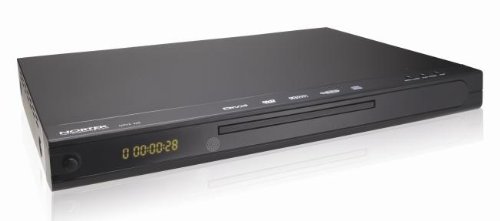
Figure 1: Front view of the Nortek NDVX 2503 DVD Player. This image shows the sleek black casing, the central disc tray, the digital display on the left, and control buttons on the right side of the front panel.
Front Panel Controls:
- Power Button: Turns the unit on or off.
- Disc Tray: Insert your DVD or CD here.
- Display: Shows playback time, track number, and other status indicators.
- Open/Close Button: Opens and closes the disc tray.
- Play/Pause Button: Starts or pauses disc playback.
- Stop Button: Stops disc playback.
- Skip Buttons (Forward/Backward): Skips to the next or previous track/chapter.
Rear Panel Connections:
(Note: Specific connections may vary. Common connections include:)
- Audio/Video Output (RCA): Red, White (audio) and Yellow (video) jacks for connecting to a TV or amplifier.
- Coaxial/Optical Digital Audio Output: For connecting to a home theater receiver for digital audio.
- Power Input: Connects the power cord.
Setup
1. Connecting to a Television:
- Ensure both the DVD player and your television are turned off and unplugged.
- Connect the yellow RCA video cable from the "Video Out" jack on the DVD player to the "Video In" jack on your television.
- Connect the red and white RCA audio cables from the "Audio Out" jacks (Red for Right, White for Left) on the DVD player to the corresponding "Audio In" jacks on your television or audio receiver.
- If using digital audio, connect a coaxial or optical cable from the DVD player's digital audio output to your receiver's digital audio input.
2. Power Connection:
- Plug the power cord into the power input on the rear of the DVD player.
- Plug the other end of the power cord into a wall outlet.
3. Initial Power-On:
- Turn on your television and select the correct input source (e.g., AV1, Video 1) that corresponds to where you connected the DVD player.
- Press the Power button on the DVD player or its remote control to turn it on.
- The Nortek logo or a setup menu should appear on your TV screen.
Operating Instructions
1. Disc Playback:
- Press the OPEN/CLOSE button on the front panel or remote control to open the disc tray.
- Place a DVD, DVD+R, or Video CD disc gently into the tray with the label side facing up.
- Press the OPEN/CLOSE button again to close the tray.
- The player will automatically begin reading the disc. Playback should start shortly. If a menu appears, use the arrow keys on the remote to navigate and the ENTER button to select.
- Use the PLAY/PAUSE, STOP, and SKIP buttons on the remote or front panel to control playback.
2. Menu Navigation:
- Use the ARROW buttons on the remote control to move through menu options.
- Press the ENTER or OK button to confirm a selection.
- The MENU button typically returns you to the disc's main menu.
Maintenance
Cleaning the Unit:
- Unplug the DVD player from the power outlet before cleaning.
- Use a soft, dry cloth to wipe the exterior of the unit. Do not use liquid cleaners or aerosol sprays.
- Avoid getting dust or debris inside the disc tray mechanism.
Disc Care:
- Handle discs by their edges to avoid fingerprints on the playing surface.
- Store discs in their cases when not in use to prevent scratches.
- Clean dirty discs with a soft, lint-free cloth, wiping from the center outwards.
Troubleshooting
| Problem | Possible Cause | Solution |
|---|---|---|
| No power | Power cord not connected; Power outlet not active. | Ensure power cord is securely plugged in. Test the outlet with another device. |
| No picture or sound | AV cables not connected correctly; Incorrect TV input selected. | Check all AV cable connections. Select the correct input source on your TV (e.g., AV1, Video 1). |
| Disc not playing | Disc is dirty or scratched; Disc inserted incorrectly; Incompatible disc format. | Clean the disc. Ensure the disc is inserted label-side up. Verify the disc is a supported format (DVD, DVD+R, Video CD). |
| Remote control not working | Batteries are dead or inserted incorrectly; Obstruction between remote and player. | Replace batteries. Ensure correct battery polarity. Remove any obstructions. Point remote directly at the player's sensor. |
Specifications
- Brand: Nortek
- Model Name: NDVX 2503
- Media Types Supported: DVD, DVD+R, Video CD
- ASIN: B0044AL0TM
- Manufacturer: Nortek
- Note: Other specifications such as dimensions, weight, and power consumption are not available in the provided data.
Warranty and Support
For warranty information or technical support, please refer to the warranty card included with your product or visit the official Nortek website. Keep your proof of purchase for any warranty claims.
For further assistance, you may contact Nortek customer service through their official channels.