1. Important Safety Information
WARNING: This product can expose you to chemicals including lead, which is known to the State of California to cause cancer and birth defects or other reproductive harm. For more information go to www.P65Warnings.ca.gov.
Please read all instructions carefully before using this heater. Failure to follow these instructions may result in fire, electric shock, serious injury, or death.
- Always plug heaters directly into a wall outlet/receptacle. Never use with an extension cord or relocatable power tap (outlet/power strip).
- This heater is hot when in use. To avoid burns, do not let bare skin touch hot surfaces. Use handles when moving this heater.
- Keep combustible materials, such as furniture, pillows, bedding, papers, clothes, and curtains at least 3 feet (0.9 m) from the front of the heater and keep them away from the sides and rear.
- Extreme caution is necessary when any heater is used by or near children or invalids and whenever the heater is left operating and unattended.
- Do not operate any heater with a damaged cord or plug or after the heater malfunctions, has been dropped or damaged in any manner.
- Do not use outdoors.
- To disconnect heater, turn controls to OFF, then remove plug from outlet.
- Do not insert or allow foreign objects to enter any ventilation or exhaust opening as this may cause an electric shock or fire, or damage the heater.
- A heater has hot and arcing or sparking parts inside. Do not use it in areas where gasoline, paint, or flammable vapors or liquids are used or stored.
- Use this heater only as described in this manual. Any other use not recommended by the manufacturer may cause fire, electric shock, or injury to persons.
2. Product Overview
The Optimus H-4500 is a 14-inch oscillating pedestal digital dish heater designed to provide efficient and targeted warmth with convenient features.
Key Features:
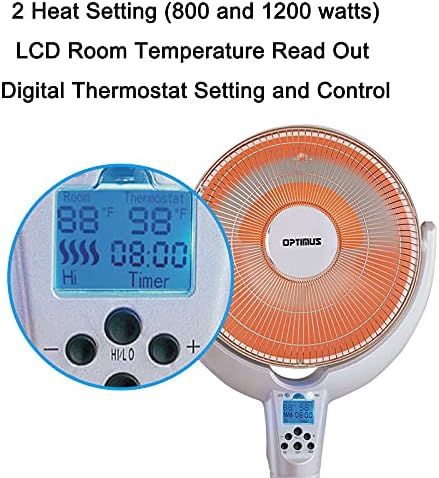
- 2 Heat Settings: Choose between 800 watts and 1200 watts for optimal comfort.
- Digital Thermostat Control: Maintain your desired room temperature with precision.
- LCD Room Temperature Read Out: Easily monitor the current room temperature.
- Oscillating Function: Distributes heat more effectively across a wider area.
- Full Function Remote Control: Adjust settings conveniently from a distance.
- Programmable Timer: Set the heater to operate for 30 minutes up to 8 hours.
- Adjustable Dish Tilting Mechanism: Direct heat precisely where it's needed.
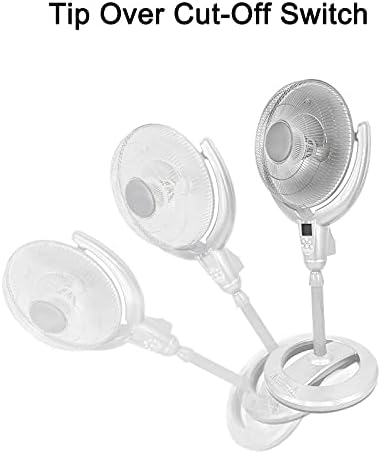
- Safety Features: Includes a Tip Over Cut-off Switch and Overload Thermal Protector for enhanced safety.
Product Images:


Product Video:
This video provides a comprehensive overview of the Optimus H-4500 14-Inch Oscillating Pedestal Digital Dish Heater, demonstrating its features and operation.
3. Setup Instructions
- Unpacking: Carefully remove the heater from its packaging. Retain packaging materials for future storage or transport.
- Assembly: If the unit requires assembly (e.g., attaching the pedestal base), follow the specific instructions provided in the separate assembly guide included with your product. Ensure all components are securely fastened.
- Placement: Place the heater on a firm, level surface. Ensure it is at least 3 feet (0.9 m) away from walls, furniture, and other combustible materials. Do not place the heater in areas where it could be easily tipped over.
- Power Connection: Plug the heater directly into a 120V AC, 60 Hz wall outlet. Do not use extension cords, power strips, or surge protectors.
- Initial Inspection: Before first use, inspect the power cord and plug for any signs of damage. If any damage is found, do not operate the heater and contact customer support.
4. Operating Instructions
The Optimus H-4500 heater can be operated using the control panel on the unit or the included full-function remote control.
Control Panel / Remote Functions:
- Power On/Off: Press the 'ON/OFF' button to turn the heater on or off.
- Heat Settings: Select between 'LOW' (800 watts) and 'HIGH' (1200 watts) heat settings using the corresponding buttons or controls.
- Digital Thermostat: Use the '+' and '-' buttons to set your desired room temperature. The LCD display will show the current room temperature and your set temperature. The heater will cycle on and off to maintain the set temperature.
- Oscillation: Press the 'OSC' button to activate or deactivate the oscillating function. This will allow the dish to move from side to side, distributing heat more broadly.
- Timer: Press the 'TIMER' button to set the auto-off timer. Each press will cycle through available settings from 30 minutes up to 8 hours. The heater will automatically turn off once the set time has elapsed.
- Adjustable Dish Tilt: Manually adjust the angle of the heating dish to direct warmth upwards or downwards as needed.
Remote Control Usage:
Point the remote control directly at the heater's receiver window. Ensure there are no obstructions between the remote and the heater. The remote requires batteries (not included, typically AAA).
5. Maintenance
Regular maintenance ensures optimal performance and longevity of your heater.
- Cleaning: Always unplug the heater before cleaning. Use a soft, damp cloth to wipe the exterior surfaces. Do not use abrasive cleaners or solvents. Ensure no water enters the interior of the heater.
- Dust Removal: Periodically use a vacuum cleaner with a brush attachment to remove dust from the grilles and heating elements. This helps maintain heating efficiency and prevents overheating.
- Storage: When not in use, store the heater in a cool, dry place. It is recommended to store it in its original packaging to protect it from dust and damage.
- Cord Care: Never wrap the power cord tightly around the heater. Avoid placing heavy objects on the cord.
6. Troubleshooting
If your heater is not operating correctly, please refer to the following common issues and solutions:
| Problem | Possible Cause | Solution |
|---|---|---|
| Heater does not turn on. | No power to the unit; Tip-over switch activated; Overheat protection activated. | Check if the power cord is securely plugged into a working outlet. Ensure the heater is on a flat, stable surface. Allow the unit to cool down for 10-15 minutes if it overheated. |
| Heater turns off unexpectedly. | Tip-over switch activated; Overheat protection activated; Timer function active. | Ensure the heater is upright and stable. Allow the unit to cool down. Check if the timer is set to turn off the heater. |
| Insufficient heat output. | Low heat setting selected; Room size too large for heater; Obstruction of heating element. | Select the 'HIGH' heat setting. Ensure the heater is appropriate for the room size. Clean any dust or debris from the heating element and grilles. |
| Oscillation not working. | Oscillation function not activated. | Press the 'OSC' button on the control panel or remote to activate. |
| Remote control not working. | Dead batteries; Obstruction between remote and heater. | Replace batteries in the remote control. Ensure a clear line of sight to the heater's receiver. |
If the problem persists after trying these solutions, please contact Optimus customer support.
7. Specifications
| Attribute | Detail |
|---|---|
| Brand | Optimus |
| Model Number | H-4500 |
| Special Feature | Oscillating |
| Color | Multicolour |
| Form Factor | Dish |
| Indoor/Outdoor Usage | Indoor |
| Product Dimensions | 15"D x 17"W x 38.5"H |
| Recommended Uses | Home |
| Mounting Type | Floor Mount |
| Room Type | Bedroom, Home Office, Study Room |
| Burner Type | Radiant |
| Fuel Type | Electric |
| Number of Speeds | 1 |
| Max Temperature Setting | 300 Degrees Fahrenheit |
| Item Weight | 11.43 pounds |
| Manufacturer | Optimus |
| Batteries Required | No |
| Included Components | Heater, Manual, Remote Control |
8. Warranty and Support
This Optimus H-4500 heater comes with a 3-year manufacturer's warranty.
For warranty claims, technical support, or any questions regarding your product, please contact Optimus customer service directly. Refer to the contact information provided in the separate warranty card or on the official Optimus website.
Please have your model number (H-4500) and proof of purchase ready when contacting support.


