
1. Product Overview
The Tandy Leather Craftool Single Beveler Stamp B205 6205 is a specialized tool designed for leathercraft. It is used to create a defined, angled edge on carved or cut leather, adding depth and dimension to your projects. This particular stamp, model B205, features a single bevel design with a textured face, allowing for precise and consistent impressions.
Key Features:
- Durable Construction: Made from a single piece of stainless steel for longevity and consistent performance.
- Precise Dimensions: Measures approximately 5/16" x 5/16" (7.9 mm x 7.9 mm) for detailed work.
- Textured Bevel: Creates a distinct textured, angled edge on leather surfaces.
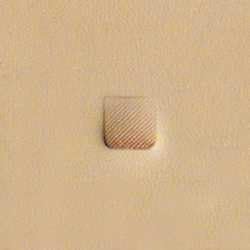
This image displays the Tandy Leather Craftool Single Beveler Stamp B205, showcasing its textured face and the distinct impression it makes on a piece of leather. The stamp is designed to create a clean, angled edge with a textured pattern, enhancing the definition of leather carving.
2. Setup
Proper setup is crucial for achieving optimal results with your beveler stamp.
- Prepare Your Leather: Ensure your leather is properly cased (dampened) to the correct moisture level. The leather should be cool to the touch, but not wet. This allows for clean, deep impressions without cracking the leather.
- Secure Your Work Surface: Place your leather project on a solid, stable work surface, such as a granite slab or a heavy workbench. A firm surface prevents bounce and ensures consistent stamp depth.
- Gather Tools: Have your beveler stamp and a rawhide mallet or maul readily available.
3. Operating Instructions
Follow these steps to effectively use your Tandy Leather Craftool Single Beveler Stamp B205:
- Position the Stamp: Place the beveler stamp on the leather where you wish to create the beveled edge. Ensure the angled face of the stamp is oriented correctly for the desired effect.
- Strike the Stamp: Hold the stamp firmly with one hand. With the other hand, strike the top of the stamp with a rawhide mallet or maul. Use a consistent, firm strike. The force required will vary based on leather thickness and desired depth.
- Create Continuous Bevels: To create a continuous beveled line, lift the stamp slightly, move it forward, and overlap the previous impression by about one-third to one-half. This technique ensures a smooth, unbroken line.
- Practice: It is recommended to practice on scrap leather to develop a feel for the correct leather dampness and striking force before working on your main project.
4. Maintenance
Proper care will extend the life and performance of your beveler stamp.
- Cleaning: After each use, wipe the stamp clean with a dry cloth to remove any leather fibers or residue. For stubborn residue, a soft brush can be used. Avoid harsh chemicals that may damage the stainless steel.
- Storage: Store the stamp in a dry environment to prevent rust. A tool rack or a dedicated tool box is ideal.
5. Troubleshooting
Here are some common issues and their solutions:
- Uneven Impressions:
- Cause: Inconsistent striking force or improper leather casing.
- Solution: Ensure consistent mallet strikes. Re-case the leather if it is too dry or too wet. Practice on scrap leather to refine your technique.
- Dull or Shallow Impressions:
- Cause: Leather is too dry, insufficient striking force, or stamp is not fully contacting the surface.
- Solution: Dampen the leather slightly more. Increase the force of your mallet strike. Ensure the stamp is held perpendicular to the leather surface.
6. Specifications
| Product Name | Tandy Leather Craftool Single Beveler Stamp |
| Model Number | B205 (Item 6205) |
| Material | Stainless Steel |
| Dimensions | Approximately 5/16" x 5/16" (7.9 mm x 7.9 mm) |
| Item Weight | 0.64 ounces |
| Manufacturer | Tandy Leather |
| ASIN | B00418QDBW |